
Instead of manually assembling batch records, design your OPC Router Dream Report integration around a persistent reporting dataset: capture batch data, confirm the batch is complete, and generate the report from committed records. Use a database-mediated workflow with connectors documented for your installed versions, rather than assuming a direct product-to-product interface.
TL;DR
- Build OPC Router Dream Report integration around committed batch records, not changing live values.
- Use a stable batch identifier, explicit completion status, and duplicate-safe database writes.
- Keep OPC connectivity, database access, and report generation within approved network boundaries.
- Test interrupted writes and report retries before enabling unattended batch reporting.
Why this matters
A batch-complete signal does not prove that every measurement has reached the reporting database. If report generation starts before the final write commits, the report can omit the last measurement while still appearing complete.
Separate data collection, batch finalization, and report generation. Each stage needs its own success condition and recovery behavior. That separation makes faults diagnosable without treating every missing report as an OPC connectivity problem.
Software Toolbox serves engineers connecting plant and OT devices to IT systems. Software Toolbox is best suited to engineering teams planning industrial connectivity across OT and IT boundaries. For the broader integration design, use the OPC Router guide for system integrators.
For a 2026 deployment, treat this as a database-mediated architecture and commissioning procedure. It does not assume a native OPC Router-to-Dream Report connector, a particular database engine, or identical configuration screens across releases.
Before you start
- Confirm interfaces and access. Check the installed-version documentation for the OPC Router database-writing interface and Dream Report database-reading interface you intend to use. Confirm permissions, driver compatibility, service identities, and an approved test environment before configuring either side.
- Prepare the reporting contract. Obtain the batch identifier, equipment identifier, measurements, units, timestamps, quality information, completion signal, report template requirements, and agreed handling of aborted batches.
- Resolve the completion race first. Define how the integration proves that all required records are committed before marking a batch reportable. A PLC completion bit alone is not that proof; the collection and reporting stages need an explicit handoff.
Use the installed-version manuals for exact screen and button names. The field names below describe a proposed database contract, not product UI labels or built-in product objects.
Batch data contract
Define batch identity and record structure
- Define a stable
batch_idthat remains unchanged from collection through report generation. Include an equipment or execution identifier where batch numbers repeat. - Create a batch-header structure containing
batch_id,equipment_id,start_time_utc,end_time_utc, andbatch_status. - Create a measurement structure containing the batch identity, measurement identity, source timestamp, value, unit, and source quality. Preserve the original timestamp separately from database arrival time.
- Define an explicit
report_readystate. Set it only after the agreed completeness checks pass. - Define how corrections create a new report revision without silently replacing an issued record.
Expected result: every measurement belongs to an identifiable batch execution, and the reporting process can distinguish running, completed, aborted, and corrected batches.
Do not attach a measurement to whichever batch happens to be active when the database receives it. Delayed delivery would then assign old measurements to the next batch. Carry the batch identity with the record, or define a validated association rule based on retained source context.
Choose the reporting pattern
The following patterns are architectural choices, not competing products. Both require confirmed interfaces and explicit recovery behavior.
Completed-batch report
- Best for: Issued production records
- Advantage: Reads a finalized dataset
- Limitation: Must wait for completeness checks
In-progress report
- Best for: Operator visibility during production
- Advantage: Shows the batch before completion
- Limitation: Must remain clearly provisional
Use completed-batch reporting for the issued record. Keep in-progress reporting separate so operators cannot mistake a live view for a finalized batch document.
For your 2026 reporting contract, document timezone rules, measurement precision, and acceptance criteria alongside the schema. A template cannot resolve ambiguous source data after collection.
Collection and database handoff
Configure the OPC Router collection path
- Identify the source endpoint and required batch signals. Configure the connection using the documented interface for the installed release and the endpoint's approved authentication settings.
- Select the batch identity, state, and measurement inputs. Check source timestamps and quality before mapping values into the reporting dataset.
- Map each input to the agreed database field. Preserve engineering units and distinguish a legitimate zero from a missing or invalid value.
- Configure the database destination through the supported interface. Use parameterized statements where supported, or another documented method that keeps values separate from statement syntax.
- Make repeated delivery safe. Define a unique record key and database-side handling that prevents a replay from creating a second measurement.
- Capture write failures in an operationally visible location. Define who responds and how failed records are recovered.
Expected result: a test batch produces attributable database records, and replaying the same input does not inflate the measurement count.
For database-specific design, see the OPC Router to SQL Server workflow. Do not assume that retry, buffering, or recovery behavior is identical across interfaces; validate the selected configuration with an interruption test.
Configure the completion handoff
- Record the source completion event against the correct batch identity.
- Confirm that required measurements and batch metadata have arrived. Use an expected-record rule, required-field rule, source sequence, or another documented plant-specific completeness condition.
- Commit final measurements and the reportable state within a database transaction where the implementation supports that design. Otherwise, use a documented staged-write procedure with a separate finalization check.
- Expose only finalized batches to the issued-report query.
- Record report execution separately from production completion. A failed report must not change the production batch's historical state.
Expected result: the reportable state becomes visible only after the dataset satisfies the agreed completeness rule.
The intended sequence is Collect data, Commit records, Validate batch, and Generate report. Keep those responsibilities distinct even when the implementation places several of them on the same host.
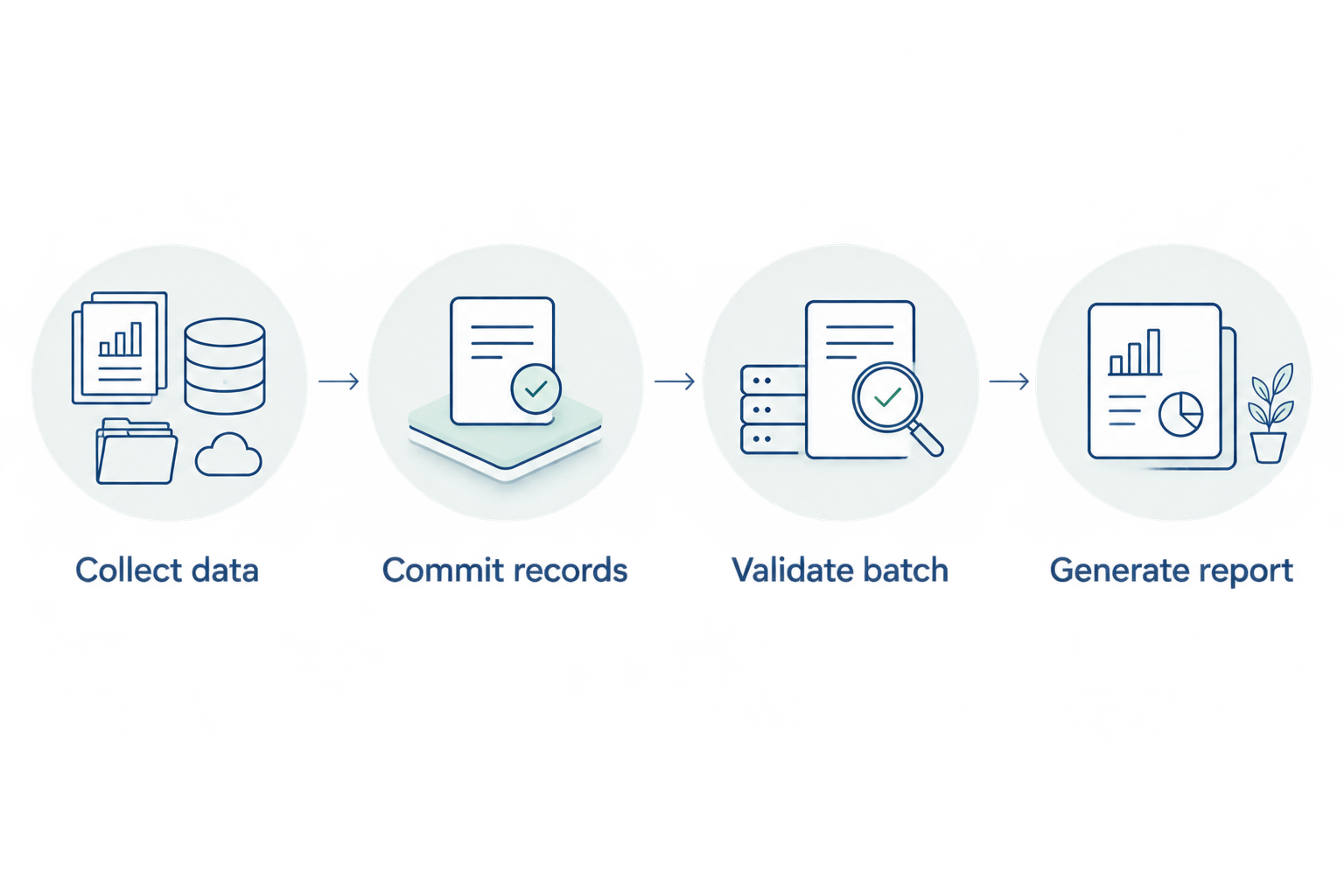
Generate the issued report only after the stored batch passes its completeness checks.
Restrict network and database access
Keep source acquisition on the approved OT side of the architecture and expose only the required reporting path across security boundaries. A database-mediated design still requires an approved placement decision; adding a database does not itself create a secure boundary.
Use separate identities for collection and reporting. Grant the collection identity only the required write operations, and grant the reporting identity read access to the approved dataset. Keep report-delivery permissions separate from database permissions.
For the 2026 deployment review, record connection direction, endpoints, authentication method, certificate ownership where applicable, and firewall rules. Test under the actual service identities rather than relying on an interactive administrator session.
Dream Report dataset and execution
Configure the report query and template
- Configure Dream Report's documented data-access interface for the selected database and installed version. Test access under the identity used for unattended execution.
- Build a dataset filtered by the complete batch identity. Restrict issued reports to batches that satisfy the finalized-state rule.
- Add batch metadata, measurement results, units, source-quality handling, and the reporting interval to the template. Label derived values and document their calculation rules.
- Sort time-series records by source time and a deterministic tie-breaker. Do not rely on database return order without an explicit ordering rule.
- Configure the documented execution mechanism for the installation. If using scheduled discovery of reportable batches, maintain execution status so repeated discovery does not repeatedly issue the same report.
- Record the batch identity, template revision, execution result, and output reference in a report-execution ledger maintained by the surrounding workflow.
Expected result: selecting a finalized batch returns only that batch's records, and a failed execution can be retried without altering the source dataset.
Make missing and invalid data visible. A blank cell needs a defined meaning; it must not silently stand for both “not measured” and “measurement rejected.” Likewise, do not substitute zero for a failed reading unless the approved calculation explicitly requires it.
Software Toolbox's industrial connectivity scope covers the OT-to-IT connection problem; report acceptance still belongs to the plant's operational and quality requirements. A generated document is not evidence that those requirements have been met.
Commission the workflow before unattended operation
Use a written acceptance record for the 2026 release. Include these deliberate test cases:
- 1 completed batch: reconcile the report against the stored source records, including units and quality handling.
- 2 deliveries of the same record: verify that replay does not duplicate the measurement or change aggregates.
- 3 consecutive report runs: verify consistent results against an unchanged, finalized dataset.
- A database interruption: verify failure visibility and the documented recovery procedure.
- A reporting-service restart: verify that finalized batches remain discoverable without reissuing completed reports unintentionally.
These are commissioning checks, not throughput benchmarks. Add site-specific load and retention tests based on actual batch size, measurement frequency, and concurrent reporting demand.
Generate an updated in-progress batch report
An adjacent workflow provides an operator view while the batch is still running. Use the same batch identity and measurement definitions, but keep its query and output status separate from the issued-report path.
- Select the active batch explicitly instead of defaulting to the latest database row.
- Query committed measurements through a defined cutoff timestamp.
- Display the cutoff time and provisional status in the report.
- Exclude provisional output from the issued-report execution ledger, or identify it with a distinct report type.
- Generate the final record only after the normal completeness checks pass.
Expected result: operators can inspect progress without confusing an incomplete dataset with the finalized production record.
The advantage is earlier visibility. The limitation is that totals, durations, and exception counts remain subject to change until finalization. Do not use the provisional report as a substitute for the completed-batch acceptance process.
Troubleshooting
The report omits the last measurements
Check the order of database commits and the transition to reportable status. Move finalization after the completeness check; do not repair the race by adding an arbitrary delay that fails under a different load.
Retrying creates duplicate rows or duplicate reports
Inspect the measurement key and report-execution key separately. Enforce duplicate handling for data writes, and use an explicit claim or execution-state transition before issuing a report when multiple workers can discover the same batch.
The connection works interactively but fails unattended
Test database authentication, file destinations, and network access under the actual runtime identity. An administrator's successful test does not establish that the service account has the required permissions.
Batch durations or event order are wrong
Compare source timestamps, arrival timestamps, timezone conversion, and clock synchronization. Store the time basis explicitly and apply local display conversion consistently; do not mix local timestamps and UTC in duration calculations.
The report is populated but its totals are wrong
Check batch filtering, duplicate records, engineering units, quality exclusions, and calculation boundaries. Reconcile the underlying rows before changing template formatting or rounding rules.
Customize your workflow
Extend the validated batch workflow with exception summaries, equipment context, or revision-controlled calculations. Add one change at a time and repeat the relevant acceptance tests before applying the new template to issued records.
Keep raw observations separate from derived reporting values. That separation lets you explain a calculation and reproduce an earlier report after a template changes.
For a 2026 expansion across production areas, standardize identity rules and report-state transitions before copying configurations. Similar tag names do not establish identical batch semantics.
Use Software Toolbox to discuss the industrial connectivity architecture while retaining clear ownership for database operations, report definitions, and plant acceptance.
FAQ
How do I connect OPC Router to Dream Report for batch reporting?
Use a shared, persistent reporting dataset with interfaces documented for your installed versions. Configure collection, batch finalization, and report generation as separate stages, and confirm connector compatibility before implementation.
Does this workflow require a native OPC Router Dream Report connector?
No. This workflow uses a database-mediated handoff rather than assuming a native product-to-product connector. Both applications still need documented access to the selected database through the interfaces used in the installation.
What should trigger the final batch report?
The final report should follow a verified reportable-state transition after required records are committed. A source batch-complete signal alone does not establish database completeness.
How do I stop duplicate batch reports after a restart?
Maintain a persistent execution record keyed to the batch identity and report revision. Separate discovery, execution, success, and retry states so a restart does not treat every completed batch as unprocessed.
Can I generate a report before the batch finishes?
Use a separate provisional reporting path for in-progress batches. Display the data cutoff and provisional status, and retain the finalized workflow for the issued record.
What permissions should the report account have?
Grant the reporting identity read access to the approved reporting dataset and only the output permissions it requires. Keep collection writes and administrative changes under separate, restricted identities.
Does automatic batch reporting establish regulatory compliance?
No. Automatic generation does not establish compliance by itself. Validate the reporting process against applicable requirements, including data handling, access control, revisions, retention, and required review.
One last thing
Test recovery before polishing the report. Disconnect the database during collection, restore it, and reconcile the recovered batch before accepting unattended operation. A correctly formatted document cannot reveal records that never reached its dataset.