Thousands of pre-built, optimized scalable vector symbols for pumps, valves, motors, tanks, industry specific groups and more. Drag/Drop directly into any HMI or SCADA application supporting vector SVG, XAML or raster (aka bitmap) JPG, PNG, GIF, or BMP formats. Enforce standards, build re-usable groupings for your projects. Focus on what matters, fast loading, quality, standards based results.
Total Symbols
Vector Graphics
Perpetual License
Symbol Factory Universal is the combination of a software application for the management and manipulation of the appearance of an included, extensive library of over 5,000 industrial graphics optimized for high performance for use in industrial automation HMI applications, including pumps, pipes, valves, tanks, mixers, motors, ducts, electrical symbols, flow meters, material handling, sensors, PLCs, transmitters, and ISA symbols.
The over 4,000 vector-based symbols in the library will scale without loss of quality, and the library also includes photorealistic raster images of common operator panel elements such as pushbuttons, selector switches and more. The graphics and included management software application are designed to help engineers create consistent, professional operator interfaces while reducing development time.
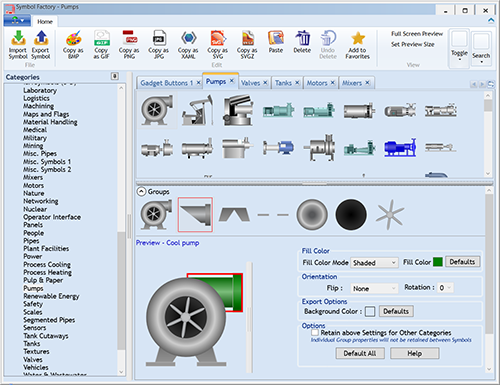
The management application empowers users to search for symbols by name and description, create derived versions with their own custom colors for re-use and storage in custom categories. This enables standards enforcement and re-use across projects.
Symbol Factory excels at solving the most time-consuming part of HMI development across a range of scenarios.
For end users and system integrators, add industrial-grade symbol libraries and controls to your application specific HMI/SCADA screens and software projects with Symbol Factory. For Independent Software Vendors (ISVs) making off-the-shelf commercial products, special licensing options are available.
📌 Quick Notes
Usage is governed by the Symbol Factory Universal End User Licensing Agreement
See how Symbol Factory compares to building graphics in-house or sourcing them piecemeal.
| Feature | Symbol Factory Universal | Build In-House | Individual Clip Art |
|---|---|---|---|
Symbol Count | Over 5,000 | Build as needed | Limited sets |
Scalable Vector Format | ✓ | Varies | Varies |
Optimized for HMI/SCADA Screen Load & Refresh Performance | ✓ | ✗ | ✗ |
Time to First Use | Minutes | Days to weeks | Hours |
Long-Term Cost | $695 one-time | High (engineering time) | Recurring |
Technical Support | ✓ Included | ✗ | ✗ |
Consistent Visual Language | ✓ | If enforced | ✗ |
Common questions from engineers, system integrators, and software vendors evaluating Symbol Factory Universal for their HMI/SCADA projects.
The Symbol Factory Universal product is the combination of a software application for the management and manipulation of the appearance of an included, extensive library of over 5,000 industrial graphics optimized for high performance for use in industrial automation HMI applications, including pumps, pipes, valves, tanks, mixers, motors, ducts, electrical symbols, flow meters, material handling, sensors, PLCs, transmitters, and ISA symbols.
The over 4,000 vector-based symbols in the library will scale without loss of quality, and the library also includes photorealistic raster images of common operator panel elements such as pushbuttons, selector switches and more. The graphics and included management software application are designed to help engineers create consistent, professional operator interfaces while reducing development time.
The management application empowers users to search for symbols by name and description, create derived versions with their own custom colors for re-use and storage in custom categories. This enables standards enforcement and re-use across projects.
Common reasons customers choose Symbol Factory include:
These benefits help organizations improve visualization consistency while reducing the time required to build industrial applications.
Symbol Factory contains over 5,000 industrial automation graphics covering common equipment and instrumentation used in industrial facilities but also specific industrial verticals.
A licensed copy of Symbol Factory provides access to the complete symbol library included with the version purchased. Over 5,000 symbols are included in the library.
The trial version allows limited testing, while a licensed version unlocks the full collection of symbols available in the product.
Categories include but are not limited to:
You can download the free trial from the Software Toolbox website and it automatically runs in trial mode after installation without any further action:
Symbol Factory Free Trial
https://softwaretoolbox.com/symbol-factory/free-trial
The trial allows you to:
A purchased license removes these trial limitations.
Symbol Factory is primarily a professionally designed and curated library of industrial symbols. With Symbol Factory Universal, you can import vector SVG images and raster images from a variety of formats.
Many customers supplement the Symbol Factory library with their own graphics within their HMI or SCADA software platform.
If your project requires custom symbols, contact Software Toolbox to discuss available options and recommended workflows.
Symbol Factory graphics can be used in many industrial visualization environments, including:
Our answer to "can I use this with my HMI/SCADA?" is: does your HMI/SCADA support one of the formats below? If it does, then the answer is yes. Consult your HMI/SCADA supplier's documentation for details on how to copy/paste or import the images. You should prefer a vector format for best results in scaling images.
Symbol Factory has a long history in the industrial control market, and we refer to symbols as Basic and Enhanced:
Basic Symbols refers to the symbols that were in Versions 2.5 and prior of Symbol Factory. The native format for these symbols is either Windows Metafile (WMF) or bitmap/picture (BMP), and can be exported in a variety of formats. These are retained in the product for backwards compatibility for our long loyal client base.
Enhanced Symbols refers to symbols that were added starting with Symbol Factory Universal (V3.x and higher). These symbols have a native format of SVG and contain real gradients, and groupings of vectors into logical parts which enables recoloring of independent parts of the symbols. There are over 1,400 Enhanced Symbols in the library. Enhanced Symbols are also available in XAML format, and can be exported to any raster format supported by Symbol Factory, although when you export to raster formats, you lose the ability to select individual symbol sub-parts in your application after export.
| Format | Basic Symbols | Enhanced Symbols |
|---|---|---|
| Vector Formats | ||
| WMF | Yes | No – gradients and vector grouping isn't supported by the WMF file format |
| SVG | Yes | Yes |
| XAML | Yes | Yes |
| Raster Formats | ||
| BMP | Yes | Yes |
| JPG | Yes | Yes |
| GIF | Yes | Yes |
| PNG | Yes | Yes |
Yes. Most Symbol Factory graphics (over 4,000 of the 5,000) are vector-based and can be copied/exported as SVG or XAML files, allowing them to be scaled larger or smaller without losing clarity or image quality. This makes them ideal for use in modern HMI and SCADA applications with varying screen sizes and resolutions.
Symbol Factory provides graphic symbols that are commonly used as the foundation for animated HMI and SCADA displays.
Animation capabilities such as color changes, rotation, visibility, fill levels, movement, and status indication are generally provided by the HMI or SCADA platform itself rather than Symbol Factory.
The symbols are intended to be used within software platforms that provide animation functionality.
Yes. Many customers customize Symbol Factory symbols to match site standards, customer requirements, or corporate branding. The Symbol Factory Universal Management application enables users to recolor symbols, save them as new versions, and group their derived symbols into their own user defined categories.
Customers also commonly modify colors, labels, grouping, and other visual elements after importing symbols into their application. For best results you should use vector formats in your application if you intend to edit the symbol after importing, and the level of editing is a function of your software application, not Symbol Factory.
Symbol Factory is designed primarily for HMI, SCADA, industrial visualization, and documentation applications. Many customers export symbols for use in engineering documentation and drawings.
Compatibility with AutoCAD depends on the ability of your AutoCAD version to support vector SVG or XAML file formats for best results with scalable images.
If your goal is to use Symbol Factory graphics within AutoCAD or AutoCAD-based products and the above does not answer your question, contact Software Toolbox with details about your workflow and software version so we can recommend the best approach.
Yes. Symbol Factory has been widely used by customers creating HMI and SCADA applications with Wonderware InTouch and AVEVA products for many years.
Customers commonly use Symbol Factory graphics to create:
The exact method for importing or using symbols depends on the Symbol Factory version and the AVEVA software version being used.
Many customers use Symbol Factory graphics in Siemens visualization projects. Because Siemens offers multiple WinCC product families and versions, implementation methods may vary.
If you are evaluating Symbol Factory for WinCC, please first determine what graphics format your WinCC version supports. If it supports vector SVG or XAML formats, and raster JPG, PNG, GIF, or BMP then you will be able to use the symbols.
The current product is Symbol Factory Universal (Version 3).
Legacy products that have been retired or are no longer recommended for new projects include:
Software Toolbox recommends Symbol Factory Universal for new installations and projects.
No. Symbol Factory 2.x has reached end-of-life status and is no longer sold for new projects.
The current version is Symbol Factory Universal (Version 3), which:
Single-User License
A single-user license is appropriate when a developer, system integrator, or engineering team creates and maintains custom screens on behalf of a specific customer, under the terms of the Symbol Factory Universal End User Licensing Agreement.
Examples:
In this scenario, only the developer uses Symbol Factory.
OEM License (also called an ISV license)
We use the term ISV, or independent software vendor, to distinguish from a machinery builder Original Equipment Manufacturer (OEM). Most people that ask us for an OEM license are actually ISVs, which is why we use the term "OEM/ISV".
An OEM/ISV license is required when Symbol Factory functionality is embedded into a commercial software application and the end user can create, edit, configure, or modify screens that utilize Symbol Factory symbols.
Examples:
In this scenario, the Symbol Factory functionality becomes part of the software delivered to the end user. Learn More about use with Commercial Software.
No. Symbol Factory licensing is generally based on the machine or user that will be using the software. Each developer who actively creates or edits screens using Symbol Factory should have an appropriate license, as defined in the Symbol Factory Universal End-User Licensing Agreement.
For larger teams, contact Software Toolbox regarding volume licensing options.
Yes. Licensed users commonly use Symbol Factory graphics across multiple projects within their organization, subject to the terms of the applicable license agreement.
The licensing requirements are based on how the software is used and distributed, not on the number of projects created.
If you are distributing software or applications containing Symbol Factory functionality, OEM licensing requirements may apply.
No. Symbol Factory is typically licensed as a perpetual software product.
Customers purchase a license that allows continued use of the software version licensed.
Support & Maintenance is generally provided separately and includes access to updates, upgrades, and technical support during the covered period.
You may need OEM/ISV licensing if:
You typically do not need OEM/ISV licensing if:
Symbol Factory Universal End-User Licensing Agreement
If you are unsure, contact Software Toolbox and describe your application so we can help determine the appropriate licensing model. Learn More about use with Commercial Software.
Usually not. Most System Integrators use a standard Symbol Factory license to develop screens and applications for specific customers.
OEM/ISV licensing is generally only required when:
If you create and maintain the screens on behalf of your customer, a standard license is often sufficient.
Symbol Factory Universal End-User Licensing Agreement
If you are unsure, contact Software Toolbox with a description of your project.
To evaluate OEM/ISV licensing, Software Toolbox typically requests:
This information helps determine the appropriate licensing model and pricing structure. Learn More about use with Commercial Software.
Yes. OEM/ISV pricing typically requires a commitment of at least 100 licenses per year.
Additional OEM/ISV terms and pricing are customized based on the application and deployment requirements.
OEM/ISV agreements are customized to match your needs with our business needs in a win-win scenario based on:
Software Toolbox works directly with OEM/ISV customers to develop licensing terms that fit their business model. Learn More about use with Commercial Software.
Contact Software Toolbox Sales or Technical Support and provide:
We can help determine the most appropriate product and licensing option for your project.
In most cases, yes. Software Toolbox understands that customers periodically replace or upgrade computers.
License transfer procedures vary depending on:
If you need to move your license to a new machine, contact Software Toolbox Support for assistance before decommissioning the old system whenever possible. License transfers may incur a support cost.
Support & Maintenance typically includes:
Support & Maintenance helps ensure that you can take advantage of product improvements, operating system compatibility updates, and technical assistance when needed.
Your perpetual Symbol Factory license does not stop working when Support & Maintenance expires.
However, expiration generally means you no longer receive:
You may continue using the version you already own subject to the terms of the Symbol Factory End User License Agreement.
Software Toolbox primarily serves businesses, system integrators, OEMs, manufacturers, utilities, and industrial organizations.
To process evaluations, quotations, and purchases, we typically require:
This information helps us ensure that licensing, support, and commercial discussions are handled appropriately and efficiently.
Get Symbol Factory Universal today and start building professional industrial graphics in minutes. Purchase now for immediate access or contact our team to discuss your project.
