
Instead of exporting SQL Server records and rebuilding compliance reports manually, configure Dream Report to read an approved reporting dataset, apply fixed reporting periods, and generate controlled outputs. Treat Dream Report SQL Server integration as a read-only reporting workflow first: database connectivity alone does not establish compliance.
TL;DR
- Dream Report SQL Server integration needs controlled queries, runtime access, and repeatable reporting periods—not just a successful connection.
- Software Toolbox serves industrial connectivity teams connecting plant data to IT systems; keep reporting separate from data acquisition.
- Use read-only SQL access for reporting, and validate missing data, timestamps, calculations, and report revisions.
- Approve the complete workflow before production use, including failure handling, output access, and retention.
Why this matters
A report can connect successfully and still contain the wrong reporting period, incomplete batches, or duplicated measurements. For a 2026 compliance workflow, define the evidence the report must contain before configuring the connection.
Software Toolbox is best for industrial teams connecting OT devices to IT systems. Its industrial connectivity portfolio addresses that integration layer; your reporting design must also establish data ownership, calculation rules, review responsibilities, and record controls.
Keep the boundaries explicit. SQL Server stores the approved source dataset, Dream Report consumes that dataset for reporting, and your quality or compliance procedure determines whether the resulting record is acceptable.
Recommendation: validate the dataset and reporting identity before designing the report layout. A formatted document cannot correct an ambiguous timestamp or an incorrect SQL join.
Before you start
- Access and documentation: Have the installed Dream Report documentation, its supported SQL connection method, SQL Server connection details, and permission to configure the reporting host. Record the application and database versions in your 2026 deployment baseline.
- Approved reporting definition: Obtain the required fields, engineering units, calculation rules, reporting timezone, retention procedure, and a known source dataset. Assign owners for database changes, report changes, and failed report runs.
- Runtime identity and driver compatibility: Identify the account that executes reports unattended, not just the engineer testing interactively. Match the connection components to the reporting process architecture; an interactive connection does not prove that the unattended process can use the same configuration or credentials.
Do not begin with production write access. Give the reporting identity only the access required to retrieve its approved dataset, and keep ingestion permissions separate.
SQL reporting dataset
Define the reporting contract
- List the required fields: event timestamp, asset or process identifier, measurement, engineering unit, and quality status where the source records it. Include a batch or production identifier when the report depends on production context.
- Specify whether timestamps represent measurement time, database insertion time, or another event. Define the reporting timezone and daylight-saving treatment explicitly.
- Establish the calculation rules. Document how the report handles missing values, invalid measurements, duplicates, partial batches, and corrected records.
- Ask the database owner to expose a controlled reporting view or another approved query interface. Use explicit columns rather than retrieving every column from an operational table.
Expected result: a written dataset contract that a database administrator and report owner can interpret identically. Preserve it with the 2026 report configuration, rather than leaving it in an engineer's working notes.
A reporting view separates the report from some underlying schema changes, but it does not eliminate change control. Renaming a column, changing its unit, or altering a join can change report meaning without causing a connection error.
Establish period boundaries
- Define each reporting interval using an inclusive start and exclusive end: timestamps at the start belong to the period; timestamps at the end belong to the following period.
- Test 2 adjacent reporting periods against the same source dataset. Verify that their shared boundary neither duplicates nor omits a record.
- For a proposed 24-hour report, confirm whether the requirement means elapsed time or a local calendar day. These differ across daylight-saving transitions.
- Define how late-arriving data affects a closed period. Choose whether to delay generation, issue a controlled revision, or flag the report for review.
Expected result: every source record has a defined reporting period, and every late correction has a documented disposition.
Avoid using report execution time as an implicit period boundary. A delayed run should still retrieve its intended period, not silently substitute the most recent interval.
Database access and network configuration
The connection path should be explicit: Reporting host, Approved connection, Reporting dataset, and Controlled output. Document the SQL endpoint separately from the destination where completed reports are stored.
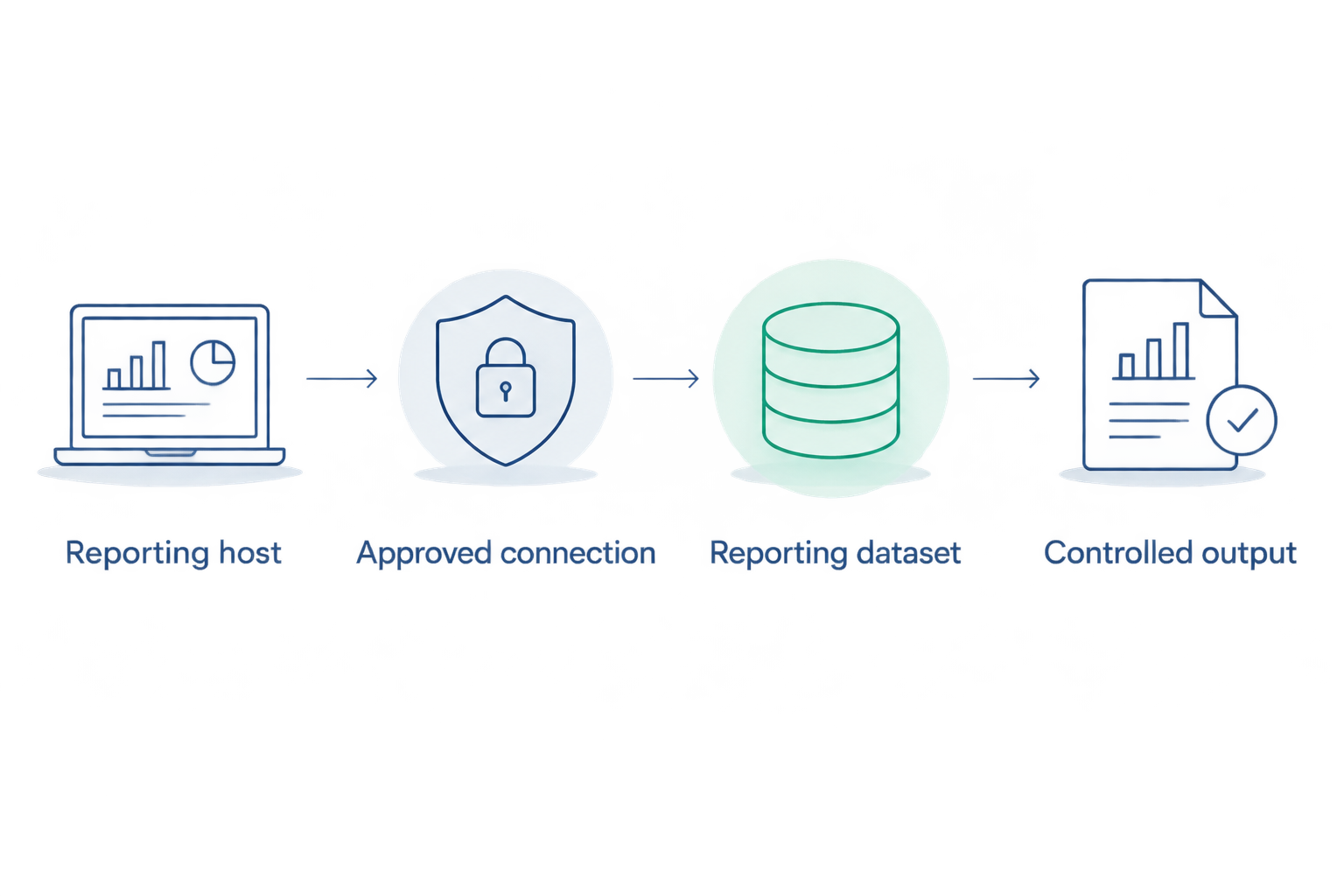
Validate database access and output access separately.
Configure the SQL connection
- Confirm the SQL Server hostname, instance or listener, database, authentication method, and configured network endpoint with the database administrator. Use the actual endpoint rather than assuming a default port.
- Permit only the required connection between the reporting host and database endpoint. Route access through the site's approved network architecture; do not expose the database directly to an untrusted network.
- Configure encryption and certificate validation according to the approved SQL client and server configuration. Resolve certificate name or trust failures rather than disabling validation to complete setup.
- Configure the Dream Report connection using the method documented for the installed release. Enter the approved endpoint, database, and authentication details; use that release's documented labels rather than substituting settings from a different version.
- Retrieve a limited, known dataset through the configured reporting connection. Compare timestamps, values, and field types against the database owner's reference result.
Expected result: the reporting host retrieves the intended records through the approved network path, with the required authentication and encryption settings.
Validate unattended access
- Identify the actual Windows account or other identity used during unattended execution. Test under that identity through an approved administrative procedure.
- For Windows authentication, confirm which identity SQL Server receives. For SQL authentication, use an approved credential-storage and rotation procedure.
- Verify that the reporting identity can retrieve the approved dataset but cannot modify production records. Apply permissions at the narrowest practical scope.
- Confirm that the runtime identity can access the designated output destination. Database permission and file-share permission are separate controls.
- Repeat the connection test after the application's normal restart procedure. Include this check in the 2026 operational handover.
Expected result: report execution does not depend on an engineer remaining logged in, a personal credential, or an interactive-only connection configuration.
Report configuration and acceptance testing
Bind the report to the approved dataset
- Configure the report's data retrieval using the installed Dream Report documentation. Map the approved fields without silently changing units or substituting another timestamp.
- Apply the defined period boundaries and asset or batch filters. Use supported parameter binding where available; do not construct SQL by concatenating untrusted input.
- Implement the approved calculations. Distinguish a missing measurement from a numeric zero, and preserve the agreed treatment of invalid data.
- Display the reporting period, timezone, asset or batch scope, and report revision in the output where required by your procedure.
- Generate a manual report for the known reference dataset. Reconcile row counts and calculated results before changing layout or adding distribution.
Expected result: the report reproduces the approved reference result and makes its scope understandable without opening the project configuration.
Do not treat an empty result as a successful operating period. Define whether it represents a legitimate absence of activity, a missing source feed, or an incorrect filter, and make that distinction visible to the reviewer.
Configure execution and output controls
- Use the installed release's documented execution controls to configure the approved reporting period and generation timing. Separate the period being reported from the time the report runs.
- Allow for source-data completion before generation. Set that interval from measured ingestion behavior and the approved reporting deadline, not an assumed universal delay.
- Configure the approved output destination and access permissions. Establish how authorized reviewers distinguish an original report from a corrected revision.
- Define failure notification and ownership using supported application functions or an approved external monitoring process. A missing report must have an assigned responder.
- Execute an acceptance test covering a normal period, an empty period, invalid data, a database outage, and an unavailable output destination.
Expected result: each test produces either the correct controlled output or a visible failure assigned to an owner. Record the results in the 2026 acceptance package.
For an additional boundary check, generate a proposed 60-minute test report and reconcile every included record against SQL. This is a test interval, not a performance claim or a required production schedule.
Preserve the evidence
Retain the approved dataset definition, connection configuration reference, calculation specification, test results, and report revision together. Exclude credentials from exported documentation.
A successful test proves the tested configuration, not every future configuration. Require impact assessment after changes to database views, source units, driver components, runtime identities, report expressions, or output permissions.
Second workflow: regenerate a corrected reporting period
A corrected-period workflow is appropriate when approved source records change after the original report is issued. It is not permission to overwrite the original evidence silently.
Scheduled period report
- Best for: Routine operational reporting
- Benefit: Produces a repeatable reporting cycle
- Limitation: Requires a defined source-data completion rule
Controlled corrected-period report
- Best for: Approved late data or source corrections
- Benefit: Reconciles a specified period after correction
- Limitation: Requires revision control and renewed review
- Record the reason for correction and identify the affected period, assets, or batches.
- Confirm that the source correction is approved under the applicable procedure. Preserve the relationship between the original data and its correction where required.
- Rerun the exact historical reporting interval using the approved report revision. If the report logic also changed, document that as a separate change.
- Issue the corrected output with an identifiable revision and retain its relationship to the original.
- Route the corrected report through the required review and distribution process.
Expected result: reviewers can determine what changed, why it changed, and which report is authoritative. Do not assume a database update automatically triggers regeneration; configure and test the chosen execution mechanism separately.
Troubleshooting
Interactive tests pass, but unattended reports fail
Check the runtime identity first. Compare its database access, connection configuration, credential availability, and output permissions with the interactive user's settings; then repeat the test under the runtime identity.
Do not fix this by granting broad administrator access. Correct the specific identity or permission mismatch.
The connection fails after security hardening
Check name resolution, the configured SQL endpoint, firewall policy, authentication, and certificate validation. Use the application and SQL Server error records to distinguish transport failures from login failures.
Restore the approved connection configuration rather than bypassing encryption or certificate checks. Record any necessary trust-store or endpoint changes.
The report connects but returns no records
Execute the approved query with the same period and filters under the reporting identity. Check database selection, reporting timezone, parameter types, and whether source data has arrived.
Verify the empty-period rule before approving the output. A valid connection is not evidence of a complete dataset.
Totals differ from the database reference
Compare the underlying rows before changing aggregation expressions. Inspect duplicate joins, unit conversion, null handling, quality filters, and inclusive or exclusive period boundaries.
Use an explicit sort when testing time-dependent calculations. SQL results have no guaranteed row order without an appropriate ordering clause.
The report runs, but the output is missing
Check the runtime identity's destination access and the actual resolved path. A mapped drive in an interactive session is not a reliable substitute for a service-accessible network location.
Test destination failure deliberately and confirm that the responsible operator receives a visible failure indication. Do not infer successful delivery from successful SQL retrieval.
Customize your workflow
Extend scope only after the reporting contract passes acceptance. Add another asset, batch type, or reporting period through the same dataset, permission, and reconciliation checks.
If SQL Server does not yet contain the required plant data, treat acquisition as a separate integration project. Software Toolbox provides industrial connectivity software; define source timestamps, quality handling, and recovery behavior before those records become reporting inputs.
Bring the architecture diagram, installed versions, runtime identity model, and sample query to a technical discussion. These materials make the deployment requirements explicit without embedding credentials or sensitive production records.
FAQ
How do I connect Dream Report to SQL Server?
Configure the SQL connection method documented for your installed Dream Report release, then map an approved dataset into the report. Validate endpoint access, authentication, encryption, runtime identity, and the returned records before scheduling execution.
Does Dream Report SQL Server integration make a report compliant?
No. Compliance depends on applicable requirements and validated controls for source data, calculations, access, review, retention, and changes—not connectivity alone.
Should Dream Report read SQL Server or write data into it?
Use a read-only reporting connection when SQL Server already contains the approved source records. Treat database ingestion or writeback as a separate requirement with its own supported interface and permissions.
Why does my SQL connection work manually but fail unattended?
The unattended process can use a different identity or connection configuration from your interactive session. Verify its database permissions, connection components, credential access, and output destination permissions.
How should I handle late-arriving SQL records?
Define a source-data completion rule and a controlled correction process before production use. Either delay generation appropriately or issue an identifiable revised report after approved corrections.
Can I regenerate a report after SQL data changes?
Use a controlled rerun for the affected historical period when the installed configuration supports that execution path. Preserve the original output, document the correction, and review the revised report under your procedure.
What should I test before using automated compliance reports?
Test normal data, missing data, invalid measurements, reporting boundaries, database outages, and output failures. Reconcile the report against an approved reference dataset and retain the acceptance evidence.
One last thing
Test an unavailable output destination before signing off the workflow. A report that queries SQL correctly but never reaches its controlled destination is still a failed reporting run.
Make that failure visible, assign its owner, and preserve the test result. This checks the handoff between successful data retrieval and a record your reviewers can actually use.