Advanced event log settings
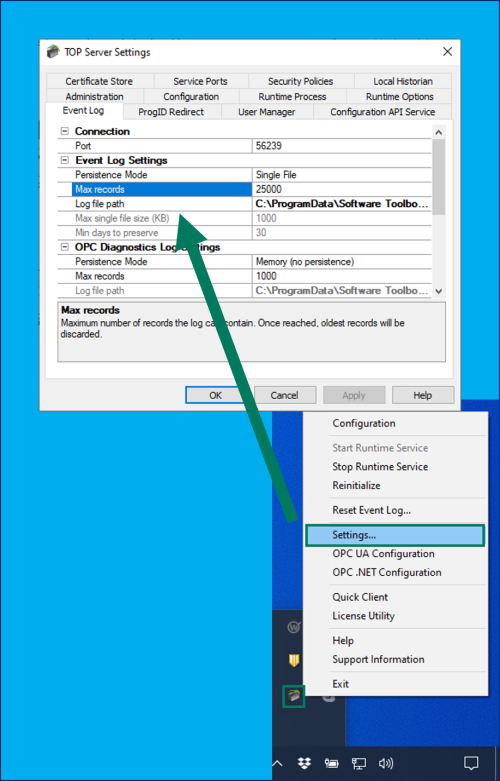
There are a number of advanced settings you can control for the event log in the TOP Server Administration Settings. The event log specific settings are located in the "Event Log" section.
The Connection settings are for the port connections used by the TOP Server Configuration to access the Event Log. If your IT department requires a specific port, you can adjust the port used here.
Additionally, the TOP Server event log can be persisted in multiple ways for flexibility in troubleshooting in different scenarios:
- Memory - this mode maintains event records in active memory only and does not persist events to a log file.
- Single File (Default) - this mode is the standard method that TOP Server has always used to persist event records to memory in a single log file, first in first out.
- Extended Data Store - this mode allows spanning of event record logs to multiple files to ensure no critical events are lost for long-term troubleshooting purposes.
- Max single file size (KB) - specifies the maximum size for each individual log file after which the Event Logger should span to a new file. Size range is from 100 KB to 10,000 KB.
- Min days to preserve - specifies the age of events to be preserved prior to file deletion. Range of time files can be preserver is from 1 day to 90 days.
When troubleshooting a problem it can be useful to increase the number of max records to make sure you don’t overwrite important events too often. The Log file path lets you select where you want the Log file to be saved. You can also copy the log file from one PC onto another and use this path to open it from another PC or on a network drive.