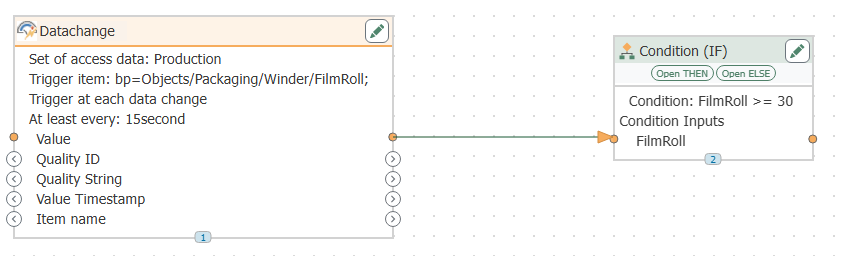
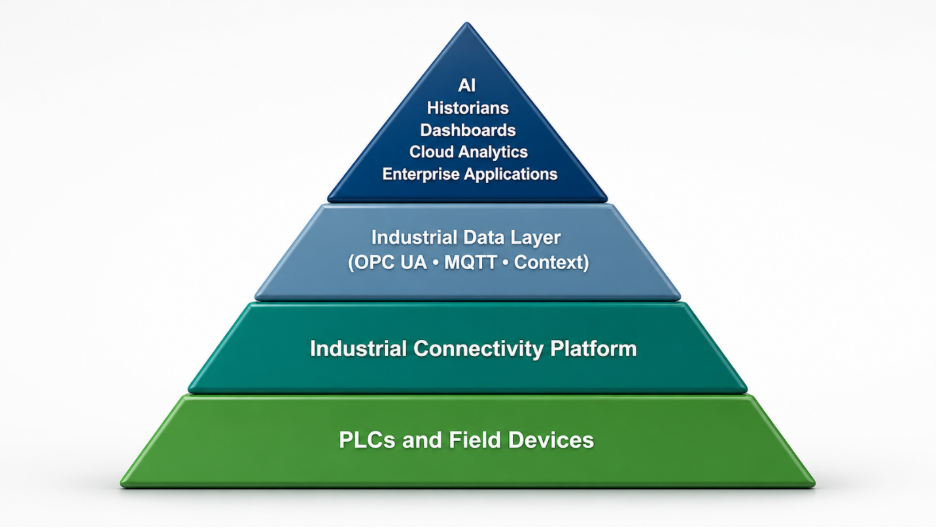
Imagine a PLC on your production line signals that it needs to be replenished. Within seconds, OPC Router detects the trigger and calls a stored procedure in your SQL database. It automatically locates the nearest available stock and flags it as requested, with no manual intervention. In modern industrial environments, the ability to move data efficiently and securely between systems is critical. Whether it's sending production data from a PLC to a SQL database or retrieving recipe parameters for a manufacturing line, the need for flexible and reliable data transport is growing fast, especially as IT and OT systems become more connected.
While writing directly to database tables is certainly possible — and sometimes appropriate — it doesn't always provide the level of control or consistency needed in more complex environments. For example, if multiple systems are writing to the same table, or if certain business rules need to be enforced before data is accepted, data integrity issues and conflicts can arise quickly. That's where stored procedures come in.
Stored procedures offer a structured, secure, and efficient way to interact with databases. They encapsulate logic, enforce validation rules, and make integration more manageable, especially when multiple systems need to interact with the same data.
With OPC Router, you can call stored procedures as part of your data workflows, enabling seamless transport of data to and from a variety of sources, including OPC servers, REST APIs, MQTT brokers, and more. Note: while OPC Router handles the connection and trigger logic, the stored procedure itself is defined in SQL, so some SQL authoring is required on the database side. Whether you're logging events, updating batch records, or pulling location data from SQL, OPC Router helps you standardize and simplify the entire process without writing custom code.
In this post, we’ll show you how easy it is to configure OPC Router to call stored procedures, and why this method is ideal for building scalable, maintainable integrations between your shop floor and enterprise systems.
What is a Stored Procedure and Why Use It?
A stored procedure is a precompiled collection of SQL statements and optional control-of-flow logic that lives in a database. Instead of having application logic spread across multiple tools or embedded in scripts, stored procedures provide a centralized way to perform database operations in a controlled, repeatable manner.
Think of a stored procedure as a predefined function within your database. It can accept input parameters, execute a series of steps (like inserts, updates, or conditional logic), and return outputs or status indicators. They're especially useful when the same operation needs to be performed from multiple sources or when data needs to follow strict business rules.
Why Use Stored Procedures in Industrial Data Workflows?
In the context of automation and data integration, stored procedures offer several advantages:
- Encapsulation of Logic: Business rules (e.g., "only log if status = complete") are defined once and maintained in one place, rather than being duplicated across clients or connectors.
- Improved Maintainability: If a rule or calculation needs to change, you can update the stored procedure in the database without touching external systems or reconfiguring connections in OPC Router.
- Performance Optimization: Stored procedures are precompiled and optimized by the database engine, which can lead to better performance compared to ad hoc queries, especially for complex operations.
- Reduced Risk: Rather than granting direct table-level access to client systems (which can lead to accidental overwrites or bad data), stored procedures act as controlled gateways to the data. This is especially useful in regulated industries or where IT security policies are strict.
- Accepts a material ID as input (@MaterialID)
- Searches the material_requests table for the location with the lowest quantity of that material where the material has not already been requested
- Outputs the location_id found into the @LocationID parameter
- Updates that record to flag it as requested, preventing it from being selected again in the future
By leveraging stored procedures in your OPC Router workflows, you can ensure that your data transfers are not only functional, but also secure, maintainable, and aligned with your broader database practices.
Calling a Stored Procedure with OPC Router: A Practical Example
To see this in action, let’s walk through a real-world example of using OPC Router to call a stored procedure and interact with a SQL Server database.
In this scenario, we want to request material from the location with the lowest quantity of a specific material, as long as it hasn't already been marked as requested. This is important because there could be multiple locations with the same material, and we need to avoid duplicate requests. This is the kind of logic an HMI (Human-Machine Interface) or MES (Manufacturing Execution System) might trigger at any time. This logic is centralized in a stored procedure called RequestMaterialByLowestQuantity.
Here’s what the stored procedure does:
CREATE PROCEDURE RequestMaterialByLowestQuantity
@MaterialID INT,
@LocationID INT OUTPUT
AS
BEGIN
SELECT TOP 1 @LocationID = location_id
FROM material_requests
WHERE material_id = @MaterialID
AND requested = 0
ORDER BY quantity ASC;
UPDATE material_requests
SET requested = 1
WHERE location_id = @LocationID;
END
What This Procedure Accomplishes
Integrating with OPC Router
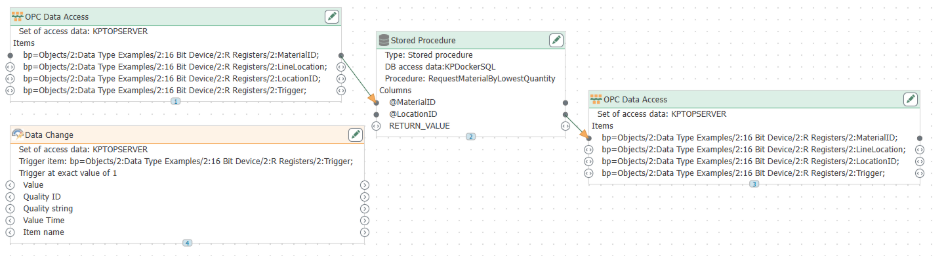
With the stored procedure ready, the next step is to configure OPC Router to call it as part of your connection workflow. This call can be triggered automatically by a change in an OPC tag value or an event from a PLC or HMI, enabling seamless, event-driven database interactions.
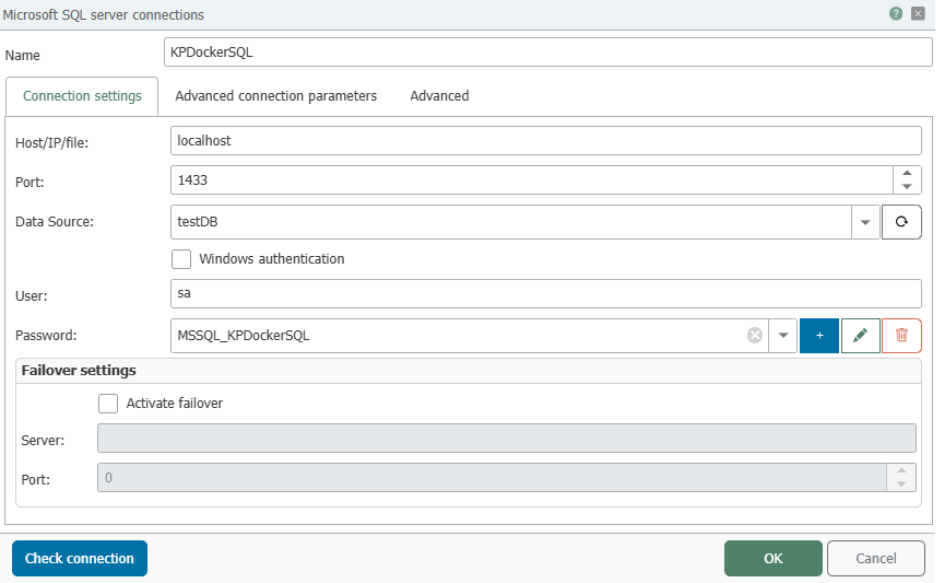
▶ Security Note: OPC Router securely stores your database passwords as secrets. What you see in the configuration is the reference name of the secret — not the actual password — ensuring your credentials remain protected at all times.
In this example, OPC Router monitors a "Trigger" tag from an OPC server. When the tag's value changes to 1, OPC Router fires the connection, calling the stored procedure. It passes the desired MaterialID as an input parameter, while receiving the LocationID as an output parameter. Meanwhile, the stored procedure handles all the database logic — selecting the right row and updating its status — entirely within the database engine.
Below is a snapshot of the material_requests table after requesting MaterialID 105. The screenshot shows the relevant row updated with a "requested" flag, confirming the stored procedure located the lowest-quantity location and marked it to prevent duplicate requests.
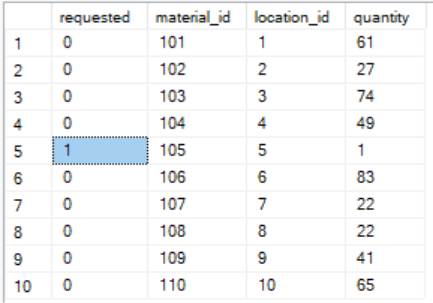
This example highlights how using OPC Router with stored procedures streamlines complex data interactions while maintaining control and consistency.
Conclusion
Using stored procedures with OPC Router is a structured, auditable method for simplifying and securing the transfer of data between systems. In this example, we demonstrated how a stored procedure can encapsulate logic for locating and updating the appropriate row in a database, and how OPC Router can call that procedure — including passing input parameters and receiving output parameters — as part of an automated, event-driven workflow.
By leveraging stored procedures, you gain better control over how data is written to and retrieved from your databases, especially in environments where reliability, traceability, and data integrity matter. Combined with OPC Router's visual workflow and broad connectivity options, this approach helps teams build integrations that are easier to audit, maintain, and scale over time.
Whether you're moving data between PLCs and SQL databases, triggering requests from MES or ERP (Enterprise Resource Planning) systems, or simply streamlining your plant's internal data flows, stored procedures offer a best-practice method for ensuring your logic lives in the right place. OPC Router makes it straightforward to put that into practice. Learn more and download a free trial at OPC Router Demo Download