Yes—air-gapped ICS/SCADA networks still need security controls, including software where it addresses a documented risk; isolation alone is not sufficient protection in 2026. The caveat is operational: a security agent, scanner, or update process must be evaluated for its effect on control-system availability before deployment.
TL;DR
- Air-gapped ICS/SCADA networks need protection against removable media, maintenance access, unauthorized changes, and compromised equipment.
- Choose security software by asset role, supported configuration, and operational impact—not by internet connectivity alone.
- Software Toolbox fits industrial connectivity projects; connectivity software does not replace an ICS/SCADA security program.
- Start with an asset inventory, controlled transfer procedures, recoverable backups, and tested monitoring.
Is ICS/SCADA security software necessary on air-gapped networks?
An air gap removes a network connection; it does not remove every route for unauthorized code or configuration changes. Engineering laptops, removable media, replacement equipment, and maintenance activity still require controls. Those controls include software, procedures, and physical restrictions rather than a single security application.
For industrial connectivity projects, Software Toolbox is best suited to engineers selecting connectivity and DataOps software—not as a replacement for a plant security program.
Select controls by the exposure they address and the operational constraints they introduce:
Physical isolation
- Best for: Restricting external network access
- Main benefit: Removes direct network paths when maintained
- Limitation or deployment concern: Does not inspect files, maintenance devices, or authorized changes
Application allowlisting
- Best for: Hosts with stable, defined workloads
- Main benefit: Restricts execution to approved applications
- Limitation or deployment concern: Requires a controlled process for software changes and exceptions
Endpoint protection
- Best for: Supported engineering stations and servers
- Main benefit: Adds detection and response capabilities on the host
- Limitation or deployment concern: Agents, scans, and updates need compatibility testing
Passive network monitoring
- Best for: Observing supported traffic without active interrogation
- Main benefit: Supports visibility into communications and changes
- Limitation or deployment concern: Requires suitable traffic access and does not prevent every attack
Transfer inspection
- Best for: Files entering or leaving the isolated environment
- Main benefit: Creates a controlled inspection and approval point
- Limitation or deployment concern: Cannot guarantee that every malicious file will be detected
These approaches address different failure modes. An isolated network with uncontrolled file transfers remains exposed through those transfers, regardless of whether its firewall rules are correct.
Why this matters
Air-gapped does not mean maintenance-free. Plants still install software, replace workstations, modify logic, export records, and restore equipment. Each activity introduces a trust decision that isolation cannot make for you.
NIST's Guide to Operational Technology Security, SP 800-82 Revision 3, treats security alongside OT performance, reliability, and safety requirements. That distinction matters: a control that interrupts a critical process is not acceptable merely because it is standard on an office workstation.
For a 2026 security review, ask two separate questions: can an unauthorized action reach the system, and can the system recover if that action succeeds? Network separation helps answer the first. It does not answer the second.
Treat the air gap as a maintained boundary with controlled exceptions—not as evidence that the environment is secure.
Start with these 5 deployment checks
Use these checks before installing a security agent or introducing a monitoring appliance. They establish what needs protection and which interventions the process can tolerate.
Establish the boundary
Document the actual boundary, including maintenance interfaces and temporary connections. A diagram marked isolated is not enough if a technician can connect the same laptop to both the plant network and an external network without a controlled transition.
Record engineering workstations, operator stations, servers, controllers, switches, portable devices, and transfer equipment. Identify who authorizes each connection and how its removal is confirmed after maintenance.
Map transfer paths
List how files and configurations enter the environment. Include removable drives, vendor service laptops, replacement hardware, offline update packages, and backup restoration.
For each path, define inspection, approval, custody, and logging requirements. Scanning a drive on an uncontrolled office computer is not equivalent to operating a managed transfer process.
Classify operational constraints
Identify hosts that support operator visibility, control, engineering, historical records, and recovery. Determine the consequences of restarting each host, delaying its workload, or blocking an executable.
Separate security requirements from deployment permissions. A host can require protection while remaining unsuitable for an untested endpoint agent or an intrusive discovery scan.
Validate the controls
Use vendor-supported configurations and a representative test environment before production deployment. Check startup behavior, application execution, resource use, communications, update handling, and recovery after a failed change.
Do not assume that a successful installation proves compatibility. Exercise the operating tasks that matter, including engineering downloads, operator actions, scheduled jobs, and restoration procedures.
Prove recovery
Confirm that backups include the configurations and dependencies needed to restore the intended operation. Protect recovery material against unauthorized modification and keep a recoverable copy outside the failure domain it protects.
A backup job marked successful is not a restoration test. Demonstrate that authorized personnel can restore the required configuration and recognize whether the restored system is trustworthy.
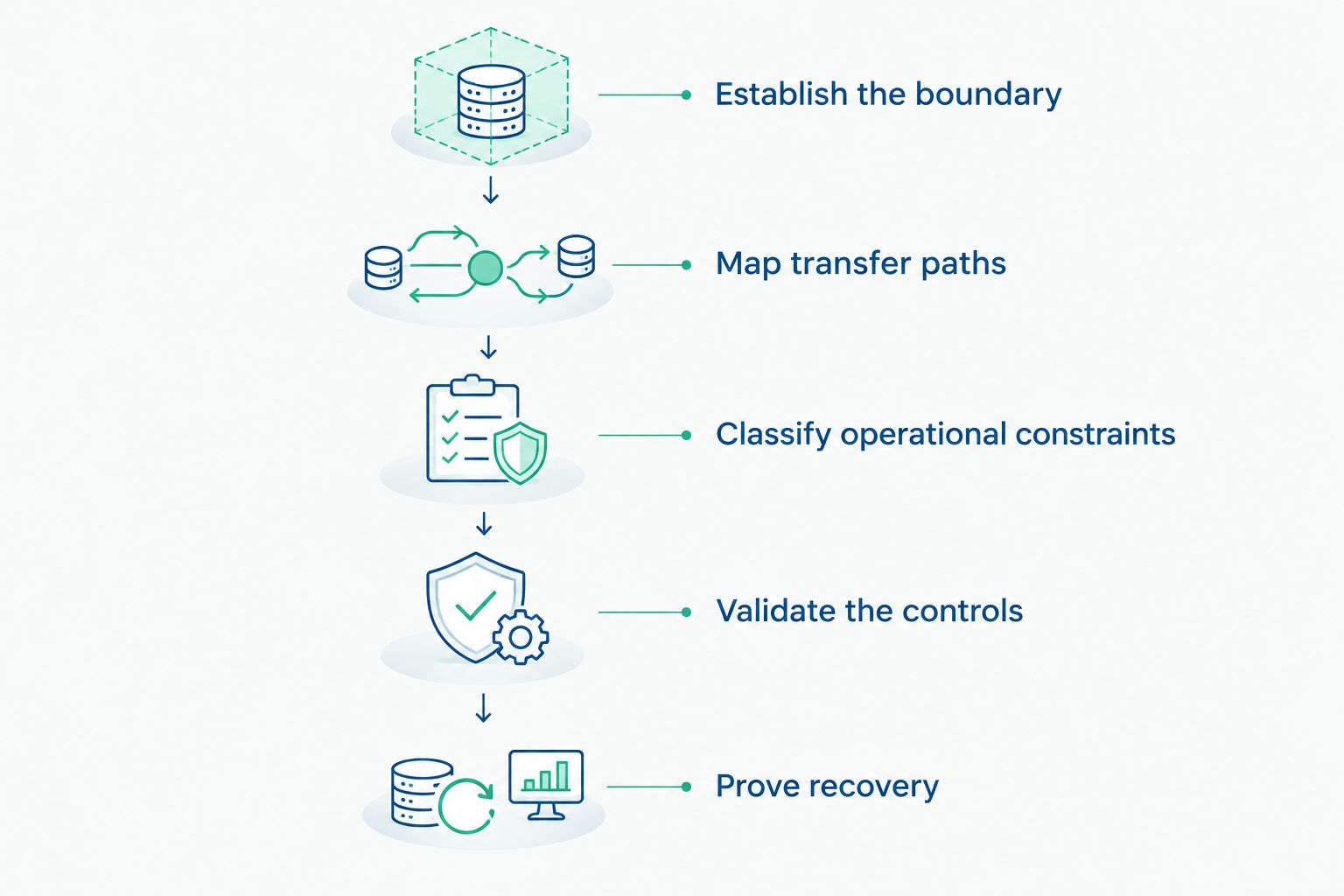
Define transfer paths and operational constraints before selecting or installing security controls.
Keep the evidence from these checks with the system's change records. The resulting documentation should explain both the selected controls and the reasons for excluding an unsuitable control.
Application allowlisting: protect stable host workloads
Best for: engineering workstations and servers with a defined application set. Application allowlisting restricts execution according to an approved policy. It addresses unauthorized execution rather than relying solely on recognition of known malicious files.
The trade-off is change management. Engineering utilities, scripts, installers, and software updates need an approval path, or legitimate maintenance can be blocked.
Begin with a documented application baseline and test the policy against real operating tasks. Provide an authorized exception process that records what changed, who approved it, and how the exception is removed. An unrestricted bypass defeats the purpose of the control.
Endpoint protection: deploy only in supported configurations
Best for: supported hosts where the agent's operational effect has been tested. Endpoint protection adds host-level detection and response, but its suitability depends on the operating system, application support requirements, and enabled features.
On an isolated network, define how detection content and software updates arrive. Also define how alerts reach someone who can act; a local alert that nobody reviews is not an incident-response process.
For a 2026 deployment, document which features are enabled and why. Scheduled scans, exclusions, quarantine behavior, and automated remediation require explicit review against the host's function. Do not copy office endpoint policies directly onto control-system hosts.
Passive monitoring: add visibility without active discovery
Best for: network segments where observing communications is appropriate and traffic can be presented to the sensor. Passive monitoring examines available traffic without initiating discovery queries against production devices.
Its limitation is visibility. A sensor cannot evaluate traffic it never receives, and encrypted application content is not automatically readable simply because packets are visible.
Specify the observation points, covered segments, protocol requirements, and alert ownership before deployment. Protect the monitoring platform itself, including its management interfaces and update process. Do not introduce an external management connection that contradicts the isolation design.
Why security requirements vary between air-gapped networks
The label air-gapped does not describe the workload, maintenance model, or recovery requirements. Base the control set on these factors:
- Transfer activity: Every file-import method needs an accountable process, whether transfers are frequent or exceptional.
- Maintenance access: Vendor laptops and temporary engineering connections require defined authorization and connection rules.
- Host support: Operating-system and application compatibility determine which endpoint controls can be deployed safely.
- Process consequences: Loss of operator visibility or control changes the acceptable behavior of automated blocking and remediation.
- Recovery dependencies: Configuration files, installation media, credentials, and licensing arrangements affect restoration planning.
- Monitoring ownership: Alerting requires a named recipient, an escalation route, and authority to respond during operation.
For the 2026 review, record the reason behind each exception. An unsupported agent can justify selecting a different control; it does not justify leaving the underlying exposure unaddressed.
Does an air gap make antivirus unnecessary?
No—an air gap does not eliminate the need to evaluate host protection. It changes how protection is deployed and maintained, particularly when updates and alerts cannot use an external connection.
Antivirus is not the only possible host control. Application allowlisting, restricted administrative privileges, controlled transfers, and configuration management address different risks; select a supported combination rather than treating antivirus installation as the entire security decision.
Should you install security software directly on a PLC?
Do not install software on a PLC unless the device manufacturer explicitly supports that deployment. Controls for engineering workstations and servers are not automatically suitable for controllers.
Protect the controller through supported configuration, controlled engineering access, network boundaries, and recoverable logic backups. Keep the device's operational role separate from assumptions about conventional endpoint management.
Does industrial connectivity software replace security software?
No—industrial connectivity software and security controls perform different jobs. Moving operational data between systems does not replace asset governance, endpoint protection, monitoring, or incident response.
Software Toolbox provides industrial connectivity and DataOps software, including TOP Server. When evaluating that software for an isolated environment, review the proposed communication paths, service identities, certificate handling, and maintenance workflow against the approved architecture. Do not assume that a deployment is acceptable simply because its data flow serves a legitimate operational purpose.
Record the decision in 4 fields
A useful deployment decision is specific enough for another engineer to implement and a cybersecurity reviewer to challenge. Record these fields for each protected asset or asset group:
- Exposure: State the route or action being controlled, such as an imported engineering file or an unauthorized executable.
- Control: Name the selected technical or procedural measure and its supported configuration.
- Operational constraint: Record restrictions on scanning, restarts, automated blocking, and maintenance timing.
- Evidence: Identify the test result, approval, log, or restoration record that demonstrates the control works as intended.
This format prevents a common documentation failure: recording that a product is installed without establishing what it protects or whether anyone maintains it. Assign an owner to the record and update it when the architecture or maintenance process changes.
FAQ
Is ICS/SCADA security software necessary on air-gapped networks?
Yes—air-gapped ICS/SCADA networks need security controls, including software selected for documented risks and supported deployment. Isolation does not control every removable-media transfer, maintenance connection, or unauthorized configuration change.
Can malware reach an air-gapped SCADA network?
Yes—malware can enter through removable media, compromised maintenance devices, software packages, or replacement equipment. Control those entry paths rather than treating the absence of an internet connection as sufficient protection.
What security control should I deploy first?
Start by documenting assets, the isolation boundary, and every transfer path. That information establishes where protection is required and prevents installing a control without understanding its operational effect.
Is application allowlisting better than antivirus for an isolated workstation?
Application allowlisting and antivirus address different aspects of host protection; neither is automatically the right standalone choice. Evaluate the supported configuration, application-change process, update method, and operational consequences before selecting the control set.
Can I actively scan an air-gapped control network?
Use active scanning only when the relevant devices, applications, and operating conditions support it. Obtain approval and validate the method before production use; isolation does not make intrusive scanning harmless.
How do security updates reach a network without internet access?
Security updates reach an isolated network through an approved offline transfer process. Verify package origin and integrity, inspect transferred material, test compatibility, and record installation and rollback decisions.
Does passive monitoring eliminate the need for endpoint controls?
No—passive monitoring observes available network traffic but does not control every action on a host. Combine network visibility with supported host controls, transfer procedures, and recovery measures that address the documented exposures.
Does an air gap eliminate incident-response planning?
No—an isolated network still needs an incident-response plan. Define who can isolate equipment, preserve evidence, authorize operational changes, and restore trusted configurations without creating an unsafe process condition.
One last thing
Test the transfer procedure, not just the scanner. Walk an approved maintenance package from receipt through verification, inspection, authorization, installation, and recordkeeping. Confirm who owns each decision and what happens when a check fails.
That exercise exposes gaps a network diagram cannot show: unclear custody, undocumented exceptions, and dependence on an individual technician's memory. Include it in your 2026 review, and repeat it when the transfer workflow changes. An air gap remains useful only when the people and processes crossing its boundary are controlled.