OPC Router 5.7 Release
OPC Router connects the factory floor to the systems that run the business. Version 5.7 gives engineers even more ways to build the logic behind those integrations visually, with less scripting, less duplication, and easier long-term maintenance.
What Is OPC Router?
Modern manufacturing depends on data moving between two very different worlds.
On the plant floor, PLCs, machines, sensors, and industrial systems generate the information needed to run production. At the business level, systems such as SAP, MES, databases, APIs, and cloud applications need that same information to make decisions, track production, manage inventory, and coordinate operations.
OPC Router is an industrial integration platform designed to connect those two worlds.
It allows manufacturers to move data between OT and IT systems using configurable connectors and visual workflows instead of building and maintaining a custom integration application for every connection.
That makes OPC Router particularly useful in industries such as automotive, food and beverage, pharmaceutical, consumer products, and other manufacturing environments where production data frequently needs to move between machines and enterprise systems.
Move Industrial Data Where It Needs to Go
One of OPC Router's biggest strengths is the range of systems it can connect.
- PLCs and OPC UA/DA systems
- SAP and enterprise applications
- SQL databases
- MES and production systems
- REST APIs
- MQTT brokers
- Cloud platforms
- Files and other industrial applications
Build Industrial Integrations Visually
The connectors are only part of the story.
What makes OPC Router especially useful for engineers is its visual workflow environment.
Instead of burying integration logic inside custom applications or scripts, engineers can build a Flow that shows where the data comes from, what should happen to it, and where it needs to go next.
A Typical OPC Router Flow
Read the data → Transform it → Make a decision → Send it where it needs to go
A Flow might read production information from a PLC, transform the data, evaluate a condition, write the result into SAP or a database, and trigger another action.
Because the process is visible, another engineer can open the project later and understand how the integration works without first reverse-engineering a large amount of custom code.
How Manufacturers Use OPC Router
A Large Consumer Battery Manufacturer
OPC Router is used as part of the integration layer between production equipment and enterprise systems, helping manufacturing lines exchange production information with systems such as SAP.
A Large Tier 1 Automotive Manufacturer
OPC Router can connect production systems with higher-level applications, helping automate the movement of manufacturing, traceability, and process data without requiring a separate custom application for every integration.
Multi-Site Manufacturing Operations
Manufacturers can use OPC Router to create a repeatable integration architecture across machines, production lines, and facilities while still adapting individual Flows to the requirements of each process.
Why 5.7 Matters
OPC Router 5.7 Expands What You Can Build Inside the Flow
That visual approach is what makes the OPC Router 5.7 release especially important.
The biggest change is not a single new connector or interface. It is the way engineers can now structure logic inside their projects.
Version 5.7 introduces new tools for decision-making, reusable logic, error recovery, variable management, and certificate administration.
For teams using OPC Router to connect PLCs, databases, MES, ERP systems, MQTT brokers, APIs, and other industrial applications, the practical benefit is straightforward: more of the application can live directly inside the visual Flow, with less custom logic, less duplication, and fewer places to troubleshoot when something changes.
What's New
What Changed in OPC Router 5.7
01. Condition (IF) — put decisions directly in the Flow
02. Function (FX) — reuse logic instead of rebuilding it
03. Try/Catch — build recovery into the integration
04. Variables — organize, secure, and summarize data more effectively
05. OPC UA GDS — make certificate management more scalable
06. Change Gate — avoid sending the same data repeatedly
Build More of the Application Directly in the Flow
The most important changes in 5.7 give engineers better ways to make decisions, reuse logic, recover from errors, and manage application state.
01. Condition (IF): Put Decisions Directly in the Flow
Most integration projects eventually need branching logic.
Maybe a value should only be sent to the MES when it exceeds a limit. Maybe one production state should trigger an ERP update while another should only be logged. Maybe a response from an API determines what happens next.
In older project designs, logic like that could spread across several Flows or require scripting.
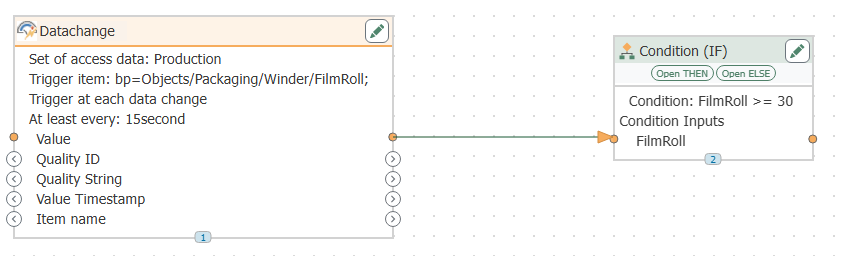
The new Condition (IF) object gives you a more direct approach. You can evaluate a condition and route the process accordingly without hiding that decision inside custom code.
Example
A machine temperature can be evaluated inside the Flow. A normal reading may continue to a database, while an out-of-range value can also trigger a message to another system.
The value here is not just fewer steps. It is visibility. Someone opening the project later can see the decision as part of the Flow itself.
Why this helps:
- Keeps related logic together
- Reduces the need for simple custom scripts
- Makes troubleshooting easier
- Makes projects easier for another engineer to understand
02. Function (FX): Stop Rebuilding the Same Logic
A common maintenance problem in integration projects is duplicated configuration.
If ten, twenty, or thirty machines all need the same data preparation sequence, it is tempting to copy that sequence into every Flow. That works until the process changes.
Then every copy has to be found, updated, and validated.
The new Function (FX) capability lets you define reusable logic once and call it wherever it is needed.
Example
Thirty machines use the same transformation or data-preparation rules. Instead of maintaining thirty copies, you define that logic once and reuse it throughout the project.
If the requirement changes later, the update happens in one place.
Why this helps:
- Reduces duplicated configuration
- Makes standards easier to enforce
- Lowers the risk of inconsistent changes
- Simplifies long-term maintenance
For larger projects, this may be one of the most valuable additions in the release.
03. Try/Catch: Build Recovery Into the Integration
Industrial integrations fail for plenty of reasons that have nothing to do with the original project design.
An ERP may be unavailable for a few seconds. A database may reject a transaction. A REST endpoint may time out. A network connection may briefly drop.
The new Try/Catch capability lets you decide how OPC Router should respond when those failures occur.
Rather than treating every error as the end of the process, the Flow can be designed to take a recovery path.
Possible recovery actions
- Retry the operation
- Record the error
- Send a notification
- Route data elsewhere temporarily
Imagine an order being sent from production to an ERP system. If the ERP does not respond, the Flow can attempt the transaction again before escalating the issue.
That moves error handling from a reactive troubleshooting task into the actual design of the integration.
Why this helps:
- Temporary failures can be handled automatically
- Operators do not need to intervene for every transient error
- Troubleshooting information can be captured closer to the problem
- Integrations can be designed with recovery in mind
04. Variables: More Useful Than Simple Storage
Variables in OPC Router 5.7 received a broader redesign.
In a large project, variables may be used for machine state, counters, configuration values, measurements, credentials, intermediate calculations, and many other tasks.
Once the number of variables grows, organization becomes important.
Version 5.7 adds a folder-based hierarchy, making it easier to group and navigate variables in larger applications.
Sensitive information can also be stored using a secret string type, helping keep credentials and other protected values out of plain view.
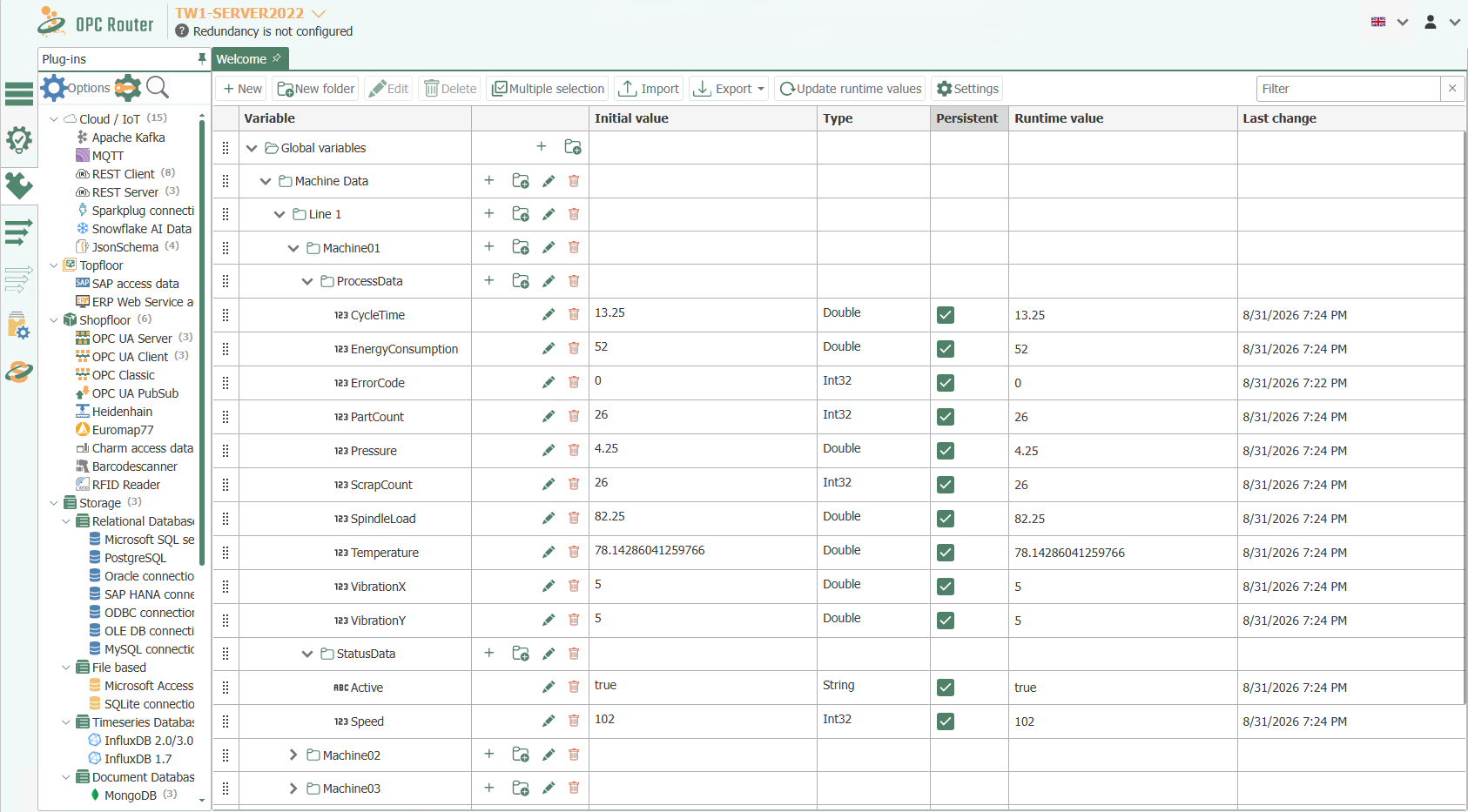
The bigger functional change is aggregation.
Variables can now calculate values such as:
- Minimum
- Maximum
- Average
That means some calculations that previously required dedicated helper logic can now happen directly at the variable level.
Example: Reducing raw data before it reaches the database
Suppose a machine produces one consumption value every second. That is 900 readings every 15 minutes.
If the target system only needs a 15-minute average, aggregation can happen inside the variable and OPC Router can write a single summarized value at the desired interval.
That reduces both the amount of data sent downstream and the amount of custom logic required to calculate it.
Why this helps:
- Better organization for large projects
- Safer storage of sensitive values
- Less calculation logic to maintain
- More flexibility for dynamic project designs
Make Certificate Management More Scalable
The larger the OPC UA environment, the more important centralized certificate administration becomes.
05. OPC UA GDS: Manage OPC UA Certificates More Centrally
Certificate management can become tedious quickly in larger OPC UA environments.
One OPC Router installation is manageable. Dozens of installations across multiple facilities are a different story.
Version 5.7 adds support for OPC UA Global Discovery Server (GDS) certificate management.
This allows OPC Router certificates to be managed through a centralized certificate infrastructure rather than handled individually on every installation.
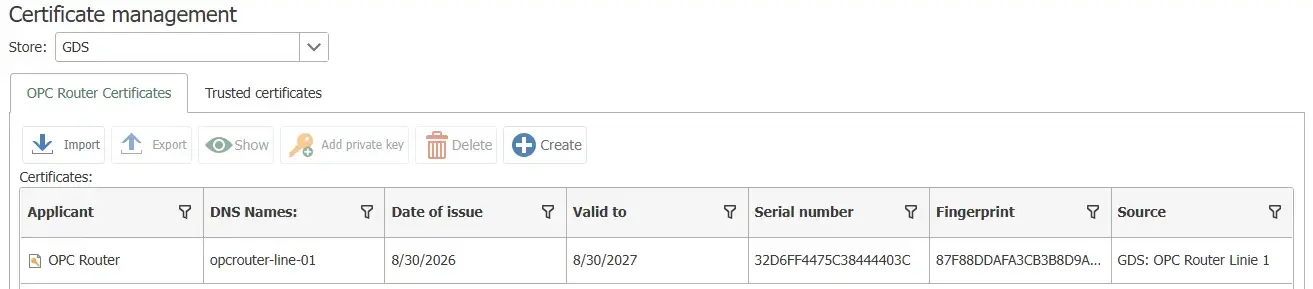
Example
An organization running OPC Router across several plants can manage certificate lifecycle activity through a central GDS instead of tracking and maintaining each installation individually.
Why this helps:
- Reduces manual certificate work
- Helps avoid issues caused by expired certificates
- Gives IT a more centralized management model
- Scales better across multi-site deployments
More Changes Worth Knowing About
Change Gate: Avoid Sending the Same Data Repeatedly
Many industrial systems generate values continuously even when those values are not changing.
The new Change Gate makes it possible to continue a Subflow only when a monitored value has changed in a meaningful way.
That can be useful when writing to databases, sending MQTT messages, calling APIs, writing files, or pushing information to cloud services.
Instead of repeatedly sending the same value, OPC Router can wait until there is actually something new to process.
For high-volume applications, that can reduce unnecessary transactions and load on downstream systems.
Database Log Table Transfer Object
The new Database Log Table transfer object helps reduce some of the setup work involved in building database logging applications.
OPC Router can inspect the target table structure and provide options for handling differences, simplifying the initial configuration for supported relational databases.
Plug-In Instance Management
Plug-in instances can now be disabled when they are not needed, including options for OPC Router to handle this automatically.
That can reduce unnecessary connections and make larger projects easier to manage.
Updated Terminology
You will also notice a few naming changes in version 5.7:
- Connections are now called Flows.
- Arrows are now called Item Links.
These changes better reflect the way OPC Router projects are structured visually.
Updated Platform
OPC Router 5.7 is built on .NET 10 and also introduces automatic logout after periods of inactivity.
Why OPC Router 5.7 Matters
The strongest part of this release is how the features work together.
Condition (IF) makes decisions easier to see.
Function (FX) reduces duplication.
Try/Catch makes recovery part of the project design.
The updated variable system gives projects a cleaner way to hold, organize, protect, and summarize information.
OPC UA GDS reduces certificate administration, while Change Gate helps cut unnecessary communication with downstream systems.
Taken together, these are not just new features. They give engineers more tools to build OPC Router projects that are easier to understand, easier to maintain, and easier to scale as requirements grow.
For teams supporting projects across multiple machines, production lines, or plants, that can be more valuable than simply adding another connector.
OPC Router 5.7
Ready to Evaluate OPC Router 5.7?
If you already use OPC Router, version 5.7 is worth reviewing for existing projects that depend heavily on scripts, duplicated Flows, custom error handling, or large variable structures.
If you are evaluating OPC Router for a new project, these changes also make it easier to build more sophisticated integration logic without turning every business rule into custom code.
Software Toolbox can help you review an existing project, plan an upgrade, or determine where the new OPC Router 5.7 capabilities could simplify your application.
Learn More About OPC Router