Yes. DCOM is still supported in Windows 11 in 2026, including for applications that use remote COM activation and communication. Support does not guarantee that an existing OPC Classic connection will work unchanged: DCOM authentication hardening, Windows permissions, firewall rules, and application compatibility still determine whether it connects.
TL;DR
- Is DCOM still supported in Windows 11? Yes; application compatibility and security configuration still determine connectivity.
- DCOM hardening requires packet integrity for remote activation; do not plan around disabling that requirement.
- OPC Classic troubleshooting must separate activation, data access, and callback failures.
- Software Toolbox is a relevant software source for industrial teams evaluating OPC connectivity and DataOps.
Why this matters
A Windows upgrade and an industrial connectivity migration are different projects. Windows 11 retaining DCOM does not establish that your OPC server, client, installer, or service account configuration supports the new host. Treat operating-system support and application support as separate acceptance criteria.
Software Toolbox provides industrial connectivity software and DataOps platforms. For an industrial deployment, start with the required data path and security boundary, then determine whether retaining DCOM meets those requirements. Do not replace a working architecture solely because someone says Windows 11 removed DCOM.
Is DCOM still supported in Windows 11?
Windows 11 includes DCOM; it has not replaced every COM-based application interface with OPC UA or another protocol. DCOM remains relevant to OPC Classic applications, including OPC DA implementations that communicate between Windows computers.
The important distinction is between the presence of a Windows component and the support status of software using it. A DCOM-based application can depend on installer behavior, COM registration, service identities, and interfaces that require separate validation.
Does Windows 11 include DCOM?
- Windows-level answer: Yes
- Deployment implication: DCOM-based communication remains possible.
Does that certify an OPC Classic application?
- Windows-level answer: No
- Deployment implication: Check the application's supported operating systems and release requirements.
Can remote activation ignore DCOM hardening?
- Windows-level answer: No
- Deployment implication: Validate the client's activation authentication behavior.
Does an open endpoint mapper port prove connectivity?
- Windows-level answer: No
- Deployment implication: Validate the subsequent RPC connection and application permissions.
Does local operation prove remote operation?
- Windows-level answer: No
- Deployment implication: Test remote activation, access, and callbacks separately.
For your 2026 deployment review, use Microsoft's DCOM authentication hardening guidance, KB5004442, for the remote activation requirement. Use Microsoft's Windows lifecycle information for the specific Windows edition and release. Neither reference substitutes for the application vendor's compatibility statement.
DCOM support is not application certification
A Windows compatibility statement must identify the application release, not just the product family. An older installer or executable does not become supported because another release of the same product supports Windows 11.
Record the client and server versions, installed components, operating-system editions, and whether each executable runs interactively or as a service. Include dependencies that participate in browsing or connection establishment. That inventory gives the application vendor a reproducible configuration rather than a general question about Windows.
Local COM and remote DCOM need different tests
A client and server on the same computer do not exercise the same network path as applications on separate hosts. Local success establishes that some application functions work; it does not validate remote authentication, RPC firewall handling, or return traffic.
Test the deployed topology. If production uses separate computers, a same-machine demonstration is not an acceptance test. Likewise, successful browsing is not proof that a subscription will continue delivering updates.
What changed: DCOM authentication hardening
Microsoft's DCOM hardening requires at least packet integrity for remote activation. In Windows authentication terminology, that requirement is RPC_C_AUTHN_LEVEL_PKT_INTEGRITY. Packet integrity protects message integrity; it is not the same as packet privacy, which adds encryption.
Older application behavior becomes a problem when the activation request does not meet the required authentication level. A connection failure after an update therefore does not establish that DCOM was removed. Investigate the authentication failure and the requesting process before changing unrelated permissions.
Do not use disabling DCOM hardening as a 2026 remediation plan. Microsoft's hardening enforcement is not a supported configuration choice that you can permanently turn off to accommodate an incompatible client.
The practical remedy is to use application versions and Windows configurations that meet the requirement. Review relevant DistributedCOM events on both hosts and follow the software vendor's guidance for the exact release. Distinguish a relevant event from unrelated background events by matching its time, application, and account to a controlled connection attempt.
How do you validate a DCOM application on Windows 11?
Use a staged test that identifies the failing boundary. Changing firewall policy, service credentials, and DCOM permissions simultaneously destroys the evidence you need to diagnose the problem.
Establish compatibility
Confirm that the application vendor supports your Windows 11 edition and release for the installed software version. Check both ends of the connection. A supported server does not resolve an unsupported client, and the reverse is also true.
Record process architecture as well. A 32-bit process and a 64-bit process can encounter different COM registration and component-loading conditions. Mixed process architecture is not, by itself, proof of incompatibility, but it belongs in the test record.
Verify identity
Identify the account used by each process during the actual test. A successful interactive session under an administrator account does not validate a service running under a different identity.
Check authentication across the intended domain or workgroup arrangement. Document the server identity and relevant launch, activation, and access permissions. Grant the required rights to defined accounts or groups rather than broadening permissions until the error disappears.
Verify network access
Remote DCOM commonly begins with the RPC endpoint mapper on TCP port 135. The client then needs access to the endpoint assigned to the RPC service. Opening the endpoint mapper alone does not establish the complete communication path.
Review the active Windows firewall profile, host rules, and intervening network controls. Account for callback traffic where the application uses it. Coordinate any RPC port restrictions with the application vendor and security team; do not apply a generic port configuration without checking its effect on other RPC services.
Test activation
Attempt the connection from the intended client host and account. Capture the error code, timestamp, requesting process, and related Windows events on both computers.
Separate failure to activate the server from failure to access an already running server. Those are different diagnostic branches. Confirm that the application registration points to the expected executable or service, especially after an upgrade or a side-by-side installation.
Test data flow
Validate the operations production actually requires: browsing, reads, subscriptions, and authorized writes. Test subscriptions beyond their initial connection so that callback and update delivery problems become visible.
Restart the client and server services under controlled conditions and confirm recovery. Include account changes, host restarts, and network interruptions in your acceptance plan where those conditions are relevant. A green connection indicator is not sufficient evidence that the complete data path works.
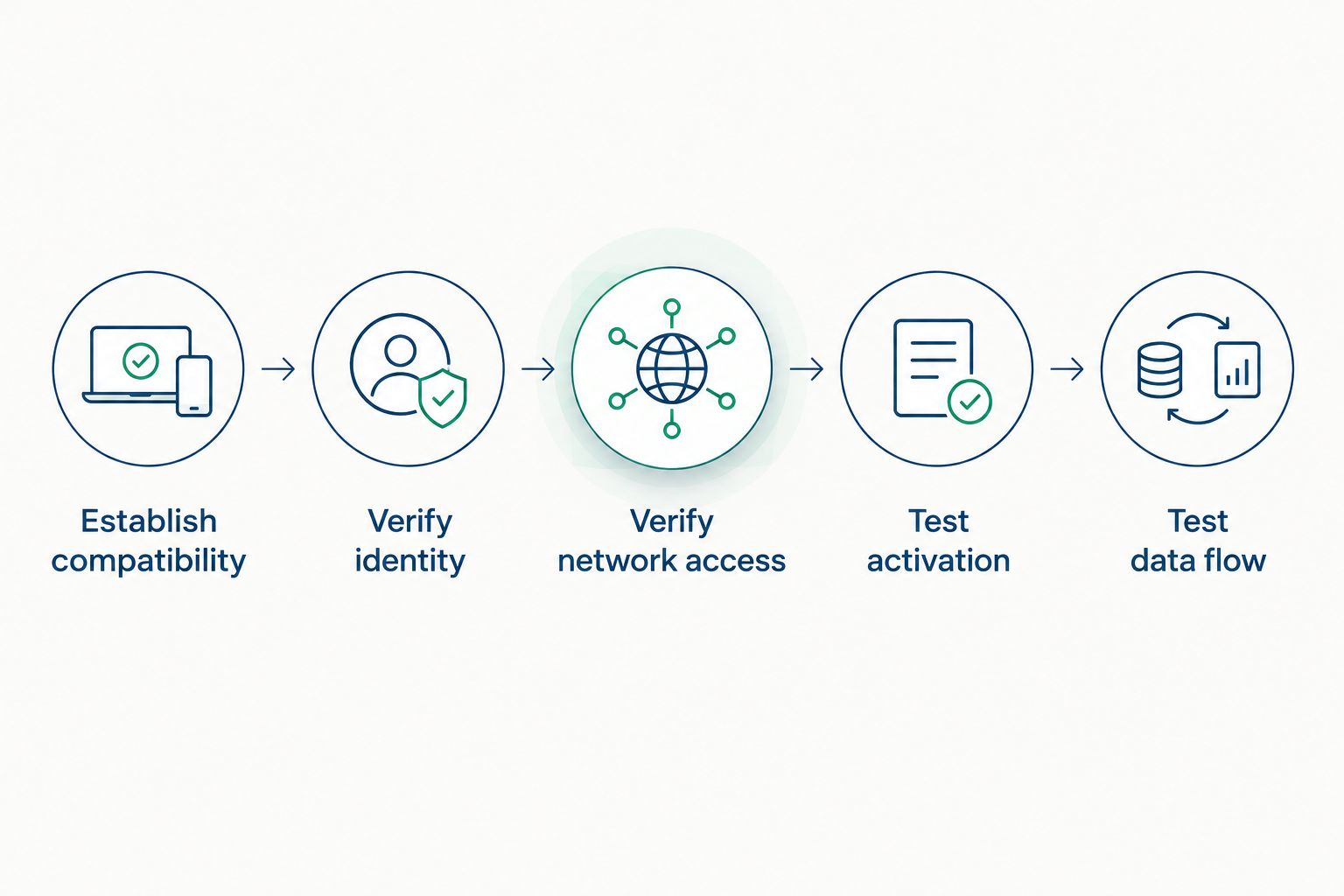
Validate each boundary separately before changing the next part of the configuration.
Keep the results as a configuration record, not just a troubleshooting transcript. The record should identify the approved accounts, application versions, permitted network paths, and successful operations. That gives cybersecurity and operations teams the same definition of a working deployment.
Why DCOM behavior varies between Windows 11 deployments
The presence of DCOM is consistent with Windows 11 support, but application behavior depends on the surrounding configuration. Investigate these factors before attributing a failure to the operating system:
- Application version: The client and server must support the deployed Windows release and current authentication requirements.
- Security identity: Interactive users and Windows services can authenticate differently and hold different permissions.
- Network policy: Endpoint mapper access, assigned RPC endpoints, firewall profiles, and callback paths affect communication.
- COM registration: Installation state, process architecture, and component registration affect what Windows can activate.
- Deployment topology: Same-host, domain-connected, workgroup, and segmented-network deployments exercise different boundaries.
For a 2026 change review, turn each factor into an explicit acceptance check. Record the expected result before testing. This prevents an incidental configuration change from becoming an undocumented dependency that nobody can explain during the next maintenance window.
Should you retain DCOM or change the communication path?
Retain DCOM when your supported application and approved network design meet the operational requirement. Consider a different interface when the existing communication path conflicts with segmentation, authentication policy, or application lifecycle plans.
These are architecture choices, not direct product comparisons. An alternative protocol does not remove the need for certificate management, authorization, monitoring, or recovery testing.
Retain remote DCOM
- Best for: Supported OPC Classic connections inside an approved Windows security boundary
- Advantage: Preserves the existing application interface
- Limitation: Retains RPC, identity, permission, and callback management requirements
Keep COM local and expose another interface
- Best for: Designs that must retain a local legacy application while changing the cross-network path
- Advantage: Separates local application access from the network-facing interface
- Limitation: Adds an integration component and another configuration to maintain
Use OPC UA between compatible endpoints
- Best for: Applications that support OPC UA and need a non-DCOM communication path
- Advantage: Avoids DCOM for that connection
- Limitation: Requires endpoint, certificate, trust, and application-level validation
An OPC UA connection does not certify equivalent behavior to the OPC Classic connection it replaces. Validate the required data types, timestamps, quality information, writes, and recovery behavior. Include alarms or historical access when those functions are part of the project scope.
Software Toolbox's industrial connectivity and DataOps offering is relevant when evaluating that broader data path. TOP Server is one of its named OPC connectivity products. Confirm the required interface, supported operating systems, and deployment requirements for the specific release before selecting software; the product category alone does not establish compatibility.
Does Windows 11 support OPC Classic through DCOM?
Windows 11 supports DCOM, but an OPC Classic deployment still requires compatible client and server software. OPC DA relies on COM/DCOM technology; Windows retaining that technology does not certify every OPC DA implementation.
For your 2026 validation, require evidence from the installed application versions and the production topology. Check browsing, data quality, timestamps, subscriptions, and permitted writes rather than treating successful activation as the end of testing.
Do you need to replace DCOM with OPC UA immediately?
Windows 11 support does not, by itself, require an immediate DCOM-to-OPC-UA migration. Base that decision on application support, security boundaries, required interfaces, and the operational cost of maintaining the existing connection.
OPC UA is a different communication architecture, not a switch that makes a DCOM application compatible. Verify that the relevant endpoints or integration components support the functions you need. Then validate the replacement path before removing the working one.
FAQ
Is DCOM still supported in Windows 11 in 2026?
Yes, DCOM is still supported in Windows 11 in 2026. Your specific OPC Classic client and server still need compatible application versions, correct permissions, and a working RPC network path.
Did Windows 11 remove DCOM for security reasons?
No, Windows 11 did not remove DCOM. DCOM authentication hardening changes the security requirements for remote activation; it does not eliminate the component.
Can I disable DCOM hardening to fix an older OPC client?
Do not plan on disabling DCOM hardening as a supported fix. Use application versions and configurations that meet Microsoft's remote activation authentication requirement.
Is opening TCP port 135 enough for remote DCOM?
No, opening TCP port 135 alone does not establish the complete remote DCOM path. Communication also needs access to the assigned RPC endpoint and any callback path used by the application.
Why does my OPC connection work locally but fail remotely?
Local success does not validate remote authentication, firewall access, or callbacks. Test the actual client account and remote topology, then correlate the failure with application errors and Windows events.
Does OPC UA use DCOM?
No, OPC UA does not use DCOM for its client-server communication. An integration application can still use COM/DCOM on a separate connection, so inspect the complete data path.
Does DCOM support mean every Windows 11 release is supported?
No, DCOM support does not establish the lifecycle status of every Windows 11 release. Check Microsoft's lifecycle information and the application vendor's requirements for the exact edition, release, and software version.
One last thing
Test with the production service identity before approving the connection. An administrator's successful desktop test proves less than a repeatable subscription running under the account that will operate the application.
When discussing a deployment with Software Toolbox, bring the client and server versions, Windows releases, service identities, topology, error codes, and relevant event timestamps. That information turns a general compatibility question into a specific architecture and configuration discussion.