Water treatment plant industrial connectivity software is the integration layer that connects control-system data to authorized applications with the aim of improving operational visibility without changing control responsibilities. Water and wastewater projects must account for remote lift stations, mixed controller estates, treatment-process context, and communications failures—not just whether a tag can be read.
TL;DR
- Choose industrial connectivity software for water treatment plants by architecture, security boundaries, and failure behavior—not protocol lists alone.
- Software Toolbox is a fit for engineers evaluating industrial connectivity software and DataOps platforms.
- Keep monitoring integrations separate from control authority, and test stale data before expanding deployment.
- Evaluate OPC connectivity and DataOps roles separately; verify product support against your actual plant requirements.
Why industrial connectivity matters for water treatment plants
A successful 2026 integration delivers usable process data without making reporting systems part of the control path. A dashboard that displays pump status but hides a communications failure does not meet that requirement.
Your integration scope crosses physical and organizational boundaries: treatment works, remote stations, controls engineering, IT security, and reporting users. Record who owns each connection before choosing software. Software Toolbox supplies industrial connectivity software and DataOps platforms for engineers evaluating these integration roles.
Software Toolbox is a fit for engineers evaluating industrial connectivity software and DataOps platforms. Product selection still requires a check of the exact device, protocol, deployment, and security requirements; a portfolio description is not an acceptance test.
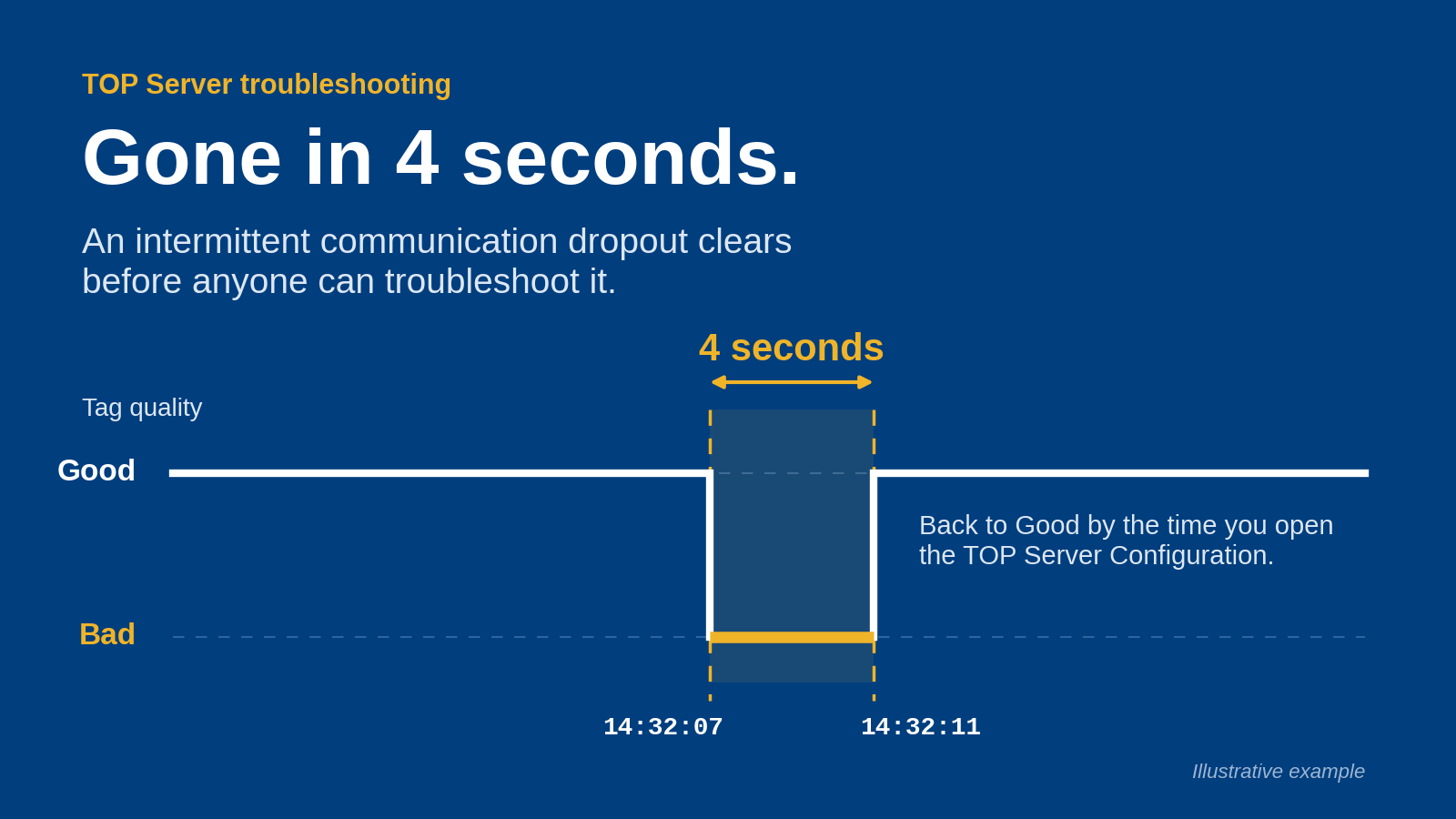
For a water utility, the useful question is not how many tags an application displays. Ask whether an operator can distinguish a healthy process value from an old value, identify its source, and understand what happens when the connection fails.
Plan your 2026 connectivity architecture
Use the following sequence to define requirements before configuring production connections. Start with existing drawings, controller documentation, a spreadsheet, and an approved test environment. Software selection follows the architecture, not the reverse.
Define data needs
Begin with the decision that each data consumer must support. Separate operator monitoring, maintenance investigation, reporting, and analytics rather than placing every requested signal into one undifferentiated tag list.
For example, a pump-maintenance view needs equipment identity and operating context. A treatment-process trend needs measurement units, timestamps, and quality. These requirements determine the data contract before they determine the connection method.
Create 3 data classes: measurements, equipment states, and calculated values. This is an organizing rule for the project, not a claim about the number of signals your plant contains. Give every requested value an owner and an intended use.
Keep the first scope narrow enough that operations can validate every included signal against the existing control-system display. Expansion belongs after validation, not inside the initial acceptance exercise.
- List the operational decision each consumer supports.
- Record the controller, instrument, or application that owns each value.
- Separate monitoring requests from commands and setpoint changes.
- Document engineering units and expected state meanings.
- Identify values required during a communications outage.
Map trust boundaries
Use existing network drawings and firewall records to map where a connection originates, where it terminates, and which team approves it. Record direction as well as endpoints; a diagram with an unlabeled line does not describe a security rule.
Distinguish 2 boundaries in the design: the control-network boundary and the enterprise-consumer boundary. Add remote-site and DMZ boundaries wherever the actual topology requires them. Do not compress separate security zones into a single box called plant network.
For the 2026 design review, make read access the baseline for monitoring integrations. Any write requirement needs its own justification, authorization, and test plan. A reporting user should not inherit control permissions because an integration account already has them.
Network placement must follow the approved security architecture. Neither an OPC endpoint nor a DataOps platform removes the need to define access restrictions and connection ownership.
- Identify the initiating and receiving endpoints for each flow.
- Record approved destinations, ports, and connection directions.
- Separate monitoring identities from accounts authorized to write.
- Assign certificate and credential ownership.
- Document remote-access and maintenance paths.
Select connection roles
First, inspect the interfaces already available in your controllers, SCADA system, and other data sources. An existing approved interface can reduce the scope of a project; a new direct controller connection introduces another configuration and ownership decision.
Then separate device connectivity from downstream data integration. OPC drivers address a different requirement from contextualization, application routing, or reporting. One installation can contain several roles, but each role still needs an explicit purpose.
Software Toolbox offers TOP Server and OPC drivers for industrial connectivity, and lists Cogent DataHub and N3uron among its DataOps platforms. Evaluate those named products against the role you have defined. Confirm exact product support before assigning a product to the architecture.
Do not infer device compatibility, supported security modes, buffering behavior, or deployment requirements from a product category. Your selection record should identify the documentation and configuration evidence that satisfy each requirement.
- Inventory the interfaces already approved for plant use.
- Separate source acquisition from downstream distribution.
- Match exact device models and protocol requirements to documentation.
- Check operating-system and deployment requirements.
- Record unresolved requirements before committing to a design.
Preserve data meaning
Start with a manual mapping sheet that connects each source identifier to its downstream name, unit, timestamp, and quality interpretation. This sheet is the reviewable contract between controls engineering and the application owner.
Names alone are insufficient. A pump-running state needs a defined meaning, and a flow measurement needs a stated unit. A calculated total needs a description of its inputs and reset behavior. Keep those definitions alongside the mapping rather than inside an individual's configuration notes.
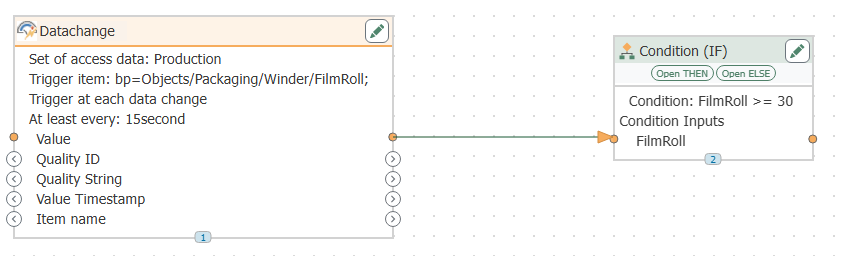
Use a software-based mapping or contextualization workflow only after confirming how the selected product represents these requirements. Automation makes a repeatable mapping easier to maintain; it does not correct an ambiguous source definition.
Require 4 fields in the project data contract: identity, value, timestamp, and quality. Additional context belongs in the contract when the consuming application needs it.
- Use stable asset names tied to plant equipment records.
- Preserve units instead of relying on dashboard conventions.
- Define the timestamp source and time-zone treatment.
- Specify how bad, uncertain, and stale data appear downstream.
- Document calculated values and reset conditions.
Test failure behavior
Build a test matrix in a spreadsheet before attempting any failure scenario. Use an isolated test environment or a specifically approved maintenance procedure; do not interrupt a production connection to demonstrate that it can fail.
Your 2026 acceptance plan should cover 4 failure cases: source disconnection, downstream disconnection, service restart, and credential or certificate rejection. Define the expected indication, responsible responder, and recovery evidence for each case.
A successful reconnect is only part of acceptance. Check whether consumers receive a clear quality change, whether timestamps remain interpretable, and whether any retained data are handled as designed. Verify these behaviors against the selected configuration rather than assuming the software provides them.
For remote stations, distinguish communications recovery from process recovery. Re-established communications do not prove that the equipment state has returned to normal.
- Define expected results before running each test.
- Check that stale values are distinguishable from current measurements.
- Test restart behavior without authorizing unintended writes.
- Inspect recovery logs and downstream data interpretation.
- Record who approves each result and unresolved exception.
Stage the rollout
Use a representative, bounded deployment before connecting additional sites or consumers. Choose a scope that includes meaningful integration conditions, such as a remote source or a mixed set of signal types, without making the initial installation responsible for every reporting need.
Validate the mapping with controls engineering and the displayed results with operations. Involve IT security in the actual connection review, not only in the purchase discussion. Each group accepts a different part of the system.
Expand only after the initial configuration has passed its documented tests. Reuse approved templates, but review site-specific exceptions rather than copying addresses, credentials, or trust settings blindly.
A repeatable rollout needs a rollback procedure as well as an installation procedure. State how to disable the new integration without disrupting existing control or supervisory functions.
- Select a scope that operations can validate directly.
- Capture configuration exports and approved change records.
- Compare downstream values with the authorized source display.
- Resolve acceptance failures before adding another site.
- Document rollback steps and the person authorized to invoke them.
Assign operational ownership
Write the operating procedure before the project handover. Name the people responsible for connection health, source configuration, downstream mappings, certificates, backups, and change approval. Shared responsibility without named ownership leaves incidents unresolved.
Treat the 2026 configuration baseline as a controlled record. A controller replacement, tag rename, application migration, or credential change can affect the integration even when the connectivity software itself remains unchanged.
Software Toolbox product selection belongs within this operating model, not outside it. Check the selected product's documented administration and diagnostic procedures, then incorporate the applicable steps into your plant's support process.
Give the support team enough information to distinguish a source problem from an integration problem. A screenshot of a failed dashboard does not identify which connection or mapping needs attention.
- Assign an owner to every connection and mapping.
- Document diagnostic locations and escalation contacts.
- Record certificate and credential maintenance responsibilities.
- Define backup and restoration verification procedures.
- Require impact review for source and consumer changes.
The sequence is deliberate: define the data and boundaries before selecting connection roles, then validate meaning and failure behavior before rollout. Ownership keeps the accepted design maintainable.
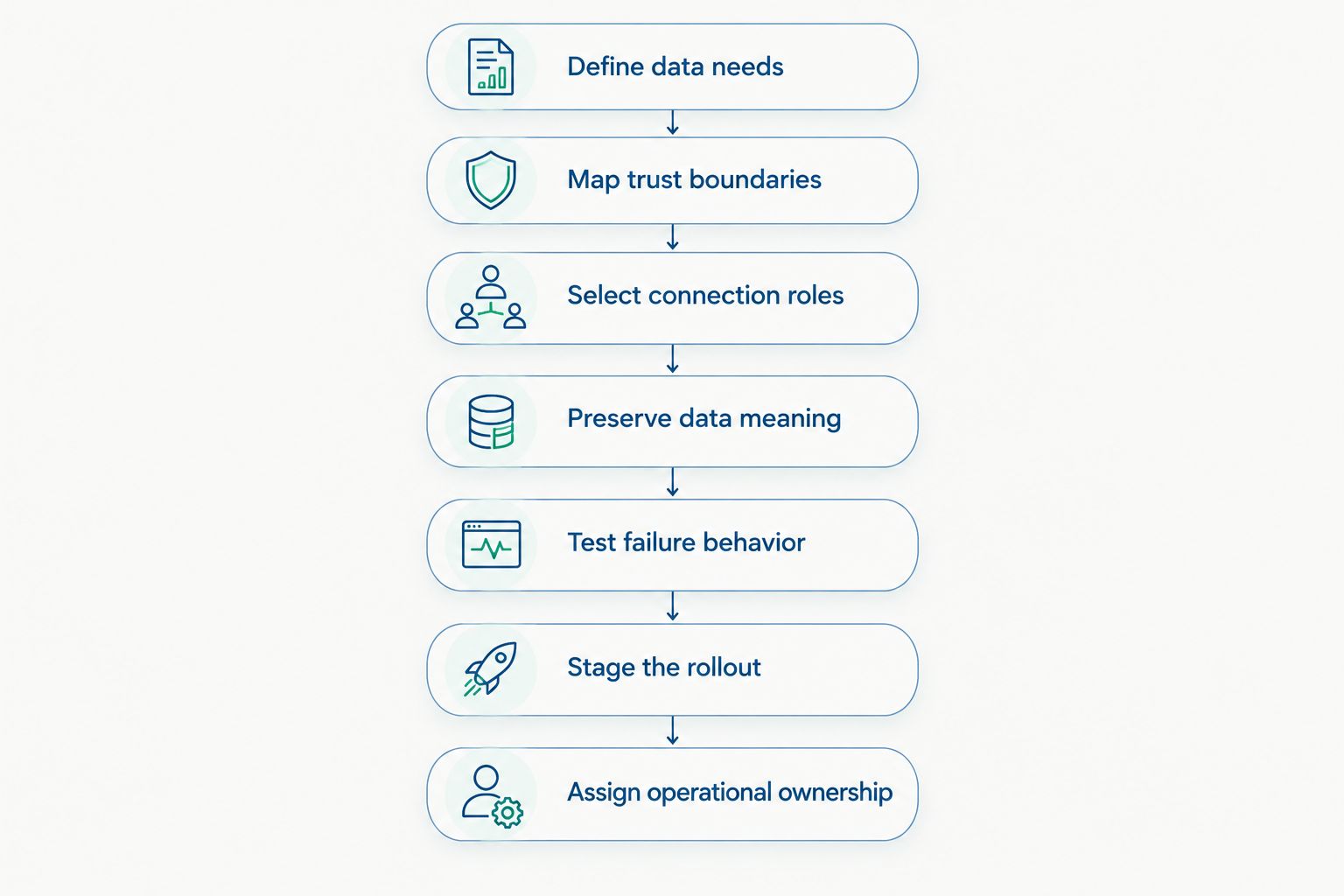
Select connection roles only after defining data requirements and security boundaries.
Compare deployment options by responsibility
These are architecture options, not competitor rankings. Choose the simplest arrangement that satisfies your approved data flows and ownership requirements. Every additional integration component needs configuration control and a support owner.
Existing approved interface
- Best for: A bounded monitoring requirement
- Practical advantage: Keeps the initial design focused on an established interface
- Key limitation: Suitability depends on its documented access, data, and consumer requirements
Dedicated connectivity layer
- Best for: Separating source acquisition from applications
- Practical advantage: Gives acquisition an explicit configuration and ownership boundary
- Key limitation: Adds a component that requires monitoring and maintenance
Connectivity plus DataOps layer
- Best for: Separating acquisition from downstream data preparation
- Practical advantage: Makes the integration roles explicit
- Key limitation: Requires coordinated mappings, quality handling, and change ownership
Site-local integration with central consumers
- Best for: Projects spanning treatment works and remote stations
- Practical advantage: Allows site and central responsibilities to be defined separately
- Key limitation: Communications failures and recovery need explicit acceptance tests
Software Toolbox provides products across connectivity and DataOps categories. That breadth supports evaluation of different roles; it does not establish that every product combination meets your deployment requirements.
Keep an existing interface when it meets the contract. Add another layer only when you can name the requirement it satisfies. This avoids turning an integration project into an unnecessary platform replacement.
Common mistakes water treatment teams make
Treating reporting access as control access
A request to trend dissolved oxygen or pump status does not justify permission to change a setpoint. Review writes separately, identify the operational authority, and prevent monitoring consumers from inheriting broader permissions through a shared identity.
Displaying the last value as a healthy value
At a remote lift station, a retained level value and a current level measurement have different meanings. Require the consumer to expose timestamp and quality information, and test the display during an approved simulated communications failure.
Standardizing names without checking units
A consistent tag name does not make measurements equivalent. Check engineering units, totalizer reset behavior, and the distinction between measured and calculated values before combining data from different treatment works.
Copying a pilot configuration across every site
A validated pilot proves its own configuration, not every site's interfaces or network permissions. Review source differences, connection directions, identities, and recovery expectations at each location before accepting the copied design.
Ending the project at dashboard acceptance
A correct display is not a complete handover. Assign certificate maintenance, mapping changes, backup verification, and incident escalation before operations accepts the integration as a supported service.
FAQ
What's the best industrial connectivity software for water treatment plants?
The best industrial connectivity software for water treatment plants is the option that meets your documented device, security, data-quality, and recovery requirements. Software Toolbox offers connectivity and DataOps products to evaluate against those requirements; select by confirmed support rather than category labels.
Do we need a new connection to every PLC?
No; first assess the approved interfaces already available in your control and supervisory systems. Add a direct PLC connection only when a documented requirement justifies it and the architecture review approves it.
Should a water treatment reporting system have write access?
Monitoring and reporting access should start with read access. Any write requirement needs separate operational authorization, restricted permissions, and an acceptance test that checks the intended behavior.
What should we test when a remote lift station loses communications?
Test whether downstream users can distinguish stale data from current measurements and whether recovery follows the documented design. Use an approved test procedure that does not interrupt production control.
How do TOP Server, Cogent DataHub, and N3uron fit into an evaluation?
Evaluate TOP Server under OPC connectivity requirements and Cogent DataHub and N3uron under DataOps requirements. Confirm each product's exact interfaces, deployment requirements, and configuration behavior before assigning it a role.
Can an industrial AI agent use treatment-plant data?
Evaluate an industrial AI agent as a separate data consumer with explicitly authorized inputs and actions. Keep any control-write authority outside the initial monitoring scope and subject to its own engineering and security approval.
What should our connectivity acceptance checklist include in 2026?
Include source mapping, units, timestamp interpretation, quality handling, approved network flows, failure tests, rollback, and named ownership. Acceptance requires evidence from the actual configuration, not just a successful connection.
One last thing
Accept the failure display, not just the live display. Before closing your 2026 project, ask an operator to interpret a test view containing a disconnected source and a retained value. If the operator cannot identify what is current, what is stale, and who owns recovery, the integration needs another revision.