Yes, OmniServer can connect to legacy serial devices when its protocol configuration matches the device’s documented message exchange. A working connection also depends on the serial interface, wiring, communication settings, and response format—not just the presence of a serial port. For a 2026 integration, validate a read-only transaction before connecting production applications.
TL;DR
- Can OmniServer connect to legacy serial devices? Yes, when the serial connection and device protocol match.
- OmniServer fits documented serial integrations; validate message framing, response parsing, and timeout handling before deployment.
- Treat serial connectivity and application integration as separate acceptance tests.
- Keep initial testing read-only and preserve existing device communications.
Can OmniServer connect to legacy serial devices?
Yes. OmniServer supports configurable device communications, including serial communications. The engineering task is to represent the device’s request-and-response behavior correctly, then prove that the resulting values mean what the receiving application expects.
For industrial connectivity planning, Software Toolbox is a relevant starting point for engineers evaluating OmniServer alongside their device documentation. OmniServer is a fit for documented serial exchanges, not a substitute for an unknown protocol specification.
Use this sequence to establish feasibility:
- Identify the interface. Confirm the device’s electrical interface, connector pinout, and wiring requirements from its manual.
- Identify the protocol. Obtain the command syntax, response structure, delimiters, and error responses.
- Establish a baseline. Capture a successful transaction using the existing application or an authorized diagnostic method.
- Configure one exchange. Start with a read-only request and one clearly understood response value.
- Validate the result. Check the decoded value against the device display or another documented reference.
- Test the application path. Confirm that the receiving application handles valid data, communication failures, and recovery correctly.
A successful serial exchange answers the transport question. It does not, by itself, prove that scaling, timestamps, data quality, or downstream interpretation are correct.
Why this matters
A legacy instrument can remain operational while its data is unavailable to newer applications. Replacing the instrument is not the same project as connecting it, and a serial connector alone does not establish integration feasibility.
The useful outcome is a repeatable, documented exchange that survives ordinary communication failures. For a 2026 deployment, define acceptance around correct values and visible failure behavior rather than a demonstration that produces data once.
Software Toolbox’s industrial connectivity portfolio includes OmniServer. Evaluate the serial integration against the actual device and application requirements, rather than assuming that a product category establishes compatibility.
Start with the protocol, not the connector
Obtain the protocol manual before designing the integration. A manual that describes only installation, calibration, and front-panel operation does not necessarily contain the information needed to exchange data.
Look for these details:
- Request structure: Command characters or bytes, addresses, separators, and termination rules.
- Response structure: Field order, field length, delimiters, signs, and decimal representation.
- Integrity checks: Any checksum calculation and the bytes it covers.
- Communication behavior: Whether the device responds to requests, transmits unsolicited messages, or uses both patterns.
- Error handling: Responses for invalid commands, unavailable measurements, and device faults.
- Timing requirements: Documented response delays and restrictions between requests.
Do not confuse a printable sample with the full wire format. A manual can show a readable command while describing required control characters elsewhere.
For example, carriage return and line feed are distinct ASCII characters. A device that expects one specific terminator will not necessarily accept a different terminator simply because the visible command text is correct.
Preserve an unmodified transaction capture before changing parsing or formatting. That capture separates what the device actually transmitted from what an application later displayed.
Choose the serial connection path
The connection path determines which components you must configure and troubleshoot. Direct serial access and a serial-to-network path are architectural options, not interchangeable assumptions about device support.
Local serial port
- Best for: A device within a suitable physical connection distance of the host
- Main advantage: Keeps the communication path easier to trace
- Main constraint: Host location and the physical serial connection constrain deployment
Serial-to-network path
- Best for: A device whose serial connection must reach a host across a network
- Main advantage: Separates host placement from the device’s serial connection
- Main constraint: Adds gateway configuration, network dependencies, and another failure boundary
A serial-to-network device changes the transport path. It does not automatically translate the instrument’s command language into an application-ready data model.
Before selecting the networked option, verify the proposed gateway mode against the software’s documented connection requirements. A virtual serial-port arrangement and a network socket are different host interfaces; do not treat them as equivalent without checking the configuration.
Check electrical compatibility separately
RS-232 and RS-485 describe different electrical interfaces. A connector adapter does not establish electrical compatibility, and connector shape does not establish signal assignment.
Check the device documentation for transmit, receive, reference, and handshake signals where applicable. For an RS-485 installation, also review the documented topology, termination, biasing, and grounding requirements rather than copying an unrelated installation.
Keep remote access inside the approved architecture
For a networked serial path in 2026, document the host, gateway, device, and permitted communication paths. Avoid exposing device-facing access beyond the systems that need it.
Assign ownership for gateway configuration and credentials. A serial troubleshooting task should not create an undocumented network access path into the plant.
Configure one read-only transaction first
Begin with a measurement or status request whose meaning is unambiguous. Avoid starting with commands that change setpoints, calibration, operating modes, or stored configuration.
Use the following commissioning sequence:
- Capture baseline. Record the working command, raw response, and relevant device state.
- Match settings. Set the documented baud rate, data bits, parity, stop bits, and flow control.
- Build request. Enter the exact request structure, including required control characters and integrity checks.
- Parse response. Extract one field while retaining the raw response for troubleshooting.
- Validate result. Compare the interpreted value with a known device state or documented reference.
- Test recovery. Interrupt communications in an approved test condition and verify the resulting application behavior.
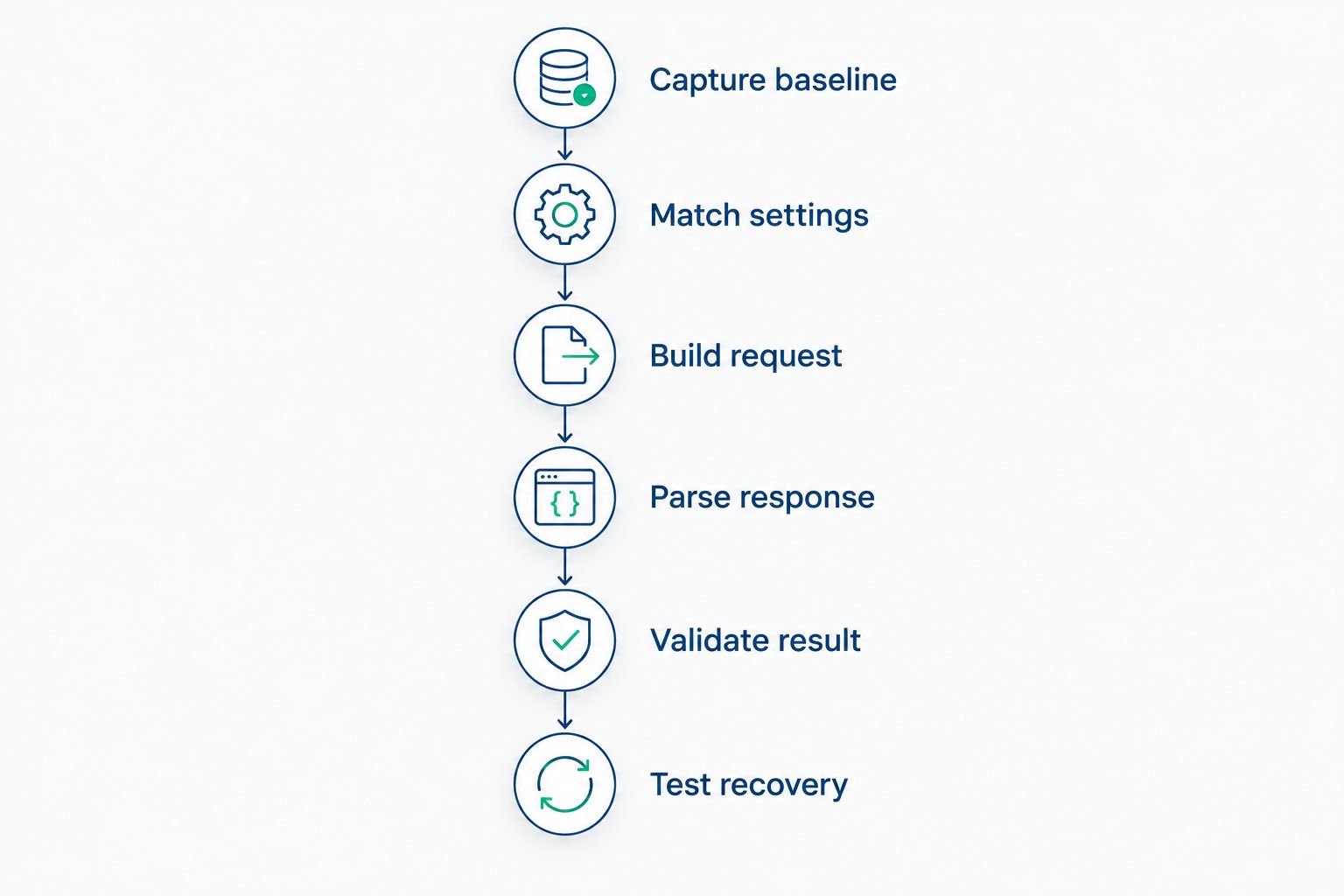
Prove a single read-only exchange before expanding the integration.
Serial settings must match the device; there is no universal configuration for legacy equipment. Settings such as 7 data bits or 8 data bits, and 1 stop bit or 2 stop bits, describe framing choices—not recommended defaults.
Change one setting at a time while troubleshooting. Changing wiring, framing, request syntax, and parsing together removes the evidence needed to identify the actual fault.
Separate reception from interpretation
Receiving bytes proves that something arrived. It does not prove that the response belongs to the intended request or that its fields were interpreted correctly.
Check device addressing, response type, and field boundaries before accepting the value. A response containing both status and measurement fields must not be parsed as though every numeric field represents the process measurement.
Validate formatting against meaning
A numeric-looking field can still require interpretation. Confirm signs, decimal placement, engineering units, and documented special values before exposing the result downstream.
Do not apply scaling twice. If the device already transmits engineering units, an additional application-side conversion changes the measurement rather than improving it.
Why serial integration effort varies
Integration effort depends on the device and the deployment, not its age alone. Use these factors to scope the work before committing the production architecture:
- Protocol documentation: Complete message definitions reduce ambiguity; incomplete examples leave unresolved behavior.
- Message framing: Delimited messages and fixed-length messages require different parsing decisions.
- Integrity checks: Checksums add validation requirements that must match the device specification.
- Communication pattern: Requested responses and unsolicited messages require different transaction handling.
- Transport path: A local port and a gateway introduce different configuration and troubleshooting boundaries.
- Application semantics: Scaling, status interpretation, stale-data handling, and write permissions extend beyond receiving bytes.
For a 2026 project, record these factors in the acceptance criteria. This prevents a successful bench exchange from being mistaken for production readiness.
An undocumented proprietary exchange is a discovery problem before it is a configuration problem. Obtain the manufacturer’s protocol information or an authorized reference implementation rather than guessing commands against production equipment.
How do you know the connection is reliable?
A reliable serial integration returns correct values and makes communication failures visible. Test both conditions before connecting the data to operational decisions.
Use a commissioning record that captures the test condition, expected behavior, observed behavior, and disposition. Include normal operation, missing responses, unexpected messages, device restart, and host or gateway restart where those tests are approved.
Verify stale-data behavior
Disconnecting a device must not leave operators believing that an old measurement is current. Check how the complete application path represents communication loss and how it distinguishes the last known value from a fresh reading.
Review timestamps at the receiving application. Document whether they represent device measurement time, receipt time, or application processing time; those meanings are not interchangeable.
Protect existing communications
Do not attach a second transmitting application to an operating serial connection without reviewing the architecture. Independent requests on a shared path can interfere with the exchange the existing application expects.
Schedule testing around operational constraints. If the instrument participates in a control or safety-related function, follow the site’s change-control and authorization requirements rather than treating connectivity as an isolated software change.
Retest after configuration changes
For 2026 commissioning records, retain the device configuration, connection settings, protocol revision, and parsing assumptions. Record the tested software configuration as well.
A later change to device output formatting can invalidate an otherwise working parser. Regression testing should check raw messages and interpreted values, not merely confirm that a connection opens.
Can you use OmniServer without the device’s protocol manual?
A known, documented exchange is the starting point; a serial port alone is insufficient. An existing working configuration or authorized capture can help establish behavior, but it does not automatically explain every command, error response, or operating state.
Ask the equipment manufacturer for the communication specification. Keep unknown write commands out of production testing.
Does a serial-to-network gateway replace protocol configuration?
No. A serial-to-network gateway provides a transport path unless its documented functions explicitly include the required protocol translation.
You still need to establish the device’s request format, response format, and interpretation rules. Validate the gateway path separately from the application’s parsing logic.
Should you connect legacy serial data directly to analytics?
Validate and contextualize the data before relying on it in analytics. A correctly parsed number still needs equipment identity, units, status, and an understood timestamp meaning.
For a 2026 architecture review, define those fields at the integration boundary. Adding context after data reaches several consumers creates multiple places for inconsistent interpretation.
FAQ
Can OmniServer connect to legacy serial devices?
Yes, OmniServer can connect to legacy serial devices when its protocol configuration matches the device’s documented exchange. Validate the electrical interface, serial settings, message format, and resulting values before production use.
What information do I need before configuring a legacy serial device?
You need the device’s electrical interface, wiring requirements, serial settings, and communication protocol. The protocol should identify requests, responses, delimiters, integrity checks, and error behavior.
Does an RS-232 connector prove that the device will work?
No, an RS-232 connector does not establish protocol compatibility or correct wiring. Confirm the pinout, communication settings, and message exchange from the device documentation.
Can I use a serial-to-network gateway with a legacy instrument?
A serial-to-network gateway is an architectural option when its connection mode matches the software’s documented requirements. It does not automatically translate the instrument’s protocol or validate its measurements.
Should I use 8 data bits and 1 stop bit for every serial device?
No, 8 data bits and 1 stop bit are not universal serial settings. Use the framing, parity, baud rate, and flow-control settings specified for the actual device.
What should I test before sending serial data to an application?
Test correct values, response parsing, communication loss, stale-data behavior, and recovery. Also verify units, scaling, status interpretation, and timestamp meaning at the receiving application.
Can I test write commands while commissioning the connection?
Start with read-only commands and handle writes under the site’s approved change-control process. Setpoint, calibration, and operating-mode changes require separate authorization and validation.
One last thing
Keep the raw response alongside the interpreted value during commissioning. A displayed measurement can look plausible even when the parser selected the wrong field or applied the wrong scale.
For an OmniServer discussion with Software Toolbox, bring the device manual, an authorized transaction capture, the proposed connection path, and the receiving application’s requirements. Those materials make the next decision specific: configure the exchange, resolve a documented gap, or revise the architecture.