Siemens S7 driver software connects S7-300, S7-400, S7-1200 and S7-1500 PLCs to SCADA, historians and IT systems. Best overall: TOP Server. Best for database and ERP integration: OPC Router. Best for MQTT and Unified Namespace edge deployments: N3uron. Best for one PLC and no extra software: the PLC's built-in OPC UA server.
TL;DR
- TOP Server is the best siemens s7 driver software in 2026 for plants mixing S7 with other PLC brands.
- OPC Router wins when S7 data must flow into SQL databases, ERP or MES without custom scripts.
- N3uron fits S7 data headed to MQTT and a Unified Namespace.
- The S7-1500's built-in OPC UA server is enough for one PLC and one client, nothing more.
- Cogent DataHub is a data hub, not an S7 driver. Pair it with an OPC server.
Why this matters in 2026
S7 PLCs are rarely alone on the plant floor. Most sites also run Rockwell, Modicon or legacy serial devices, and every extra connection path is another thing to patch and secure. Picking the S7 connectivity layer decides whether you maintain one data path or five. If you run mixed brands, read how a single OPC server handles multiple PLC brands at once before you shortlist.
The S7 side has its own quirks. S7-1200 and S7-1500 CPUs only accept third-party connections after you enable PUT/GET access and relax block protection in TIA Portal. The classic S7 protocol runs over ISO-on-TCP on port 102. Any driver you pick has to work within those constraints, and your IT team needs to know about them.
What makes the best Siemens S7 driver software
Use these six criteria to audit the ranking before you read the table:
- PLC family coverage. Does it reach the S7-300/400 and the S7-1200/1500, or only one generation?
- Northbound interfaces. OPC UA, OPC DA, MQTT, SQL or REST. Pick for what your consumers speak.
- Multi-vendor reach. Can the same product also talk to your non-Siemens devices?
- Security posture. OPC UA security policies, certificate handling and a minimal list of open ports.
- Deployment fit. Windows service, edge device, or embedded in a larger platform.
- Maintenance burden. How much scripting or custom code does it take to keep running after the integrator leaves?
Siemens S7 driver software at a glance
1
- Item: TOP Server
- Best for: Mixed-brand plants feeding SCADA and HMI
- Standout feature: OPC server with a 140+ driver library
- Key limitation: Needs a client to consume the data
2
- Item: OPC Router
- Best for: S7 data into databases, ERP and MES
- Standout feature: Visual workflows instead of scripts
- Key limitation: Integration layer, not a general tag server
3
- Item: N3uron
- Best for: S7 to MQTT and Unified Namespace
- Standout feature: Edge-native IIoT platform with modules
- Key limitation: Overkill for a simple OPC client link
4
- Item: Cogent DataHub
- Best for: Bridging and aggregating data between systems
- Standout feature: Live tag routing between OPC, MQTT and more
- Key limitation: Relies on another source for S7 access
5
- Item: Built-in OPC UA on S7-1500
- Best for: One PLC, one client
- Standout feature: No extra software to buy
- Key limitation: No multi-vendor reach, may need a Siemens license
1. TOP Server: best Siemens S7 driver software for mixed-brand plants
TOP Server is an OPC server from Software Toolbox with a library of 140+ drivers, including Siemens PLC drivers. You configure channels and devices once, then serve the tags over OPC UA or OPC DA to any SCADA, HMI or historian.
The reason it ranks first: S7 is almost never the only protocol in the building. One server that also covers Allen-Bradley, Modbus and others keeps your connectivity layer to a single install, a single certificate store and a single set of firewall rules.
TOP Server pros:
- One OPC UA endpoint for S7 and non-Siemens devices.
- Works with any OPC client, so you are not tied to a SCADA vendor.
- Standard OPC UA security policies for IT and cybersecurity review.
- A single diagnostics view for all connected devices.
TOP Server cons:
- It serves data; it does not store, transform or route it. You still need a client, historian or integration layer.
- A PLC you are not allowed to reconfigure (PUT/GET disabled) blocks any third-party driver, TOP Server included.
TOP Server pricing: depends on the driver and tag-count options you select. See the breakdown of what TOP Server costs before requesting a quote.
Best for: plant controls engineers and integrators standardizing on one connectivity layer. Verdict: Buy.
2. OPC Router: best Siemens S7 driver software for database and ERP integration
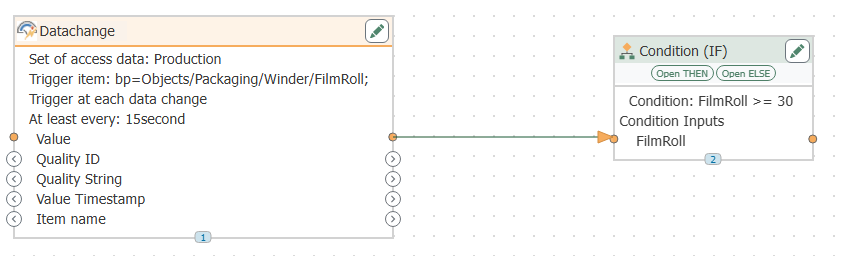
OPC Router connects S7 PLCs to SQL databases, REST services, ERP and MES using visual workflows. You drag a trigger (a tag change, a timer), map the data, and write it to the destination. No scripting stack to maintain.
This is the pick when the question is not "how do I get S7 tags into SCADA" but "how do I log a batch record to SQL when a DB bit flips." Integrators who build this repeatedly will find the OPC Router guide for system integrators useful for project structure.
OPC Router pros:
- Replaces custom glue scripts with workflows an operations engineer can read.
- Handles transformation and routing between OT sources and IT targets in one tool.
- Supports OPC UA features beyond generic Data Access.
- Fits OEM and integrator projects that repeat across sites.
OPC Router cons:
- It is an integration layer. If you only need tags in an HMI, it adds more than you need.
- Workflow design is a skill; plan time for the first project.
OPC Router pricing: quoted per deployment. Contact sales for current licensing.
Best for: IT/OT architects pushing S7 production data into business systems. Verdict: Buy for integration projects, Skip for plain tag serving.
3. N3uron: best Siemens S7 driver software for MQTT and Unified Namespace
N3uron is an industrial DataOps platform built around modules. Its Siemens S7 module reads PLC data at the edge, and other modules publish it over MQTT, including Sparkplug B, into a Unified Namespace.
Choose it when your target architecture is edge-first: S7 data modeled, contextualized and published to a broker, with no Windows OPC server in the middle. If you are unsure about scale, see whether N3uron fits a small manufacturer.
N3uron pros:
- Connectivity, modeling and MQTT publishing in one platform.
- Edge deployment keeps the data path short and the open ports few.
- Good fit for Unified Namespace builds.
- Module-based, so you add only what you use.
N3uron cons:
- Heavier than needed if your only consumer is a classic OPC client.
- A Unified Namespace design takes planning that no driver can do for you.
N3uron pricing: module-based. Request a quote for your module mix.
Best for: teams building a UNS or feeding cloud platforms from S7 PLCs. Verdict: Buy for IIoT architectures, Wait if you only need OPC.
4. Cogent DataHub: best for bridging S7 data between systems
Cogent DataHub is a real-time data hub. It aggregates tags from multiple sources and routes them to others: OPC, MQTT, databases and more. It is not a Siemens S7 driver. In an S7 project it typically sits downstream of an OPC server such as TOP Server and does the routing.
Its value is in tying systems together: bridging two SCADA platforms, tunneling OPC data across a DMZ without opening DCOM, or feeding a historian from several sources. Put it in the stack when your S7 data has to cross network zones or systems.
Cogent DataHub pros:
- Aggregates data from many sources into one live data set.
- Useful for crossing network zones with controlled, minimal connections.
- Bridges systems that do not otherwise talk to each other.
Cogent DataHub cons:
- Needs a separate source for S7 access.
- Adds a component to the architecture; justify it with a bridging or tunneling need.
Cogent DataHub pricing: quoted by configuration.
Best for: architects bridging or aggregating S7 data across systems and zones. Verdict: Hold until you have a bridging need, then Buy.
5. Built-in OPC UA server on the S7-1500: best for a single PLC
S7-1500 CPUs include an OPC UA server. For one PLC and one client, it costs nothing in extra software and puts no extra component on the network. Check Siemens' current licensing for your CPU and firmware, since an OPC UA license may be required.
The limits show up fast. It covers only that PLC family, so your S7-300, Modicon and serial devices still need another path. Each PLC becomes its own endpoint to secure, certificate-manage and monitor.
Built-in OPC UA pros:
- No additional software to install or patch.
- Simple for a single-PLC cell.
- Vendor-supported on the controller.
Built-in OPC UA cons:
- S7-1500 only; older S7-300/400 PLCs are out.
- No multi-vendor reach and no central management as you add PLCs.
- Certificate work repeats per controller.
Pricing: included or licensed by Siemens, depending on the CPU. Confirm with Siemens.
Best for: a single S7-1500 cell with one client. Verdict: Buy if you have exactly one PLC, Skip once you have more.
How we ranked
The ranking follows the criteria above. Multi-vendor reach and northbound flexibility weighed most, because S7 rarely runs alone. Each item owns a distinct slot: tag serving, integration, edge IIoT, bridging, and zero-software. Products outside the Software Toolbox catalog are not ranked here.
Which Siemens S7 driver software should you choose?
Default pick for 2026: TOP Server. It covers S7 and everything around it, and you can add OPC Router, N3uron or Cogent DataHub on top as the architecture grows.
- Mixed PLC brands feeding SCADA: TOP Server.
- S7 data into SQL, ERP or MES: OPC Router.
- S7 data into MQTT and a Unified Namespace: N3uron.
- S7 data crossing systems or network zones: add Cogent DataHub.
- One S7-1500 and one client: use the built-in OPC UA server.
Scope your S7 connectivity
Talk to Software Toolbox about drivers, architecture and licensing.
FAQ
What is the best Siemens S7 driver software in 2026?
TOP Server is the best overall choice for plants that mix S7 with other PLC brands. It serves all of them through one OPC UA endpoint.
Do I need to change PLC settings to connect third-party software to an S7-1200 or S7-1500?
Yes. Third-party drivers need PUT/GET access enabled and relaxed block protection in TIA Portal. Review this with your cybersecurity team before enabling it.
Which port does S7 communication use?
Classic S7 communication runs over ISO-on-TCP on port 102. Open it only between the PLC and the driver host.
Can OPC Router read from Siemens S7 PLCs?
Yes. OPC Router connects to S7 PLCs and moves the data into databases, ERP, MES and other targets using visual workflows.
Is Cogent DataHub a Siemens S7 driver?
No. Cogent DataHub aggregates and routes data between systems. For S7 access it typically sits behind an OPC server such as TOP Server.
Is N3uron a good choice for sending S7 data to MQTT?
Yes. N3uron's Siemens S7 module reads PLC data at the edge, and its MQTT modules publish it into a Unified Namespace.
Is the built-in OPC UA server on the S7-1500 enough?
It is enough for one PLC and one client. Once you add other PLC brands or older S7 families, a dedicated OPC server is easier to manage.
One last thing
The driver is the easy part of S7 connectivity. The slow part in 2026 projects is agreeing with IT on PUT/GET access, port 102 and OPC UA certificates. Settle those three before you buy anything, and the software choice gets short.