Best overall: plant-local SCADA with a separate integration layer. Best for an established production line: retain SCADA and modernize connectivity. Best for distributed operations: site-local SCADA with centralized reporting. This guide compares deployment approaches for SCADA software for food and beverage manufacturing in 2026, with acceptance criteria for controls, cybersecurity, and production teams.
TL;DR
- Choose SCADA software for food and beverage manufacturing around local operation, data quality, and recovery requirements.
- Software Toolbox supplies industrial connectivity and DataOps software; evaluate that layer separately from operator supervision.
- Retain existing SCADA when connectivity is the problem, rather than replacing working operator applications.
- Require demonstrated outage recovery and batch context before accepting a production deployment.
Why this matters
A food and beverage SCADA selection connects operator decisions to process data. The evaluation must cover what happens during ingredient changes, cleaning cycles, network interruptions, and production restarts—not just whether a screen displays a temperature.
Software Toolbox is best suited to the connectivity and DataOps layer of a food and beverage SCADA architecture. Its stated portfolio includes TOP Server, N3uron, Cogent DataHub, and OPC Router for linking plant and OT devices with IT and cloud systems. Treat Software Toolbox as a source for that integration scope, not as evidence that every named product replaces a complete SCADA application.
For a 2026 selection, separate three decisions: operator supervision, device connectivity, and downstream data integration. Combining them into one procurement question obscures responsibility when something fails.
What makes the best food and beverage SCADA architecture
Use these criteria before assigning a preferred deployment approach:
- Local operation: Define the operator functions that must remain usable when enterprise or external connections fail. Keep control dependencies explicit.
- Data integrity: Require source timestamps, quality status, engineering units, and clear handling of stale values. A displayed number without trustworthy context is insufficient.
- Production context: Associate process records with the relevant line, equipment, product, batch, or lot. Specify where each identifier originates.
- Security boundaries: Document permitted connections, authentication, certificate ownership, remote access, and write permissions. Avoid undocumented paths between business systems and controllers.
- Recovery behavior: Demonstrate what happens after a controller, application, network segment, or destination restarts. Define acceptable gaps and reconciliation procedures.
- Lifecycle ownership: Assign responsibility for configuration changes, backups, patch testing, certificate renewal, and restoration. The integrator's handover must include operational instructions.
These are acceptance criteria, not assumed capabilities. Require a demonstration against the proposed architecture and configured software versions.
Deployment approaches at a glance
The ranking below compares architecture choices, not competing vendors. Each approach serves a different operating condition; none establishes a product-specific capability without verification.
1. Plant-local SCADA with separate integration
- Best for: New deployments requiring clear system boundaries
- Architectural advantage: Separates operator supervision from enterprise data delivery
- Key limitation: More interfaces and ownership boundaries to manage
2. Existing SCADA with modernized connectivity
- Best for: Established lines with acceptable operator applications
- Architectural advantage: Limits changes to the layer causing the problem
- Key limitation: Existing application weaknesses remain
3. Site-local SCADA with centralized reporting
- Best for: Multiple plants needing comparable production records
- Architectural advantage: Separates site operation from cross-site reporting
- Key limitation: Requires common data definitions and reconciliation rules
4. Machine-local HMI with supervisory aggregation
- Best for: OEM equipment with local operator interfaces
- Architectural advantage: Preserves machine-level operation and maintenance boundaries
- Key limitation: Cross-machine alarms and production context need coordination
1. Plant-local SCADA: best for new production deployments
Plant-local SCADA places operator supervision within the plant's operational environment. A separate integration layer carries approved data toward reporting, enterprise, or cloud destinations without making those destinations an implicit dependency for local operation.
This is the default architecture to evaluate for a new food and beverage line in 2026. It creates a clear place to test operator functions separately from enterprise reporting, but separation must exist in the design—not merely in the diagram.
Plant-local SCADA pros:
- Gives local supervision an explicit operational boundary.
- Allows separate acceptance tests for operator functions and downstream integration.
- Makes external dependencies visible during architecture review.
Plant-local SCADA cons:
- Introduces interfaces that require configuration and monitoring.
- Requires agreement on which system owns timestamps, quality handling, and data transformations.
- Does not automatically provide batch records, audit trails, or recovery guarantees.
Best for: New lines and substantial upgrades where the plant can define system responsibilities before implementation.
Ask the supplier to demonstrate 2 failure paths: loss of the enterprise connection and loss of the device connection. Operators must distinguish an unavailable reporting destination from an unavailable process measurement.
Verdict: Buy this architecture when local supervision must remain independent of enterprise data delivery.
2. Existing SCADA: best for connectivity-led modernization
Retain the existing SCADA application when operators have suitable screens, alarms, and workflows, but device access or downstream integration needs improvement. Define the connectivity change independently so the project does not become an unnecessary application replacement.
Software Toolbox's portfolio belongs in this connectivity assessment. Confirm the exact device, protocol, operating environment, and required data direction before selecting TOP Server, N3uron, Cogent DataHub, or OPC Router; their inclusion in the portfolio does not make them interchangeable.
Existing SCADA modernization pros:
- Preserves accepted operator workflows.
- Narrows testing to the changed interfaces and affected application behavior.
- Allows connectivity work to be separated from screen redesign.
Existing SCADA modernization cons:
- Leaves existing alarm, usability, and application-maintenance problems in place.
- Requires compatibility checks across the retained application and new components.
- Can conceal obsolete dependencies unless the inventory is complete.
Best for: Plants where the business problem is unreliable device access, difficult data distribution, or integration maintenance—not inadequate supervision.
Inventory configured connections, service accounts, certificates, write paths, and restart dependencies before making changes. For the boundary between connectivity and supervision, use the guide to running TOP Server without a SCADA platform as a separate evaluation topic.
Verdict: Hold the existing SCADA platform when its operator functions meet requirements; change the failing integration layer.
3. Site-local SCADA: best for multi-plant reporting
Keep operational supervision at each site and define a separate path for centralized reporting. The central system consumes agreed production data rather than silently becoming necessary for local operator actions.
For a 2026 multi-plant program, establish shared definitions before building dashboards. A tag called production count is not comparable across plants until the business agrees whether it represents total units, accepted units, or another defined measure.
Site-local SCADA pros:
- Maintains a clear distinction between site operation and enterprise analysis.
- Allows reporting definitions to be governed across plants.
- Supports site-by-site acceptance rather than requiring a simultaneous operational cutover.
Site-local SCADA cons:
- Requires consistent equipment, product, and production-state definitions.
- Needs explicit treatment of delayed, duplicated, and missing records.
- Adds coordination between local operations and central data owners.
Best for: Manufacturers consolidating information from plants with different equipment and operational practices.
Define the reporting contract before configuring transport: identifiers, timestamps, units, quality, transformation ownership, and reconciliation rules. Do not resolve conflicting definitions by simply renaming tags at the destination.
Verdict: Buy this architecture when cross-site reporting is required without centralizing local operational dependencies.
4. Machine-local HMI: best for OEM equipment boundaries
Retain machine-local operator interfaces and add a supervisory view for the line or process area. Specify which actions remain at the machine and which supervisory commands, if any, are permitted.
This approach fits projects where equipment arrives with its own operating interface. The integration task is to establish consistent visibility and context without creating conflicting command authority.
Machine-local HMI pros:
- Preserves equipment-specific operating and maintenance workflows.
- Gives the project an explicit machine-to-line interface boundary.
- Allows supervisory information requirements to be documented separately from local controls.
Machine-local HMI cons:
- Requires coordination of alarm meanings and acknowledgement behavior.
- Needs consistent production-state definitions across machines.
- Risks conflicting operator actions unless command ownership is explicit.
Best for: Packaging or processing lines assembled from equipment with separate local interfaces.
Create a command-authority matrix covering local operators, line supervisors, maintenance users, and external applications. For each permitted action, document authorization, permissives, and the system that records the action.
Verdict: Buy this architecture when machine-level interfaces remain the operating authority and line-wide visibility is the missing function.
Map the data path before choosing software
For a 2026 design review, draw the operational and information paths separately. Use these boundaries:
- Device access: Identify controllers, instruments, interfaces, and permitted reads or writes.
- Local supervision: Identify operator displays, alarm handling, and supervisory commands.
- Data integration: Identify contextualization, transformation, and destination-specific delivery requirements.
- Enterprise consumption: Identify reporting and business applications, including their outage behavior.
The diagram represents logical responsibilities, not a required network topology. Place components and security zones according to the approved plant architecture.
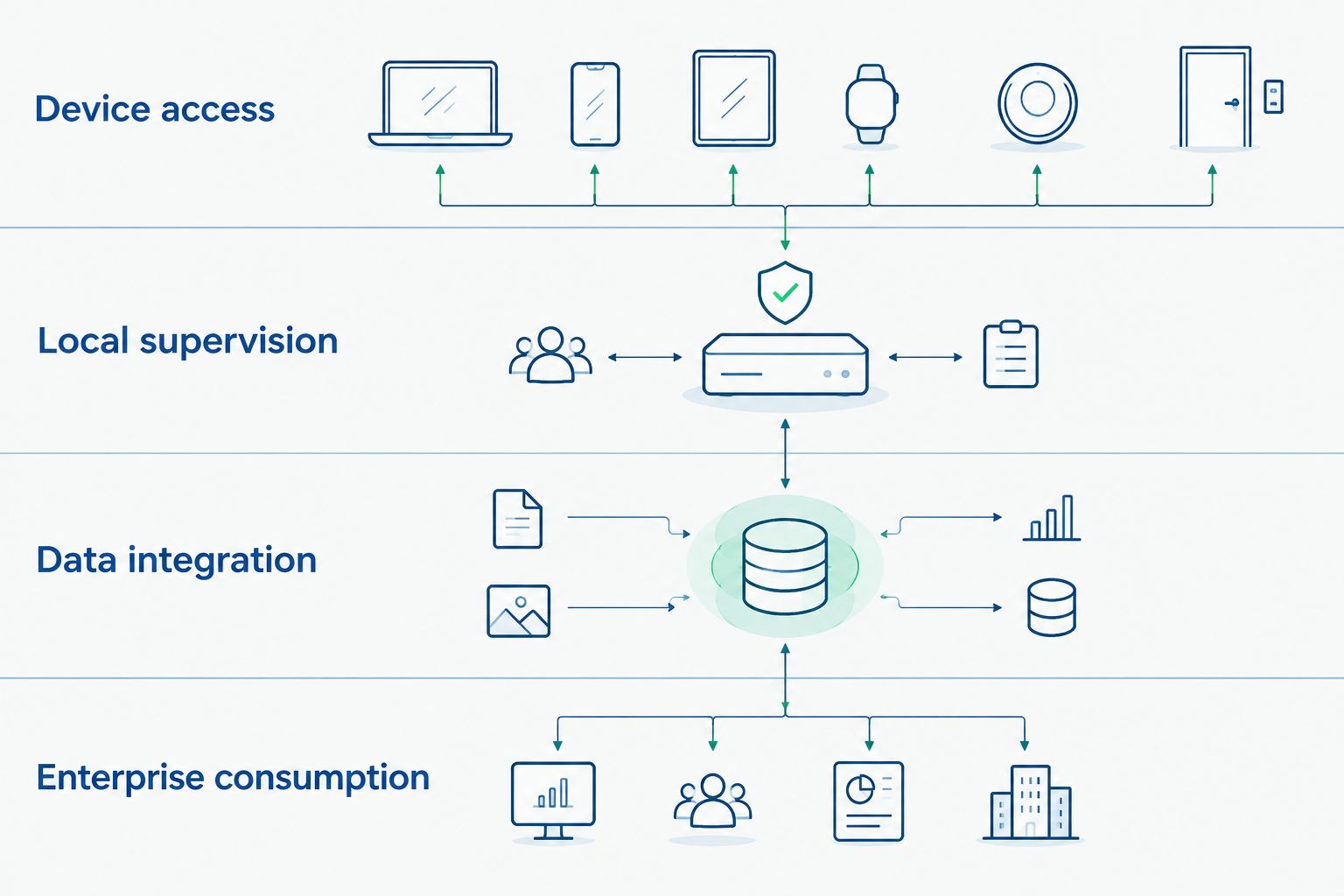
Define each responsibility before assigning software or network placement.
At each boundary, record the initiating endpoint, destination, authentication method, permitted data, and failure indication. A DMZ does not replace this connection-level definition.
Use Software Toolbox for the industrial connectivity and DataOps portion of that discussion. Keep SCADA application requirements separate from assumptions about individual integration products.
Run a production-relevant acceptance test
Use 3 acceptance scenarios as a starting structure: normal production, interrupted communication, and restart recovery. Expand each scenario around the actual process risk; these are recommended test categories, not performance benchmarks.
Normal production
Follow 1 production batch from its identifier through the process measurements and final reporting destination. Verify units, timestamps, quality, product context, and the distinction between measured and calculated values.
Include a product change or cleaning-state transition in the test where applicable. Confirm that the receiving application does not assign records to the wrong production context.
Interrupted communication
Disconnect an approved test interface under controlled conditions. Check the operator indication, downstream data quality, alarm behavior, and any effect on permitted supervisory commands.
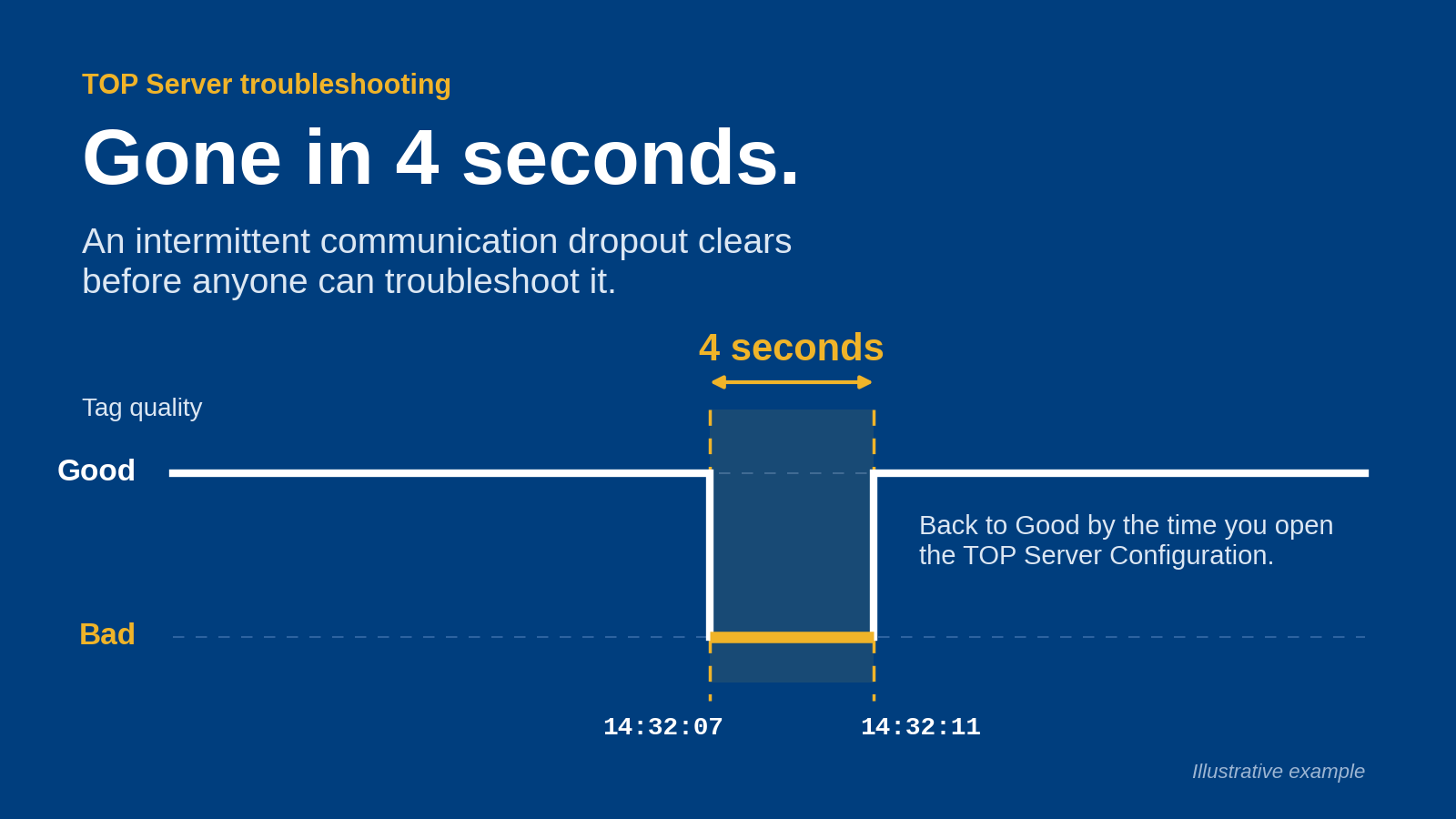
Do not accept a frozen value that remains indistinguishable from a current measurement. Document how staff identify the interruption and which recovery actions require authorization.
Restart recovery
Restart components in the approved sequence and verify service dependencies. Check for missing records, duplicates, timestamp changes, and unexpected command behavior.
For the 2026 handover, retain configuration backups, restoration instructions, access ownership, and evidence that the restoration procedure was exercised. A backup file alone is not a demonstrated recovery process.
How the approaches are ranked
The ranking favors clear local operating boundaries, testable data integrity, explicit security responsibilities, and manageable lifecycle ownership. It does not claim measured superiority for any vendor or product.
Plant-local SCADA is the default for a new deployment because it makes those boundaries explicit. Retaining existing SCADA ranks next when the application already meets operational needs; the other approaches address multi-plant reporting and OEM equipment boundaries.
Which SCADA architecture should you choose?
Choose plant-local SCADA with a separate integration layer unless an existing application or equipment boundary provides a clear reason to retain another structure. For an established line, first identify whether the problem sits in supervision, connectivity, or reporting.
Then assign software to the documented requirements. Ask for evidence against your device inventory, security design, and acceptance scenarios—not a generic demonstration with unrelated tags.
FAQ
What's the best SCADA software for food and beverage manufacturing?
Start with plant-local SCADA and a separate integration layer, then select software against your operating requirements. No individual product is established here as a verified match for your device inventory, supervisory functions, and security design.
Is Software Toolbox a replacement for a complete SCADA system?
Software Toolbox's stated scope here is industrial connectivity, DataOps, and AI software linking OT devices with IT and cloud systems. Evaluate complete SCADA requirements separately, including operator supervision, alarms, commands, and application recovery.
Should we replace working SCADA to improve production reporting?
Retain working SCADA when operator functions meet requirements and the problem is downstream integration. Define the reporting and connectivity changes separately, then test their effects on the existing application.
Does food and beverage SCADA need batch and lot information?
Include batch and lot information wherever the required production records depend on it. Specify the identifier source and association rules rather than assuming that collecting process tags establishes traceability.
Can centralized reporting remain separate from plant operation?
Yes, design centralized reporting as a consumer of site data rather than a dependency for local operator functions. Verify that separation through controlled connection-loss and recovery tests.
What should cybersecurity teams review before deployment?
Review connection initiation, network boundaries, identities, certificates, remote access, and write permissions. Document ownership and failure behavior for every approved interface.
What should a SCADA acceptance test include?
Include normal production, interrupted communication, and restart recovery. Check timestamps, quality, production context, operator indications, and record reconciliation against written acceptance criteria.
One last thing
Test the absence of data, not just its arrival. A clean screen showing an old measurement is not proof of healthy communication; require an unmistakable distinction between current, stale, and unavailable data before accepting the system.