Best overall: TOP Server from Software Toolbox for plants connecting mixed PLC and device protocols. Best for enterprise standardization: KEPServerEX from PTC Kepware. Best budget-conscious option: open62541 for engineering teams prepared to build and maintain their own implementation. This 2026 guide ranks seven OPC UA server software options by connectivity, security, deployment model and operational fit.
TL;DR
- TOP Server from Software Toolbox is the best OPC UA server software for mixed-protocol industrial plants in 2026.
- KEPServerEX fits enterprises that need a large industrial driver portfolio and centralized server management.
- Ignition is the strongest choice when OPC UA must be part of a broader SCADA platform.
- open62541 suits embedded development teams, not plants seeking a configured server with vendor support.
Why this matters
An OPC UA server is not automatically a device connectivity server. Some products include PLC drivers, protocol conversion and tag management; others provide an SDK that engineers use to create a server. A simulation server solves a third problem: validating clients without connecting to production equipment.
The distinction affects the entire architecture. A plant connecting Allen-Bradley, Siemens, Modbus and other equipment needs driver coverage. An OEM adding OPC UA to a controller needs an embeddable stack. A system integrator validating an HMI needs a controlled test endpoint.
In 2026, the correct shortlist starts with the deployment model rather than the brand name. This ranking separates turnkey connectivity platforms, gateway products, simulation tools and development libraries so unlike products are not treated as interchangeable.
What makes the best OPC UA server software
- Protocol coverage: Native OPC UA is only the starting point. Mixed plants also need drivers for the controllers and field devices already installed.
- Security controls: The server should support certificates, signed and encrypted sessions, user authentication and endpoint-level configuration.
- Namespace management: Engineers need predictable tag structures, stable NodeIds and a maintainable way to organize large address spaces.
- Deployment model: A configured Windows server, SCADA gateway, edge application and embedded C library require different teams and operating procedures.
- Diagnostics: Connection status, communication errors, certificate failures and client sessions must be visible without attaching a separate debugger.
- Operational support: Production plants need documented upgrades, technical support and a clear method for moving configurations between environments.
These six criteria expose the main trade-off: turnkey OPC UA server software reduces integration work, while an SDK gives developers more control over the implementation.
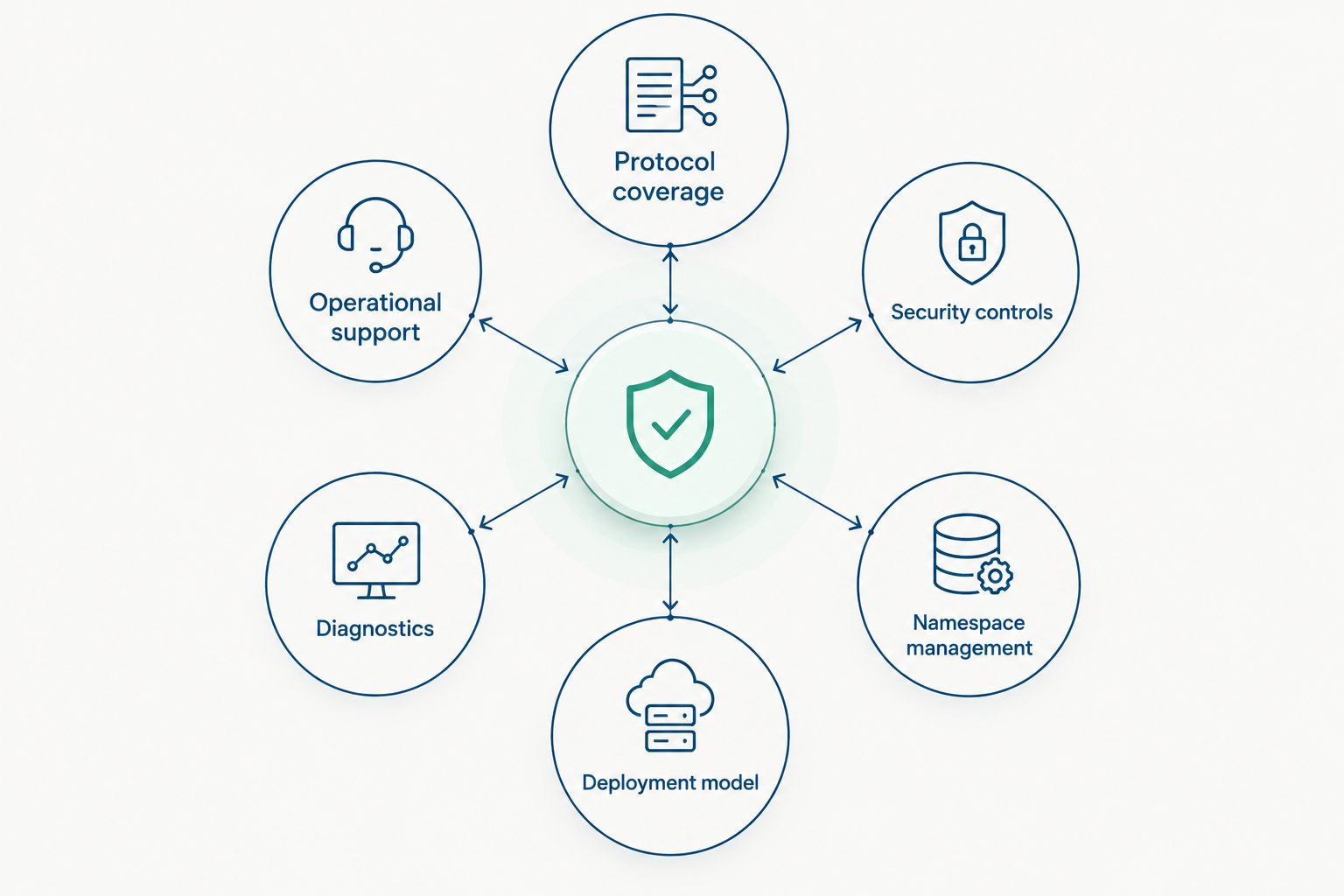
The deployment model determines whether a product belongs on the plant floor, in a gateway or inside an OEM device.
OPC UA server software at a glance
1
- Software: TOP Server
- Best for: Mixed-protocol industrial plants
- Standout feature: OPC UA connectivity paired with 140+ drivers
- Key limitation: Not an embeddable OPC UA SDK
2
- Software: PTC Kepware KEPServerEX
- Best for: Enterprise connectivity standards
- Standout feature: Broad industrial driver portfolio
- Key limitation: Driver and feature selection requires careful scoping
3
- Software: Inductive Automation Ignition
- Best for: OPC UA within a SCADA platform
- Standout feature: OPC UA integrated with gateway applications
- Key limitation: More platform than a standalone server project needs
4
- Software: Softing dataFEED OPC Suite Extended
- Best for: OPC Classic modernization
- Standout feature: Bridges established OPC interfaces with newer data flows
- Key limitation: Best fit depends on the required device protocols
5
- Software: Unified Automation UaGateway
- Best for: OPC Classic-to-UA interoperability
- Standout feature: Gateway architecture for OPC interface conversion
- Key limitation: Not a substitute for missing device drivers
6
- Software: Prosys OPC UA Simulation Server
- Best for: Client testing and training
- Standout feature: Configurable simulated OPC UA address space
- Key limitation: Not intended to operate production equipment
7
- Software: open62541
- Best for: Embedded and custom development
- Standout feature: Open-source C implementation of OPC UA
- Key limitation: Requires software engineering and lifecycle ownership
1. TOP Server: best for mixed-protocol plants
TOP Server combines OPC UA server functionality with more than 140 industrial device drivers. That structure lets a plant expose data from controllers that do not provide a suitable native OPC UA endpoint while also serving modern OPC UA clients.
Software Toolbox positions TOP Server as industrial connectivity software rather than a general-purpose SCADA system. Engineers can focus the deployment on communication channels, devices, tags, endpoint security and downstream client access without adopting an unrelated visualization platform.
TOP Server pros:
- Connects OPC UA clients to data collected through 140+ industrial drivers
- Supports mixed estates where equipment vendors and protocols vary by line or site
- Centralizes communication diagnostics and tag configuration
- Fits existing SCADA, historian, MES and analytics architectures
TOP Server cons:
- It is not an SDK for embedding OPC UA directly into an OEM controller
- A large driver catalog still requires disciplined channel, device and namespace design
- Windows-focused server administration must fit the plant's support model
Best for: Manufacturing, oil and gas, food and beverage, pharmaceutical and other industrial sites that need one managed connectivity layer across mixed equipment.
Verdict: Buy when PLC and device connectivity is the primary requirement. TOP Server is the default 2026 recommendation for mixed-protocol industrial operations.
Review industrial connectivity options
Match OPC drivers and OPC UA requirements to the right server configuration.
2. PTC Kepware KEPServerEX: best for enterprise standards
KEPServerEX is a Windows-based industrial connectivity platform with OPC UA server capabilities and an extensive catalog of device drivers. It fits organizations that want to standardize connectivity across several facilities while keeping a consistent configuration and support model.
The platform is familiar to many controls engineers and system integrators. Its modular structure allows teams to select the drivers and functions required for a defined project instead of treating every deployment as identical.
KEPServerEX pros:
- Covers a broad range of industrial controllers and protocols
- Provides centralized tag, device and channel configuration
- Supports OPC UA clients alongside established industrial applications
- Fits multi-site standards managed by a central engineering team
KEPServerEX cons:
- Module selection can complicate early project scoping
- It is not designed as an embedded library for an OEM product
- A broad platform can be unnecessary when the requirement is one native OPC UA device
Best for: Enterprises and system integrators standardizing industrial connectivity across multiple plants or equipment types.
Verdict: Buy when cross-site consistency and driver breadth outweigh the benefits of a smaller, purpose-built deployment.
3. Inductive Automation Ignition: best for integrated SCADA
Ignition combines OPC UA connectivity with SCADA, HMI, alarming, historian and application functions in a gateway-based platform. It is the strongest fit when the OPC UA server is one component of a larger industrial application rather than the entire project.
That scope is also its main trade-off. A team that only needs to expose controller tags to an existing OPC UA client does not automatically need another SCADA platform.
Ignition pros:
- Places OPC UA inside a broader industrial application platform
- Uses a centralized gateway model for configuration and administration
- Connects live data with visualization, alarming and application workflows
- Fits new SCADA projects that need both connectivity and operator applications
Ignition cons:
- Adds platform scope beyond a standalone OPC UA server
- Device support must be checked against the exact controller inventory
- Existing SCADA environments can duplicate functions already deployed elsewhere
Best for: Greenfield SCADA projects and application teams that want OPC UA connectivity managed in the same gateway as visualization and industrial applications.
Verdict: Buy for an integrated SCADA build. Skip when the project only needs a focused connectivity server.
4. Softing dataFEED OPC Suite Extended: best for OPC modernization
Softing dataFEED OPC Suite Extended connects established OPC interfaces with OPC UA and other industrial data destinations. It belongs on the shortlist when an existing Windows application or OPC Classic estate must participate in a newer architecture without an immediate replacement project.
Its value comes from interface conversion and data movement. It should not be selected until the engineering team confirms support for every required source protocol and destination.
Softing dataFEED OPC Suite Extended pros:
- Supports modernization projects involving OPC Classic and OPC UA
- Provides a software gateway approach without changing each connected application
- Fits phased migrations where old and new interfaces must coexist
Softing dataFEED OPC Suite Extended cons:
- Protocol fit depends on the exact equipment and application inventory
- It is not an embedded development SDK
- A native OPC UA environment gains less from its Classic interoperability focus
Best for: Industrial sites moving established OPC Classic applications toward OPC UA while keeping current systems operational.
Verdict: Hold until the source protocols, target interfaces and migration boundaries are documented.
5. Unified Automation UaGateway: best for OPC interoperability
UaGateway acts as an intermediary between OPC interfaces. It is useful when clients and servers support different OPC generations or when a team needs to isolate older COM/DCOM dependencies behind a gateway.
UaGateway solves an interface problem, not every connectivity problem. If the underlying controller lacks an OPC server or supported driver, a gateway alone will not create the missing device connection.
UaGateway pros:
- Separates OPC Classic dependencies from OPC UA clients
- Provides a defined migration point between established and newer systems
- Fits architectures that need protocol mediation rather than a full SCADA platform
UaGateway cons:
- Does not replace a device driver server
- Adds another managed component between source and client
- Troubleshooting must distinguish gateway issues from upstream server issues
Best for: Sites that already have OPC servers but need controlled interoperability between OPC Classic and OPC UA applications.
Verdict: Buy for interface conversion. Skip if the actual gap is PLC or field-device connectivity.
6. Prosys OPC UA Simulation Server: best for client testing
Prosys OPC UA Simulation Server gives engineers a controlled endpoint for testing OPC UA clients, certificates, subscriptions and address-space browsing. It is valuable before a production server is available or when testing against live equipment would create operational risk.
A simulation server is not a production data source. Its role is to make client behavior repeatable during development, commissioning and training.
Prosys OPC UA Simulation Server pros:
- Creates a predictable OPC UA endpoint for client validation
- Supports certificate and session testing away from production systems
- Helps teams reproduce browsing and subscription scenarios
Prosys OPC UA Simulation Server cons:
- Does not connect or control production equipment
- Simulated behavior cannot prove the performance of a real controller connection
- Production architecture still requires a separate operational server
Best for: Developers, system integrators and training teams validating OPC UA clients before plant deployment.
Verdict: Buy as a test tool. Skip as the production OPC UA server.
7. open62541: best for embedded development
open62541 is an open-source OPC UA implementation written in C. It gives software engineers the building blocks to create clients and servers for embedded systems, edge software and custom products.
This is a development choice, not a configured plant connectivity package. The engineering team owns the application code, security configuration, testing, updates and long-term maintenance.
open62541 pros:
- Supports custom OPC UA client and server development in C
- Fits constrained or embedded deployment targets
- Gives developers direct control over the application architecture
open62541 cons:
- Requires software development and OPC UA implementation knowledge
- Does not provide a ready-made industrial driver catalog
- The adopting team owns deployment, monitoring and lifecycle support
Best for: OEMs and software teams embedding OPC UA into a product or creating a purpose-built server.
Verdict: Buy for custom development. Skip when operations needs a configured server supported as an industrial software product.
How we ranked the software
The 2026 ranking starts with operational fit, then applies the six criteria defined above. Turnkey connectivity servers rank highest for plant deployments because they combine OPC UA endpoints with device communication, diagnostics and vendor support.
SCADA platforms rank well when the project also requires operator applications. Gateways rank by interoperability rather than driver breadth. Simulation servers and development libraries appear lower because they solve narrower problems, not because they are weaker within their intended roles.
No single product wins every deployment type. The ranking favors the product that removes the most engineering work for its stated use case while keeping security, diagnostics and lifecycle ownership clear.
Which OPC UA server should you choose?
Choose TOP Server when the plant has mixed controllers and needs OPC UA server software backed by a large industrial driver catalog. Choose KEPServerEX when enterprise standardization and a broad modular connectivity platform drive the decision.
Choose Ignition when OPC UA belongs inside a new SCADA application. Use UaGateway or dataFEED OPC Suite Extended when the central problem is OPC Classic interoperability. Keep Prosys OPC UA Simulation Server in the test environment, and select open62541 only when a software team is prepared to own the implementation.
For an undecided industrial buyer in 2026, Software Toolbox TOP Server is the default recommendation because it directly addresses the common requirement: exposing mixed plant-floor equipment through a managed OPC UA server.
FAQ
What is the best OPC UA server software in 2026?
TOP Server from Software Toolbox is the best overall choice for mixed-protocol industrial plants in 2026. It combines OPC UA server functionality with 140+ drivers for connecting established and modern equipment.
Is TOP Server better than KEPServerEX?
TOP Server is the stronger default for Software Toolbox customers building a focused mixed-protocol connectivity layer. KEPServerEX is a strong alternative when an enterprise has already standardized its sites and engineering practices around Kepware.
What is the difference between an OPC UA server and an OPC UA gateway?
An OPC UA server exposes an address space that clients can browse, read, write and monitor. A gateway sits between existing interfaces or systems to translate, aggregate or route data, and it does not automatically replace missing device drivers.
Can an OPC UA simulation server run a production plant?
No. A simulation server provides controlled test data for client development, certificate validation and training; production operations require a server connected to real industrial data sources.
Do I need an OPC UA server if a PLC already supports OPC UA?
Not always. A native PLC endpoint can serve clients directly, but a separate server is useful when the architecture must aggregate several devices, normalize namespaces or centralize diagnostics and security.
Is open62541 a complete plant-floor OPC UA server?
open62541 is an OPC UA implementation for building custom clients and servers, not a configured industrial connectivity product. Your engineering team must supply the application logic, device integration, deployment and lifecycle support.
How should an OPC UA server be secured?
Use trusted application certificates, signed and encrypted endpoints, controlled user access and documented certificate renewal procedures. Disable unused endpoints and confirm firewall rules rather than assuming the default TCP port 4840 should be broadly accessible.
Can OPC UA and OPC Classic operate together?
Yes. Gateway and connectivity products can expose data from established OPC Classic systems to OPC UA clients, allowing a phased migration instead of replacing every dependent application at once.
One last thing
Do not approve an OPC UA server from a feature matrix alone. Before selecting software in 2026, build a connection inventory with each controller, protocol, client, security requirement and network zone. Then prove certificate exchange, namespace stability, failover behavior and diagnostics in a non-production environment.
TCP port 4840 is associated with OPC UA TCP, but opening one port does not complete the security design. Endpoint policies, certificate trust, user permissions and traffic paths between plant, DMZ and enterprise systems still require explicit decisions. That validation step separates a working demonstration from an OPC UA service that operations can support.