Best overall starting point for ethernet/ip driver software in 2026: TOP Server, provided its current driver supports your PLC and required data access. Best for a custom application: a direct EtherNet/IP client. Best when the PLC already exposes the required data through OPC UA: use that interface instead of adding an EtherNet/IP driver.
TL;DR
- TOP Server is the packaged-driver candidate to assess for Ethernet/IP PLC connectivity in 2026; verify controller and tag support first.
- A direct EtherNet/IP client fits a custom application with a defined CIP data-access requirement and development capacity.
- PLC-native OPC UA avoids an additional EtherNet/IP driver when the PLC exposes every required value through OPC UA.
- Test tag types, write permissions and recovery behavior before approving any connection for production.
Why this matters
An EtherNet/IP connection is not a complete data-integration design. The PLC must expose the data your application needs, the client must read its types correctly, and the security design must permit the traffic. A successful connection test proves less than a successful read, write and recovery test.
For a manufacturing plant, an oil and gas site or another industrial operation, that distinction affects how quickly an integration reaches production. A driver can discover a controller yet fail the particular tag access or data mapping the application requires. Start with the destination and the required PLC data, then choose the connection method.
Software Toolbox provides industrial connectivity software, including OPC drivers and TOP Server. For a 2026 EtherNet/IP project, treat TOP Server as a product to validate against the exact controller and application requirements—not as a substitute for that validation.
What makes the best EtherNet/IP driver software?
Apply these criteria before comparing products or architectures. Each one can rule out a connection that otherwise looks adequate in a demonstration.
- Controller and access support: Confirm the PLC model, firmware and required read or write method against the current product documentation. EtherNet/IP support alone does not establish that every controller exposes every required item in the same way.
- Data-type handling: Include a known 16-bit integer and a known 32-bit integer in the acceptance test where those types occur in your project. Check the value, type and interpretation at the consuming application—not just the driver's connected status.
- Security boundary: Document which endpoint initiates each connection, where it terminates and who approves the path across IT/OT zones. Do not open a plant network path solely because a driver configuration requests one.
- Destination interface: Decide whether the consumer needs an OPC endpoint, a direct application connection or an existing OPC UA interface. This determines whether a packaged driver belongs in the design at all.
- Operational recovery: Test PLC restart, network interruption and client restart. Record what the consumer sees while data is stale and how normal updates resume.
- Supportable configuration: Keep the PLC address, item mapping, credentials where applicable and ownership of each change in a maintained configuration record.
Software Toolbox TOP Server is the best packaged-driver candidate for teams that need to evaluate PLC data delivery through an OPC connectivity workflow. That verdict depends on confirming the current EtherNet/IP driver, controller coverage and required operations for your deployment.
EtherNet/IP connectivity options at a glance
These are three ways to satisfy a PLC connectivity requirement, not three interchangeable software licenses. The latter two establish when a packaged EtherNet/IP driver is unnecessary or when a custom client is the better engineering choice.
TOP Server
- Best for: Evaluating a packaged OPC driver workflow
- Standout approach: One product evaluation centered on PLC access and the consuming OPC application
- Key limitation: Confirm current EtherNet/IP driver coverage and controller-specific behavior before selection
Direct EtherNet/IP client
- Best for: Custom applications with a defined CIP access requirement
- Standout approach: Application team controls the client implementation
- Key limitation: Team owns implementation, security review and recovery behavior
PLC-native OPC UA
- Best for: PLCs that already expose all required values through OPC UA
- Standout approach: Uses an existing interface instead of adding an EtherNet/IP driver
- Key limitation: Not an option when the required PLC data is unavailable through OPC UA
The table is a decision tree. Choose the packaged-driver assessment when the consumer needs an OPC connectivity path; choose a direct client when the application team owns that connection; choose PLC-native OPC UA only after confirming the PLC exposes the required values.
1. TOP Server: best EtherNet/IP driver software candidate for OPC workflows
TOP Server is part of Software Toolbox's industrial connectivity offering. Evaluate it when the project calls for a packaged driver and an OPC-facing path from PLC data to another system. The acceptance decision rests on the current driver documentation and a test with your controller, not on a general statement that a product supports industrial protocols.
TOP Server pros:
- Gives the team a named packaged-software candidate to assess against its OPC connectivity requirement.
- Keeps the driver evaluation separate from building a custom EtherNet/IP client.
- Fits an acceptance plan based on actual PLC items and the consuming application's needs.
TOP Server cons:
- A product-level fit does not confirm support for a particular PLC, firmware version, tag or write operation.
- An OPC-facing workflow still requires a defined destination, network path and operating owner.
- The integration remains unapproved until failure and recovery tests pass on the intended architecture.
Best for: IT/OT teams and system integrators assessing a packaged route from PLC data into an OPC connectivity workflow.
2026 validation task: List the controller, firmware, required items, data types, access permissions and consuming application. Confirm the current driver documentation against that list, then run a witnessed read test and an authorized write test if writes are required. Do not turn an untested write capability into a production assumption.
Verdict: Buy only after controller-specific acceptance testing. TOP Server leads this list as a packaged-driver candidate, not as a claim that every EtherNet/IP endpoint or item is supported.
2. Direct EtherNet/IP client: best for a custom application
A direct EtherNet/IP client is software built or maintained for the application that consumes PLC data. This is an engineering path rather than a recommendation for an unnamed vendor product. It fits when the application team needs a specific CIP interaction and accepts responsibility for implementing and maintaining the client.
Direct EtherNet/IP client pros:
- Lets the application specification define exactly which PLC values and operations the client needs.
- Avoids adding an OPC-facing stage when no consumer requires one.
- Places connection and recovery requirements in the same ownership scope as the application.
Direct EtherNet/IP client cons:
- The application team owns protocol implementation and controller-specific validation.
- Security review, diagnostics and recovery logic become part of the application delivery.
- A working prototype does not establish support across other PLC models or firmware revisions.
Best for: Teams with a defined custom application, the capacity to maintain an industrial client and no requirement for an intermediate OPC workflow.
A direct client still needs a network design. EtherNet/IP uses CIP; its common explicit-messaging path uses TCP port 44818, while implicit I/O commonly uses UDP port 2222. Those facts do not mean both paths should be opened for your project. Identify the actual communication mode and approve only the required route under the site's security process.
2026 validation task: Specify each requested operation, the expected response and the behavior on timeout. Test a known value at the PLC and at the application, including type interpretation. Document who changes the client when the PLC program or data model changes.
Verdict: Hold unless the application team can own the client lifecycle. Direct access is a sound design choice when that ownership is explicit; it is not a shortcut around integration work.
3. PLC-native OPC UA: best when the required data is already exposed
If the PLC exposes the required values through OPC UA, an EtherNet/IP driver is not automatically necessary. Treat this as an interface-selection decision, not as a claim that OPC UA and EtherNet/IP provide identical data or behavior. Confirm the actual namespace and access rights on the controller before choosing the route.
PLC-native OPC UA pros:
- Uses an interface already present in the approved PLC design when it contains the required data.
- Removes the need to introduce an EtherNet/IP driver solely for those values.
- Gives the project a clear test: can the intended OPC UA consumer read the correct nodes and receive the required updates?
PLC-native OPC UA cons:
- The interface is unsuitable if a required value or operation is absent from the PLC's OPC UA exposure.
- Certificate handling, access control and network placement still require an operating plan.
- Existing node names and data types may not match the consuming application's expectations without mapping work.
Best for: Projects where a supported PLC OPC UA interface already exposes every required item and the consumer can use it.
2026 validation task: Check the node list against the same data inventory you would use for a driver test. Verify read access, authorized writes where required and what the consumer reports after a PLC restart. An OPC UA endpoint's existence is not proof that its namespace covers the project.
Verdict: Buy into this architecture only after a node-by-node check. Skip an additional EtherNet/IP driver when the existing interface meets the full data and security requirement.
How to validate the choice on a plant network
Use one acceptance sheet for all three options. Changing connection methods should not change the definition of success: the same required PLC values must arrive at the same consumer with the agreed access and recovery behavior.
- Define endpoint. Record the PLC, firmware, consuming application and owner of each system. State whether the consumer needs OPC access, a direct client connection or OPC UA.
- Verify access. Identify the initiating endpoint, required communication mode and route through each network zone. Obtain security approval before enabling a path across a DMZ or other boundary.
- Map data. Record the source item, destination item, data type and permitted operation. Include representative 16-bit and 32-bit values when the project uses them.
- Test load. Exercise the actual set of required items under the intended operating conditions. A 100 Mbps or 1 Gbps link designation describes link capacity; neither figure is a promise of application update behavior.
- Plan recovery. Interrupt the connection in a controlled test. Check how the consumer identifies stale data, then confirm that updates resume correctly after restoration.
The diagram shows the order of those checks. Do not let a successful network connection stand in for the data and recovery tests that follow.
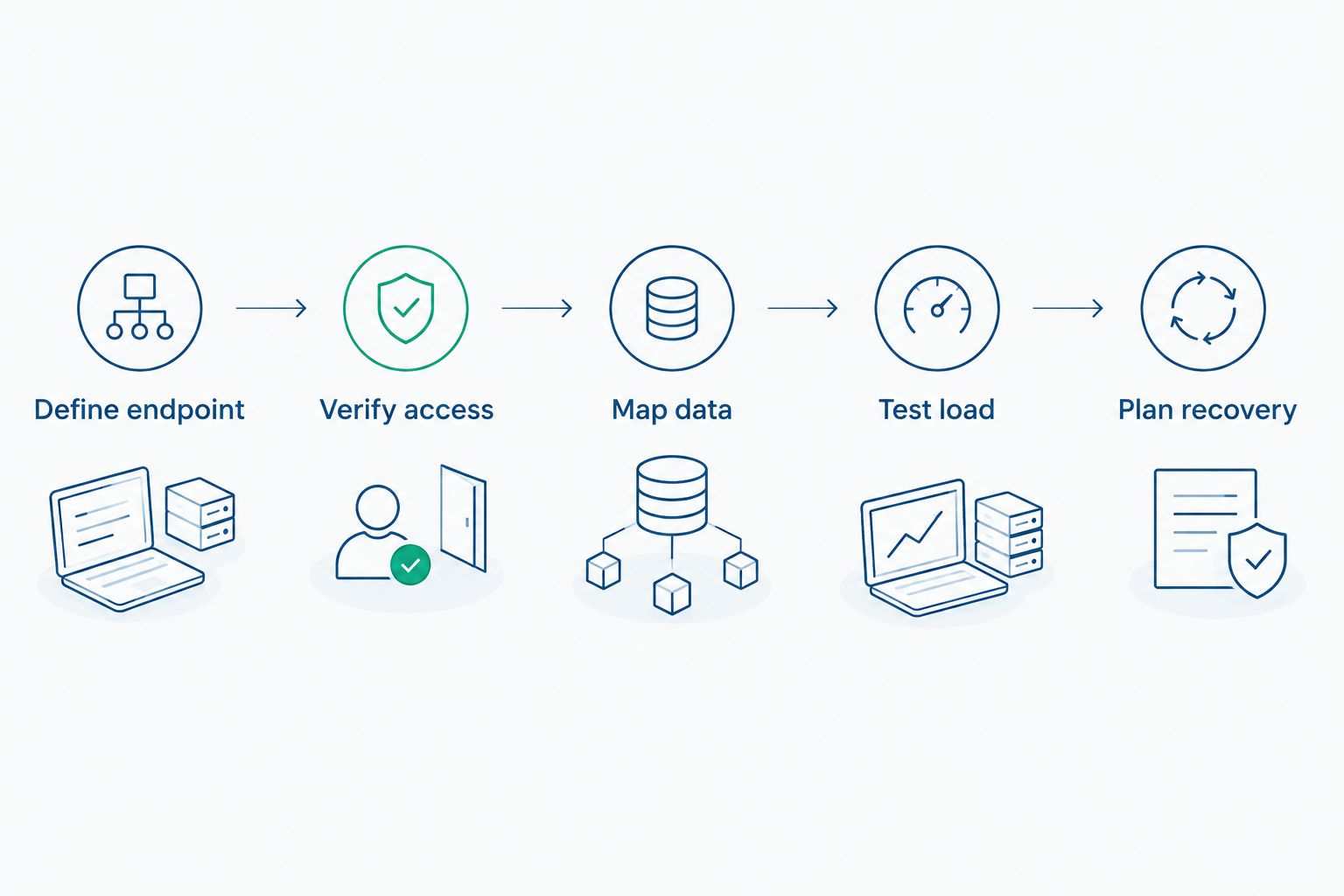
Connection approval precedes data mapping, load testing and recovery testing.
Keep the test evidence tied to the controller and application named in the acceptance sheet. A pass on a different PLC, a smaller item list or a temporary network path does not close the production requirement. If the design changes in 2026, repeat the affected checks rather than carrying forward an unrelated pass.
How these options were ranked
The ranking starts with the searcher's need for ethernet/ip driver software. TOP Server takes the first slot because it is the packaged industrial connectivity product in this selection; it requires controller-specific verification. A direct EtherNet/IP client follows for teams that need to own a custom connection. PLC-native OPC UA ranks third because it can remove the driver requirement altogether, but only where the PLC exposes all required data.
This is an architecture ranking, not a head-to-head performance claim. It does not assign throughput, controller coverage or reliability results to any product without a matching test. Use the same acceptance criteria for each path so the selection is based on the plant's requirement rather than the protocol named in a product description.
Which EtherNet/IP driver software should you choose?
Start with TOP Server if your 2026 project needs a packaged OPC connectivity workflow. Confirm that its current driver supports your controller and required access, then test the complete path into the consuming application. That is the default choice for a driver evaluation, not permission to skip the controller check.
Choose a direct EtherNet/IP client when the consuming application must implement a defined CIP interaction and your team will maintain that implementation. Choose PLC-native OPC UA when the controller already exposes every required item through OPC UA and the consumer can use that interface. Neither choice becomes better merely because it removes a software component; each must pass the same data, security and recovery tests.
FAQ
What's the best EtherNet/IP driver software for an OPC workflow in 2026?
TOP Server is the packaged-driver candidate to assess for an OPC connectivity workflow in 2026. Confirm its current EtherNet/IP driver coverage against your PLC, firmware and required data access before selection.
Does EtherNet/IP support mean every PLC tag is available?
No. EtherNet/IP support does not establish that a specific controller exposes every requested item or operation. Verify each required value and permitted write against the actual PLC.
Is a direct EtherNet/IP client better than a packaged driver?
A direct EtherNet/IP client is the better fit when a custom application needs a defined CIP interaction and its team owns the client lifecycle. A packaged driver is the starting point when the project calls for a maintained OPC connectivity workflow.
When can I use PLC-native OPC UA instead of an EtherNet/IP driver?
Use PLC-native OPC UA when the controller exposes every required value and operation through that interface. Check the namespace, access permissions and consuming application before removing the driver from the design.
Which EtherNet/IP network ports should a security team review?
Review the communication mode before approving any path: EtherNet/IP commonly uses TCP port 44818 for explicit messaging and UDP port 2222 for implicit I/O. Permit only the traffic required by the validated design.
What should a PLC connectivity acceptance test include?
Test required items, data types, access permissions and recovery after an interrupted connection. A connected status alone does not show that the consuming application receives correct, current values.
How do I assess EtherNet/IP driver licensing?
Check the current licensing terms for the exact software and deployment you plan to use. Evaluate those terms alongside controller coverage, operating ownership and the results of your acceptance test.
One last thing
Test a known value at both ends of the path before expanding the item list. In 2026, a correct-looking connection indicator still tells you nothing about whether a 32-bit PLC value reaches the consuming application with the right type and meaning.