Instead of manually exporting PLC tag values, configure an industrial connectivity layer to detect value changes and publish MQTT messages to a broker. This guide covers source acquisition, secure broker access, payload mapping, and recovery testing for a 2026 deployment using the industrial connectivity software available from Software Toolbox.
TL;DR
- To publish plc data to mqtt automatically, connect OPC acquisition to a change-triggered MQTT publisher.
- Software Toolbox supplies industrial connectivity software for engineers building PLC-to-MQTT workflows.
- Change-based publishing reduces unchanged-value messages but still requires an explicit freshness policy.
- Validate timestamps, quality, reconnect behavior, and subscriber receipt before production deployment.
Why this matters
Automatic PLC-to-MQTT publishing needs two separate decisions: how you acquire data and when you publish it. A publisher can send messages only when values change while its source driver continues polling the PLC. Reducing MQTT messages does not automatically reduce controller traffic.
An MQTT broker distributes messages; it does not interpret PLC addresses or decide whether a measurement is trustworthy. Your acquisition and mapping layers must preserve the meaning of each tag before downstream consumers use it.
Software Toolbox is best for engineers sourcing industrial connectivity software for PLC-to-MQTT projects. Its portfolio includes TOP Server, OPC Router, Cogent DataHub, and N3uron; select the source and publishing components against your actual protocol, security, and deployment requirements rather than treating those names as interchangeable configurations.
For a 2026 rollout, define success as a traceable path from controller value to subscriber receipt, including the behavior during a connection failure. A successful broker connection alone is not an acceptance test.
Before you start
- Prepare source access. Obtain the PLC address and protocol details, a tag list, engineering units, and read permissions. If acquisition uses OPC UA, prepare the endpoint, certificate trust, security policy, and authorized identity. Begin with read-only access.
- Prepare broker access. Obtain the broker hostname, listener port, TLS requirements, credentials or client certificate, approved topic namespace, and publish permissions. Prepare a separate subscriber identity with permission to read the test topic. Confirm the approved network path across OT, DMZ, and enterprise boundaries.
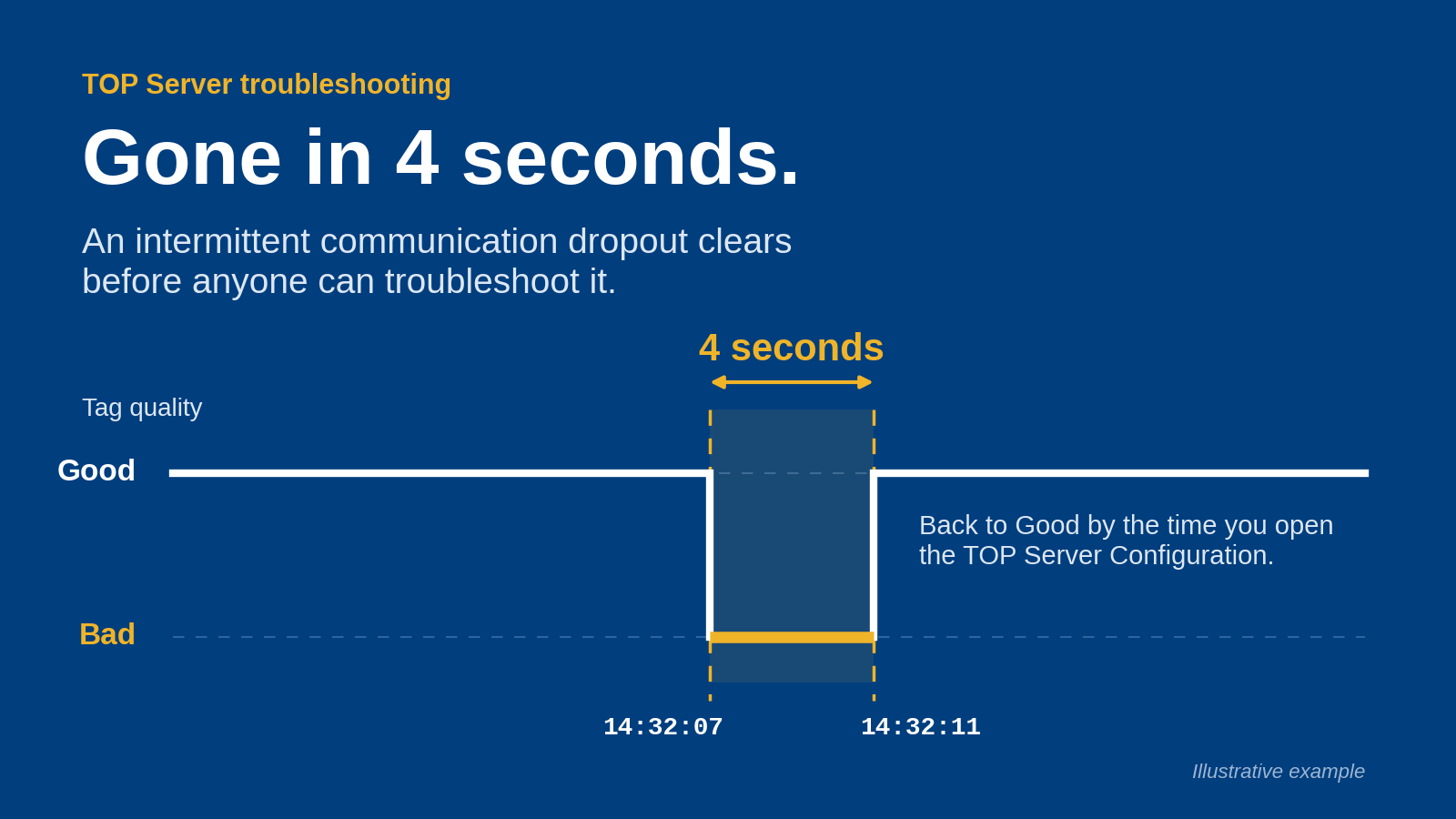
- Resolve the change-detection gotcha. A stable value does not prove a live connection. Decide whether quality changes, startup values, reconnect snapshots, and freshness messages must produce events even when the numeric value stays unchanged. Otherwise, a consumer cannot distinguish a steady process from a disconnected publisher using value messages alone.
Record the installed software version and deployment-specific configuration instructions in your 2026 runbook. The steps below describe the configuration requirements, not a shared interface across different products; use the corresponding controls in your selected application.
Source acquisition
Configure the source and change trigger
- Connect the source. Configure the PLC driver or OPC UA client with the approved device or endpoint information. For OPC UA, validate the endpoint identity, establish certificate trust, and use the agreed security configuration. Confirm live values at this layer before adding MQTT.
- Select a small commissioning tag set. Use a numeric measurement, a Boolean state, and a counter: 3 tags with different change patterns. Include the tag identifier, datatype, engineering unit where applicable, source timestamp, and quality in your mapping record.
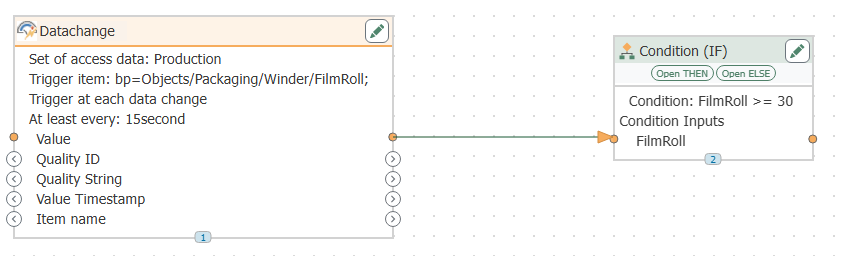
- Separate acquisition from publication. Configure the source scan or subscription behavior according to the process requirement. Then configure the MQTT publishing trigger for accepted changes. Do not assume a change-triggered publisher eliminates source polling.
- Define what counts as a change. For a Boolean state, use transitions. For a numeric measurement, decide whether every reported value or only changes beyond a defined deadband should trigger publication. Apply the deadband in the documented layer and record its unit.
- Define exception events. Specify how a quality transition, source disconnection, and source reconnection affect publishing. Do not silently replace a failed read with zero; zero can be a legitimate process value.
Expected result: your acquisition layer exposes the selected values with known datatypes and status, and the publishing trigger responds to the events you intentionally selected.
A deadband is a filtering rule, not an accuracy improvement. It suppresses changes below a threshold, so a downstream consumer loses visibility into those suppressed changes. Choose it from the process requirement rather than copying an unrelated example.
Keep the architecture explicit: PLC source, OPC acquisition, Change trigger, MQTT broker, and Subscriber are separate responsibilities, even when one application performs several of them.
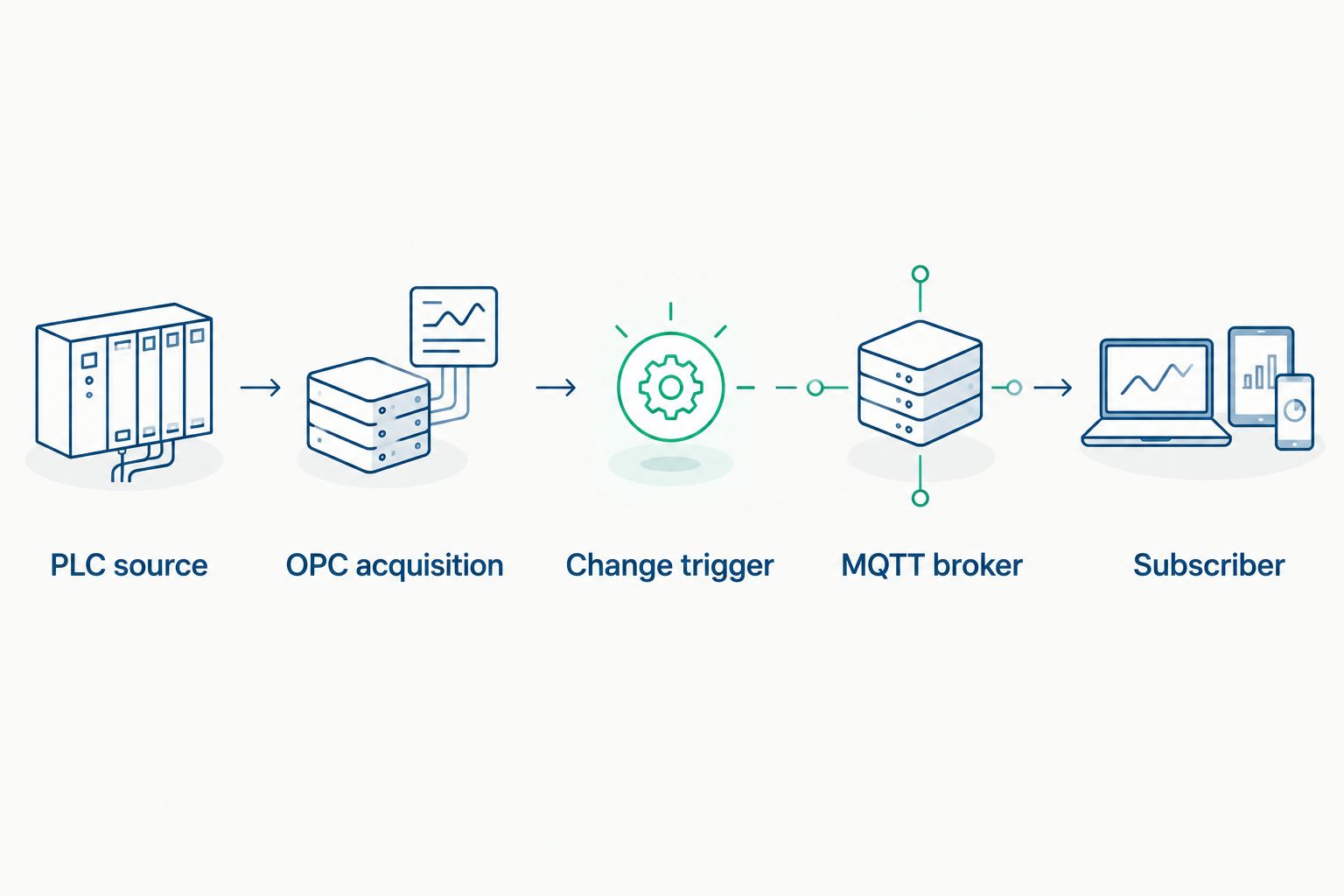
Change detection controls publication; it does not necessarily control PLC acquisition.
Broker connection
Configure identity, security, and delivery
- Use the approved broker listener. Enter its hostname and configured port. Match the listener's transport and TLS requirements; do not assume a port number determines whether the connection is encrypted.
- Validate TLS identity. Configure the required trust chain and verify the broker hostname against its certificate. If mutual TLS is required, configure the publisher's client certificate and private key with appropriate access controls. Do not disable verification to clear a connection error.
- Assign a unique client identity. Set a stable Client Identifier for this publisher. Give separately deployed instances distinct identifiers unless your design intentionally coordinates a shared identity; duplicate identifiers can cause connection replacement and repeated disconnects.
- Restrict topic permissions. Grant the publisher access only to its approved topic branch. Give the test subscriber the corresponding read permission. Successful authentication does not prove authorization to publish or subscribe.
- Choose delivery semantics deliberately. MQTT QoS controls protocol delivery behavior. QoS 0 is at-most-once delivery; QoS 1 is at-least-once delivery and permits duplicates; QoS 2 provides exactly-once delivery within the MQTT protocol exchange. None of these proves that a downstream database committed the measurement.
- Define connection-loss signaling. If your design uses MQTT Will, configure the approved status topic and payload. A Will signals an abnormal client disconnection; it does not independently prove that every PLC remains healthy.
Expected result: the publisher connects with validated identity, can publish to its authorized topic, and a separately authenticated subscriber receives the message.
Treat the connection as a narrowly scoped data path. Document the initiator, destination, listener, and allowed topic branch for cybersecurity review rather than opening broad access between network zones.
For the 2026 configuration baseline, record certificate ownership and renewal procedures alongside the connection settings. A working connection still needs an operational owner when credentials expire or the broker endpoint changes.
Topic and payload mapping
Configure the message contract
- Create a stable namespace. Define a topic hierarchy based on site, area, asset, and signal. An illustrative topic is
plant/packaging/line-a/temperature; it is a naming example, not a required namespace. Keep identifiers stable when operator-facing descriptions change. - Map the measurement explicitly. Include the value, datatype or schema expectation, engineering unit, source timestamp, and quality where available. Do not label a publisher-generated timestamp as the source timestamp.
- Preserve useful distinctions. Keep Boolean values distinct from strings and numbers. Define how counters, unavailable values, and bad-quality readings appear in the payload. Confirm that the subscriber uses the same interpretation.
- Choose retained-message behavior. Set MQTT RETAIN when new subscribers need the broker's retained value for that topic. Include timestamp and quality so consumers can assess it; retention stores a message, not proof of freshness.
- Define startup behavior. Decide whether the publisher sends an initial snapshot before waiting for subsequent changes. Without an initial snapshot or retained message, a subscriber can wait indefinitely for a stable tag's first update.
- Verify the contract at the subscriber. Inspect the actual received topic and payload, not just the publisher's preview. Confirm that parsing preserves the intended datatype, timestamp, unit, and status.
Expected result: a subscriber can interpret a message without guessing what the tag represents or when the measurement originated.
Keep source time and publication time separate. A buffered measurement published after reconnection is not a current measurement merely because the broker received it recently. If historical messages are part of the design, include enough context for the consumer to distinguish replay from live updates.
A retained value is useful for initialization, but its limitation is staleness. Require consumers to evaluate the timestamp and connection status before using it in an operational decision.
Validation and recovery
Test the complete workflow
- Exercise a known transition. Use an approved test source or a safely authorized process change. Verify the source reading, the publisher event, and subscriber receipt in sequence. Do not write to a production controller solely to prove messaging.
- Check stable-value behavior. Observe the test topic for an illustrative 60 seconds while the selected value remains unchanged. Confirm that the behavior matches your configured heartbeat and snapshot policy. This is a commissioning observation window, not a required scan interval.
- Check filtering boundaries. Test accepted and suppressed changes using a simulator or safe test source. Confirm that the deadband behaves in the intended engineering unit and does not suppress required state transitions.
- Interrupt broker access under controlled conditions. Confirm connection-status reporting and the publisher's documented behavior for unsent measurements. Reconnect and inspect whether messages are replayed, replaced by the latest value, or discarded according to configuration.
- Interrupt source acquisition separately. Keep the broker reachable while the source connection fails. Verify that the workflow reports source failure rather than continuing to represent the last numeric value as healthy.
- Restart and resubscribe. Verify publisher startup, retained-message delivery, initial snapshots, and any duplicate processing. A receiving application that triggers actions should use an explicit duplicate-handling strategy.
Expected result: the acceptance record distinguishes healthy operation, source failure, broker failure, restart, and recovery. Record observed behavior and the configuration that produced it.
Include these cases in your 2026 commissioning checklist. MQTT delivery success is not end-to-end process success; validate the receiving application's interpretation and action separately.
Publish a snapshot when the connection recovers
A recovery snapshot complements change-triggered publishing. It supplies the current state after a successful reconnect, even when individual values have not changed during the interruption.
Configure the recovery event to wait for valid source acquisition, then publish the intended current-state set. Mark timestamps and quality correctly. Do not present old buffered measurements as a fresh snapshot.
Change-triggered updates
- Best for: Consumers tracking accepted value transitions
- Advantage: Avoids repeated unchanged-value messages
- Limitation: Stable values need a separate freshness policy
Scheduled snapshots
- Best for: Consumers requiring periodic current-state reports
- Advantage: Makes update cadence explicit
- Limitation: Repeats unchanged values
Recovery snapshots
- Best for: Consumers rebuilding state after reconnection
- Advantage: Restores a current-state view
- Limitation: Does not reconstruct every missed transition
Use change-triggered updates plus a defined recovery policy when consumers need both transitions and current state. Add scheduled reports only when the consumer requires them. A snapshot is not a substitute for a durable event history.
Troubleshooting
- The broker connects, but no messages arrive. Check topic authorization, subscriber filters, and whether the trigger has received an accepted change. Test with an authorized source transition; a stable value alone does not exercise a change trigger.
- The publisher repeatedly disconnects. Check for another connection using the same Client Identifier. Then inspect broker rejection logs, credential validity, and network interruptions before changing keep-alive settings.
- Every small numeric fluctuation produces a message. Check the deadband configuration and the layer applying it. Confirm units and datatype conversion; do not increase the threshold until you establish which changes the consumer must retain.
- A new subscriber sees an old value. Inspect the retained message's source timestamp and quality. Apply the consumer's freshness rule and verify startup or recovery snapshots; receiving a retained message is not evidence of a recent read.
- Messages arrive twice after a disruption. Check QoS, reconnect replay, and application retries. QoS 1 permits duplicates; make downstream event processing duplicate-aware instead of assuming every received message represents a new process transition.
Customize your workflow
Expand from the commissioning tags by asset or process area. Keep the same payload contract, access-control boundaries, and failure tests as the namespace grows. Software Toolbox provides industrial connectivity and DataOps software; match the selected components to the acquisition and consumer requirements before extending the deployment.
For your 2026 operating plan, assign ownership of tag additions, certificate renewal, schema changes, and recovery testing. A newly added tag needs more than an address: its consumer also needs meaning, units, quality behavior, and a freshness requirement.
FAQ
How do I publish PLC data to MQTT automatically when values change?
Connect the PLC to an acquisition layer, configure an accepted-value-change trigger, and map those events to MQTT topics and payloads. Verify subscriber receipt and define startup, quality-change, and recovery behavior before deployment.
Does change-triggered MQTT publishing stop PLC polling?
No, change-triggered publishing does not automatically stop PLC polling. Acquisition and publication are separate functions; the source driver or subscription configuration determines how values reach the publisher.
Which MQTT QoS should I use for PLC data?
Choose MQTT QoS according to the delivery semantics your consumer requires. QoS 0 is at-most-once, QoS 1 is at-least-once, and QoS 2 provides exactly-once delivery within the protocol exchange; none proves downstream application processing.
Should I retain MQTT messages containing PLC values?
Retain messages when new subscribers need the last retained value for a topic. Include timestamp and quality, and require freshness checks because a retained message can outlive the source connection.
What happens if a PLC value stays unchanged?
A change-only publisher sends no new value event while the accepted value remains unchanged. Use an explicit heartbeat, status message, or periodic snapshot if consumers need evidence of continued operation.
Can a reconnect snapshot recover every missed PLC change?
No, a reconnect snapshot reports current state rather than every missed transition. Recovering transition history requires an explicitly designed buffering and replay path with timestamps and downstream duplicate handling.
Where does Software Toolbox fit in a PLC-to-MQTT project?
Software Toolbox supplies industrial connectivity software and DataOps platforms for industrial operations. Select the appropriate acquisition and publishing components against the PLC protocol, network architecture, security requirements, and consumer contract.
One last thing
Test source failure while the MQTT connection remains healthy. That test exposes a common architectural mistake: treating broker connectivity as proof of valid process data. Your subscriber should distinguish a healthy connection carrying a failed measurement from a healthy measurement that simply has not changed.