Yes. TOP Server can poll multiple PLC brands from a single project by organizing connections under channels, devices, and tags, with the appropriate driver assigned to each channel. A shared project does not make every PLC compatible: you still need to confirm the driver, controller model, firmware, communication path, and licensing for each connection.
TL;DR
- TOP Server supports multiple PLC brands in one project; driver compatibility still determines which controllers you can connect.
- Separate project organization from deployment architecture: one configuration does not eliminate network boundaries or shared failure risks.
- For the search ‘top server multiple plc brands one project,’ evaluate drivers, polling requirements, and client access together.
- Software Toolbox provides industrial connectivity software for manufacturers, utilities, and data center operators.
Why this matters
A mixed-controller plant does not need to organize its data acquisition around equipment logos. Your design needs to reflect communication protocols, network access, controller workloads, and the applications consuming the data.
Software Toolbox supplies TOP Server and other industrial connectivity software. For a 2026 deployment, choose the project boundary around operational ownership and failure impact—not simply the number of PLC manufacturers. Consolidation simplifies configuration management, but it also puts more connections inside the same maintenance boundary.
Can TOP Server poll multiple PLC brands from a single project file?
TOP Server supports a multi-driver project: different channels can use different drivers, with devices and tags configured beneath those channels. You do not need a separate project solely because the next controller comes from a different manufacturer.
The important distinction is between a configuration container and a communication path. The project holds the configuration; each configured connection still needs settings appropriate to its protocol and target device.
Project
- What belongs here: The overall server configuration
- What to check: Ownership, backup, change control, and deployment boundary
Channel
- What belongs here: Driver selection and channel-level communication settings
- What to check: Driver suitability and communication requirements
Device
- What belongs here: The target controller configuration
- What to check: Model, addressing, route, and device-specific settings
Tags
- What belongs here: The data items exposed to clients
- What to check: Address, data type, access permissions, and required update behavior
A common project therefore does not mean a common driver, identical tag addressing, or identical polling behavior. Treat every PLC connection as an engineering task, even when the server presents those connections together to downstream applications.
Before you commit the architecture, record the exact controller and communication requirements. A manufacturer name alone is not a sufficient compatibility specification.
How should you configure a mixed-brand project?
Use a staged commissioning sequence. Establish a known-good connection before expanding the project, and preserve that baseline so later changes have a clear reference point.
Define requirements
Build a connection register before configuring drivers. Include the controller manufacturer, model, firmware, network location, intended protocol, required data, and responsible owner.
Specify the consuming application's needs separately. A historian collecting production totals and an operator display showing machine status do not necessarily require the same update behavior, even when both read the same controller.
Confirm compatibility
Check the current driver documentation for the exact controller and communication method. Confirm requirements such as controller-side access settings, addressing conventions, routing, and any restrictions relevant to your application.
Do not substitute a protocol label for a compatibility check. Sharing an Ethernet network does not establish that a controller exposes the required protocol or permits access to the required data.
Build connections
Create the channels and devices required by the selected drivers. Choose names that communicate site, area, equipment, and function without making the namespace depend entirely on a controller's network address.
Keep a mapping between the configured device and the physical asset. During troubleshooting, an engineer should be able to identify the controller, its network path, and its owner without reconstructing the project history.
Validate tags
Start with a small, representative tag set. Include the data types and address patterns the final application needs rather than proving connectivity with an easy value that does not represent production use.
Check value, quality, and timestamp behavior at the consuming application. A successful browse or an apparently plausible value does not establish that the complete data path behaves correctly.
Test failures
Test communication loss, restoration, server restart, and client reconnection under an approved commissioning plan. Record the expected application response before testing, especially where stale data affects operator decisions.
Accept the connection only when normal operation and failure behavior both meet the application's requirements. Repeat this process as you add controller families and communication paths.
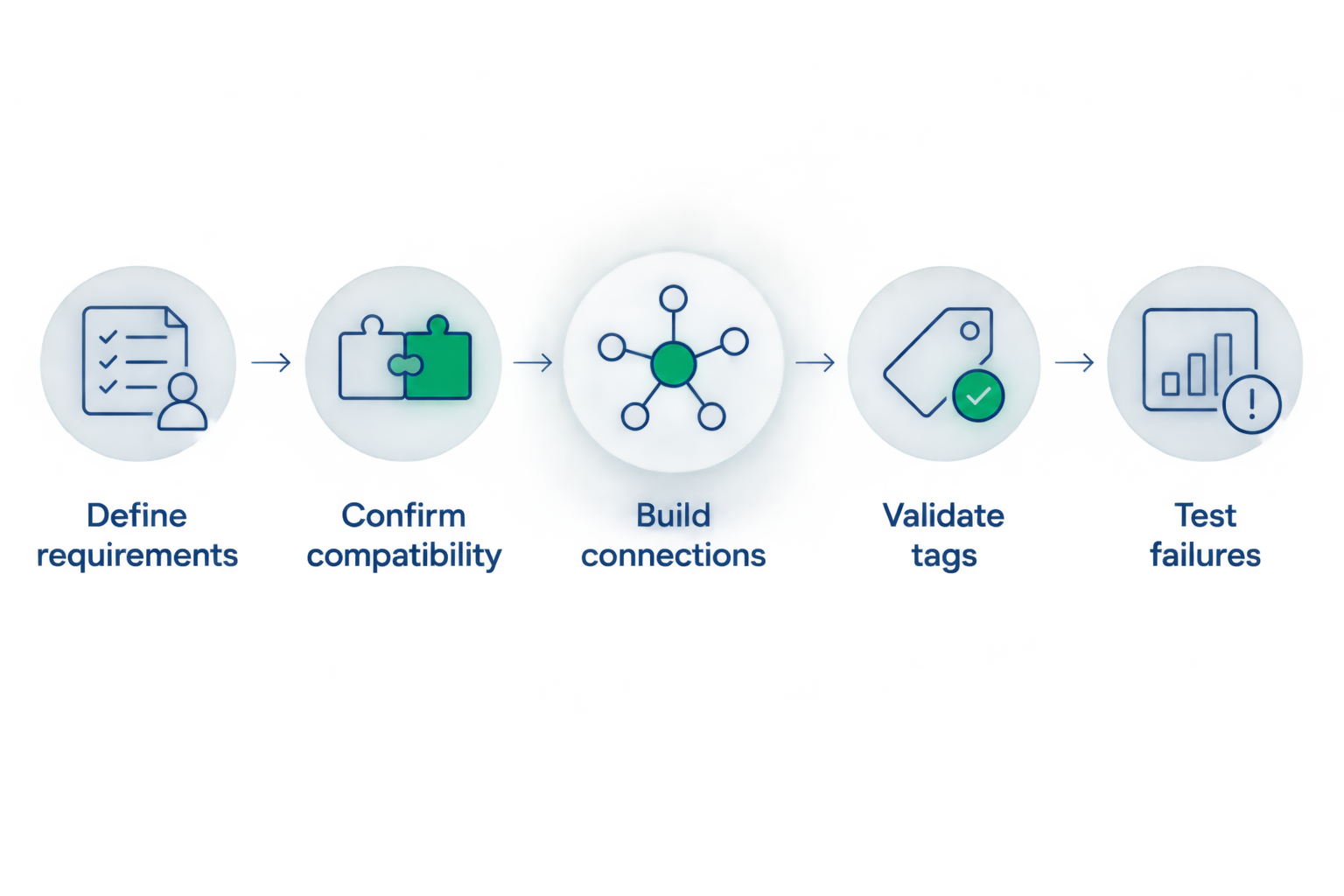
Validate each communication path before expanding the shared project.
One shared project or separate deployments?
TOP Server from Software Toolbox is a fit for engineers who need multi-driver PLC connectivity within a shared server configuration. Whether that configuration belongs in a centralized deployment is a separate architecture decision.
Use the following comparison for a 2026 design review. These are deployment choices, not competing product recommendations.
Shared deployment
- Best for: Connections with aligned ownership, access rules, and maintenance windows
- Advantage: Keeps configuration administration together
- Limitation: A shared runtime or host introduces a shared failure boundary
Separate deployments
- Best for: Connections requiring distinct security, ownership, or maintenance boundaries
- Advantage: Separates operational responsibilities and failure impact
- Limitation: Adds configurations, hosts, and lifecycle work to manage
A shared deployment is not automatically the simpler operational choice. If separate production areas require independent upgrades or different administrators, central configuration management can create coordination work that outweighs the benefit.
Separate deployments also have costs beyond infrastructure. Your team must maintain consistent naming, backups, monitoring, certificate practices, and documentation across those deployments.
Use a shared project where the operational boundaries align. Use separate deployments where isolation is a requirement. Do not expect channel organization inside a project to substitute for network segmentation or host-level separation.
Why polling behavior varies across PLC connections
The ability to configure multiple brands does not establish a universal polling capacity. For your 2026 acceptance criteria, document the workload and observe it under representative operating conditions rather than relying on a controller count alone.
- Controller workload: Communication shares controller resources with other work. Validate acquisition while the machine or process is operating under an approved test condition.
- Data layout: Requested addresses, data types, and the selected protocol affect how the acquisition workload is formed. Test the actual tag set, not an unrelated demonstration list.
- Update requirements: Different signals have different freshness requirements. Assign requirements by operational use instead of applying the fastest requested interval everywhere.
- Network path: Routing, firewalls, remote links, and intermediary equipment belong in the test scope. A local bench connection does not validate the production path.
- Client demand: Assess the intended downstream applications together. A successful isolated client test does not establish behavior under the final operating workload.
- Failure settings: Timeouts, retries, and reconnection behavior influence fault handling. Validate those settings against the consequences of a disconnected device.
Record both normal and degraded operation. A configuration that works only while every device is reachable has not passed a useful plant acceptance test.
Keep security boundaries separate from project boundaries
A single project file is not a security zone. Your network design must still specify which host initiates each connection, which destinations it reaches, and which services are permitted.
For a 2026 deployment, prepare a communication matrix covering the server host, controller networks, and consuming applications. Give cybersecurity reviewers the required flows rather than requesting broad connectivity between IT and OT.
Keep controller-facing access and application-facing access distinct in the design. Where OPC UA is used, include endpoint configuration, certificate trust, authentication, and authorization in commissioning—not as tasks deferred until production.
Do not enable writes merely because reads work. Document whether each application needs read access, write access, or both, and validate the approved permissions at the relevant layers.
A successful read is not proof that the entire security configuration is correct. Check rejected access as well as permitted access, and retain the results with the deployment record.
What should you bring to a compatibility review?
Bring a connection schedule, not just a list of brands. The useful question is whether the exact controllers, required data, network paths, and operating constraints fit the proposed configuration.
Include these items in the review package:
- Controller manufacturer, model, firmware, and intended protocol.
- Required addresses or symbolic items, data types, and access permissions.
- Required update behavior and the operational reason for it.
- Network routes, security zones, and approved communication paths.
- Consuming applications and their connection requirements.
- Restart, recovery, backup, and maintenance expectations.
Then confirm driver selection and licensing against the proposed deployment. A project file is a configuration artifact, not evidence that every configured connection is supported or licensed.
Use the contact page to discuss the controller schedule and deployment requirements. Keep the review tied to the actual environment so the resulting configuration has a testable scope.
Does one project mean every PLC uses the same driver?
No. One project can contain channels using different drivers. Select the driver for the required controller and communication method, then configure the device and tags according to that driver's documentation.
Do not organize channels solely by brand name. Review the driver's channel guidance and the actual communication paths before deciding how to group connections.
Does one project guarantee synchronized PLC readings?
No. A shared project does not establish simultaneous acquisition across controllers. If your application depends on event ordering or cross-machine timing, specify the timestamp source and allowable timing uncertainty separately.
For a 2026 commissioning plan, test that requirement at the consuming application. Values arriving together at a client do not, by themselves, prove that the underlying process measurements occurred together.
FAQ
Can TOP Server connect to different PLC manufacturers in the same project?
Yes. TOP Server can organize connections to multiple PLC brands in one project using the appropriate drivers, channels, devices, and tags. Confirm the exact controller model and communication method before deployment.
Do I need a separate project for each PLC brand?
No. Different PLC brands do not, by themselves, require separate projects. Separate deployments are an architecture choice when security, ownership, maintenance, or failure-isolation requirements call for them.
Will every PLC work if it has an Ethernet connection?
No. Ethernet connectivity does not establish driver compatibility or access to the required controller data. Verify the protocol, model, firmware, addressing, and controller-side access requirements.
Can I use the same polling settings for every controller?
Do not assume identical polling settings suit every controller. Set update requirements according to the application and validate them against the controller workload, data layout, and production network path.
Does one TOP Server project replace network segmentation?
No. Project organization does not replace network segmentation, firewall policy, host security, or application permissions. Define and approve the communication paths independently of the project structure.
What should I test before putting a mixed-brand project into production?
Test representative tag values, data types, quality, timestamps, permissions, and required update behavior. Also test communication loss, restoration, server restart, and client reconnection under an approved commissioning plan.
Does a saved project prove all the required drivers are licensed?
No. A saved project is not proof of licensing coverage. Confirm the required drivers and deployment licensing against the proposed configuration before production use.
One last thing
Use a stale-data test as an acceptance gate. Disconnect an approved test device and verify what the consuming application actually displays, stores, and alarms—not merely whether the server reports a communication error.
A retained last value can look credible after its source becomes unavailable. Document how operators and downstream systems distinguish current data from stale data, then include that behavior in the handover record.
When reviewing TOP Server with Software Toolbox, bring the failure requirements alongside the controller list. Compatibility answers whether a connection is supported; commissioning establishes whether the complete data path meets your operational requirements.