TOP Server Siemens S7 Plus Ethernet Overview
OPC Server DriverManufacturingS7 Comm Plus

TOP Server Siemens S7 Plus Ethernet OPC Driver

High-Performance Ethernet Connectivity for S7-1200 & S7-1500 Controllers with Symbolic Addressing Support

4.9(287 reviews)

Available in Driver Suites

This driver is only available as part of the following TOP Server driver suites:

Symbolic Access

Direct access to S7 1200 and S7 1500 symbolic data and optimized blocks

Scalable

Up to 256 channels and 16 devices per channel for high throughput deployments

Faster Tag Setup

Online automatic tag generation from TIA Portal versions 16 through 18

Advanced Access

TLS security, password protected controller access, and rich data model support

Product Overview

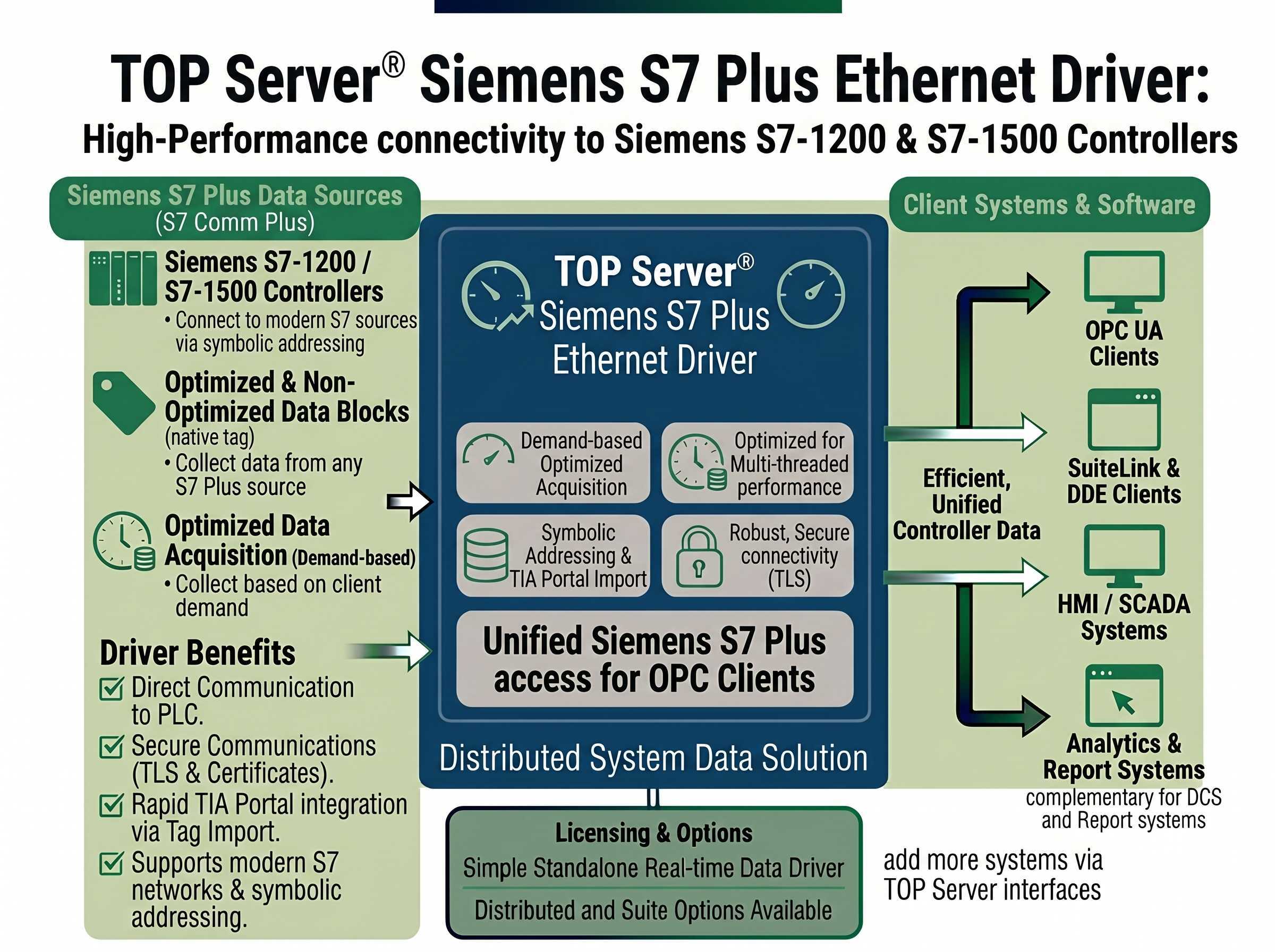
The Siemens S7 Plus Ethernet driver works in conjunction with TOP Server® to provide data exchange between OPC UA, OPC DA, SuiteLink and DDE clients and Siemens S7-1200 and S7-1500 devices supporting symbolic addressing and provides access to optimized and non-optimized data blocks using the S7 Comm Plus Ethernet protocol.

This driver eliminates the need for additional software packages or libraries by supporting direct communication with the S7 PLC using a standard computer network interface card. TIA Portal import is supported for rapid configuration & integration.

Secure communications using TLS and certificates for PLCs configured with Secure PG/PC/HMI communications in TIA Portal V17 and higher are supported.

Important Notes:

  • The controller must support symbolic addressing to work with this driver.
  • For communicating with S7 controllers via S7 Ethernet using traditional variable-based addressing, use the Siemens S7 Ethernet driver.

Why Choose This Driver?

Proven benefits that help you deploy faster and operate more reliably

Direct CPU Connectivity

Direct Ethernet connections to S7-1200 and S7-1500 CPUs via built-in Ethernet ports

Configurable Port Settings

Configurable connection port number

Comprehensive Data Type Support

Siemens S7 Data Types Supported (Read/Write): Bool, Byte, Char, INT, DINT, LINT, Word, DWord, LWord, REAL, LREAL, SINT, UDINT, UINT, USINT, ULINT, STRING, Date and Time (DT) - read-only, Time of Day (TOD), Time, S5Time, Date, OB_TOD (See Data Type Descriptions in Siemens S7 Plus Ethernet Help File)

TIME Data Access Enhancement

Starting with V6.12, TIME type is accessible as a Long (DINT) data type

Complex Type Access

Read/Write access to members of complex types: Array, Structure, UDT instance and DTL

Array Support and Auto Tagging

Array Read/Write/Auto-Tag Generation support for the following Siemens types: Bool, Byte, USINT, SINT, Char, UINT, Word, DWord, UDINT, DINT, Real, and String

Standard TCP IP Communication

Uses standard Ethernet Network Interface Card for TCP/IP Communications

Flexible NIC Configuration

Specify a Network Interface Card at the channel level

Optimized Performance

Optimized communications allow each device to have a separate thread/channel of communications when under separate channels

Automatic Model Detection

Driver auto-detects the model (S7-1500 or S7-1200)

Controller Diagnostics Logging

The following controller information is logged to the TOP Server event log on connect: IP AddressController, SeriesCPU Type, Firmware Version, Controller Component ID (MLFB)

Online Tag Generation

Online Automatic Tag Generation directly from S7-1500 and S7-1200 devices from version 16 through 18 (No TIA Portal Exporter required)

Redundancy Support

Redundancy switching via Media Level Redundancy plug-in

Secure Communications

Supports access to password protected controllers and certificate secured controllers in Secure PG/PC/HMI mode via TLS (TIA Portal V17 and higher)

Symbol Loading Configuration

Configurable setting for loading Function Block and Instance Data Block symbols (disabled by default - how to enable), Symbol Reload Control: Configurable ability to disable automatic symbol reload upon invalid tag

Performance Optimization

Client array tags limited to 10 for best performance
"The Software Toolbox team did an outstanding job. Great follow up and checking back to find out status. I will certainly recommend Software Toolbox to everyone I can. I have NEVER had a bad experience with the highly capable tech support group. Thank you for a GREAT product"

Jr Goulet

Controls Engineer

Key Features & Benefits

Everything you need for reliable Siemens S7-1200 and S7-1500 connectivity with symbolic addressing

Channel and Device Capacity

Maximum Number of Channels & Devices: Channels - 256, Devices per Channel - 16, NOTE: Practical channel/device limits will vary depending on your available system resources

Online Tag Generation

Online Automatic Tag Generation from TIA Portal for S7-1500 and S7-1200 from version 16 through 18 (No TIA Portal Exporter required)

Multiple Device Connections

Supports multiple connections per device

Advanced Data Access

Supports Data Block Access and Bit-Level Access

InstanceDB Support

InstanceDB (Data Block) Symbols supported (how to enable)

Secure Controller Access

Access to password protected controllers

Certificate Based Security

Access to trusted certificate secured PLCs configured in Secure PG/PC/HMI mode using TIA Portal V17 or Higher

Online Tag Generation

Online Automatic Tag Generation directly from S7-1500 and S7-1200 devices from version 16 through 18 (No TIA Portal Exporter required)

Technical Specifications

Protocol

S7 Comm Plus

Connection

Ethernet TCP/IP (Standard Network Interface Card)

Max Channels

256

Devices per Channel

16

Addressing

Symbolic (required)

TIA Portal Support

V16 through V18 (Online ATG)

Security

TLS 1.3 with OpenSSL 3.0.8 (TIA Portal V17+)

License Type

Perpetual

Supported Devices

  • S7-1500 Family (via built-in Ethernet module) with Symbolic Addressing including S7-15xxH/R devices
  • S7-1200 Family (via built-in Ethernet module) with Symbolic Addressing
  • PLCSIM Advanced - tested by our support team - connection setup is the same as a regular PLC, and symbolic addressing
  • Firmware Support as of V6.14 includes: S7-1200 FW 4.6, 4.5, 4.4, 4.2.1, SPS 4.2, S7-1500: FW 3.0.x, 2.9.x, 2.8.1, 2.6, 2.5 SPS 2.0, <1.7

Note: Supports Siemens S7-1200 and S7-1500 family controllers with symbolic addressing. Requires TIA Portal V16 or higher. Firmware support varies by model - see help file for detailed compatibility matrix.
