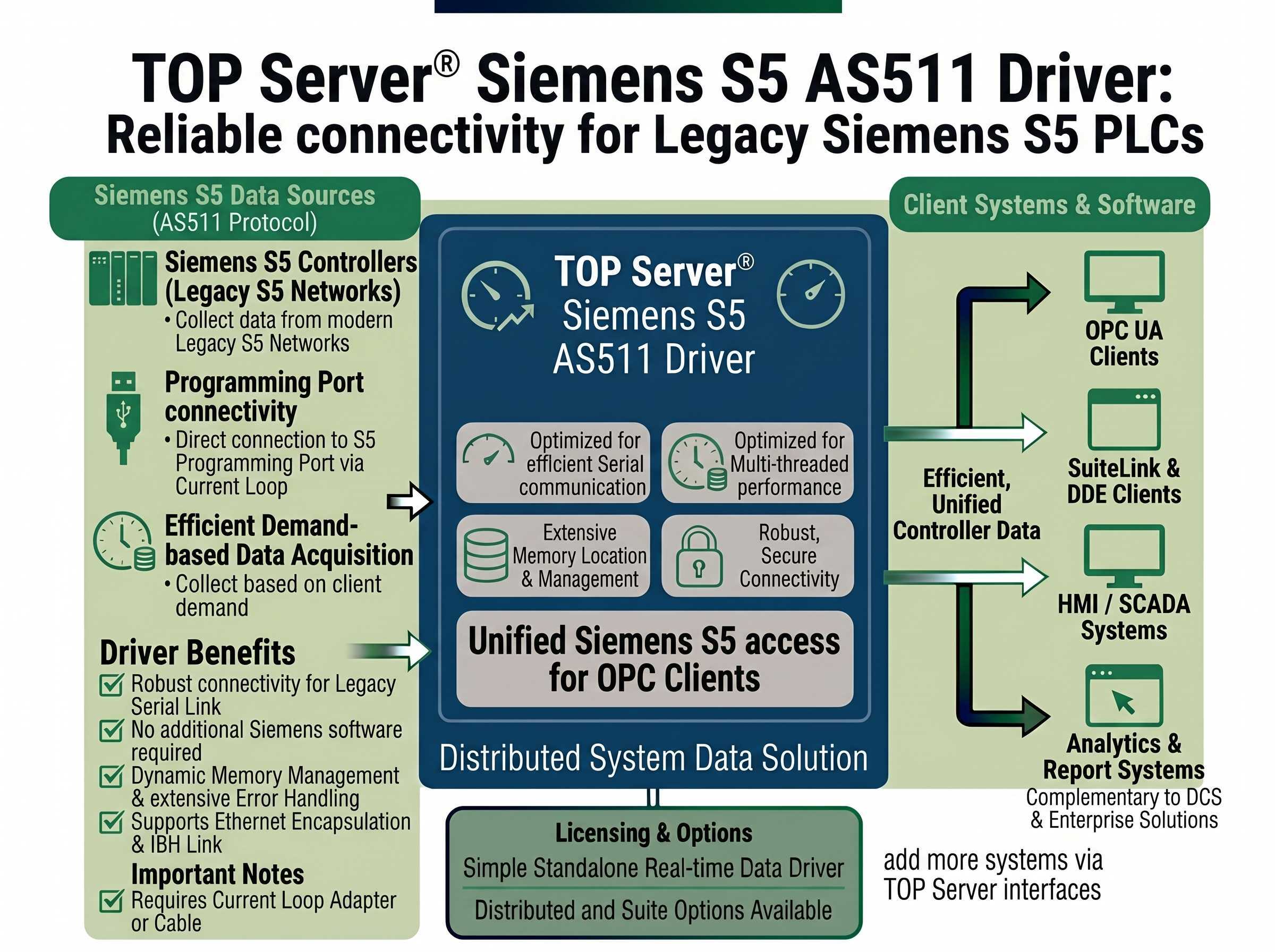
Reliable Current Loop Connectivity via the S5 PLC Programming Port - Legacy AS511 Protocol
This driver is only available as part of the following TOP Server driver suites:
Connect Siemens S5 controllers across multiple CPU families
Up to 100 channels and 30 devices per channel
Supports all memory types and industrial data formats
Serial, modem, and Ethernet encapsulation support
The Siemens S5 AS511 driver works in conjunction with TOP Server® to provide data exchange between OPC UA, OPC DA, AVEVA SuiteLink and DDE clients and Siemens S5 controllers via the Siemens AS511 Current Loop serial protocol.
This driver allows a direct connection to the programming port of the S5 PLC using a Current Loop connection. It requires the use of either the supplied Siemens programming cable or an external RS-232 to Current Loop converter. Extensive error handling helps ensure data integrity across the legacy serial link.
Important Notes:
Proven benefits for legacy Siemens S5 modernization via the AS511 programming port
Automatic Tag Database Generation using CSV Import
Tag configuration supports dynamic tags from your client application
Memory Types Supported: I, Q, F, T, C, and Data Block Access by named type
Supports all memory types and data types such as Float, Long Word, and BCD
String support includes address modifiers to specify byte order
Supports multiple PLC connections when using Ethernet Encapsulation
Auto Device Demotion Support to optimize communication with responsive devices
Communication Serialization (Virtual Networks allow multi-protocol support on the same communication channel for telemetry scenarios)
Reads the location of memory elements when the driver begins operation or detects a communications errors
NOTE: If the PLC configuration changes, users must restart the Siemens S5 Driver or pull and replace the cable connection. Both of these actions cause the driver to reacquire the location of all PLC memory elements.
"The Software Toolbox support team was very helpful and provided lots of useful advice and links to help me solve my issue."
Dan Hutton
Automation Engineer
Everything you need for reliable Siemens S5 AS511 Current Loop connectivity
Maximum Number of Channels & Devices: Channels - 100, Devices per Channel - 30, NOTE: Practical channel/device limits will vary depending on your available system resources
Compatible with S5-90U, S5-95U, S5-100U, S5-101U, S5-115U, S5-135U, and S5-155U series controllers.
Modem Support (Automatic Dial Configuration and Multiple Phone Number Management)
Supports Ethernet Encapsulation
NOTE: While this driver does support Ethernet Encapsulation, tight timing requirements of this protocol may preclude the driver from working in all Ethernet network environments.
Supports direct Peer-to-Peer Current Loop connections from the PC serial port
Protocol
Siemens AS511 Current Loop Protocol
Network
RS-232 Peer-to-Peer Current Loop from PC serial port
Ethernet Support
Ethernet Encapsulated Serial (IBH Link S5 compatible)
Baud Rate
9600 (Fixed)
Parity / Data / Stop
Even (Fixed) / 8 (Fixed) / 1 (Fixed)
Max Channels
100
Devices per Channel (Direct Serial)
1 (single PLC per serial port)
Devices per Channel (Ethernet Encap)
Up to 30 (one PLC per terminal/device server node)
Memory Types
I, Q, F, T, C, Data Block (by named type)
Data Types
All data types including Float, Long Word, BCD
String Support
Includes byte order address modifiers
Client Interfaces
OPC UA, OPC DA, AVEVA SuiteLink, DDE
License Type
Perpetual
Note: Compatible with the legacy Siemens S5 PLC family. Requires RS-232 to Current Loop Adapter (not included) or Siemens S5 programming cable. AS511 protocol uses the PLC programming port directly.
Everything you need to get started, configure, and troubleshoot your driver
Watch step-by-step video tutorials covering installation and configuration
View →Comprehensive guide for getting started with TOP Server V6
View →Comprehensive troubleshooting guide for common TOP Server issues
View →Complete driver documentation (Version 1.044) including AS511 Current Loop protocol details, Ethernet Encapsulation support, memory location management, and addressing syntax
Download →Knowledge base article on using the IBH Link S5 adapter with the TOP Server AS511 driver - includes Ethernet Encapsulation mode configuration and static IP assignment. Default port 10010.
View →Learn about CSV import and export functionality for tag configuration
View →View the complete TOP Server release history and version information
View →Information on supported operating systems and system requirements
View →