TOP Server OPC DA Project Properties
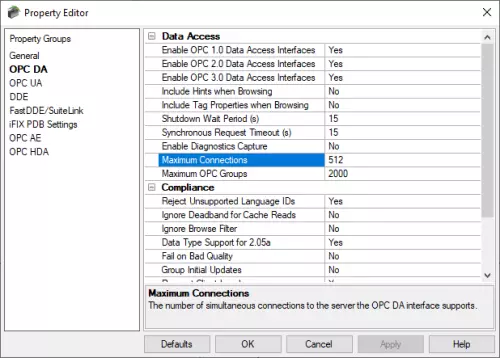
The OPC DA (Data Access) section provides the flexibility to access and alter TOP Server’s behavior and functionality for OPC DA client connections pertaining to the particular OPC Specifications and functions supported.
This can be particularly useful for:
- Forcing TOP Server to use only a particular OPC DA Specification for client compatibility
- Making addressing hints available to browsing client applications
- Exposing TOP Server tag properties as tags themselves
- Adjusting timing for OPC Client notifications when the server is shutting down
- Increasing or decreasing the timeout for OPC Synchronous transactions
TOP Server has been designed to provide the highest level of compatibility with the OPC Foundation’s specifications. The OPC Compliance Section provides access to settings specific to TOP Server support for the OPC DA specifications.
These settings are exposed to allow for maximum compatibility with virtually any OPC DA client applications available including any that may have implemented different interpretations of the OPC DA specifications.
Starting with Version 6.11, the following two settings have also been added to assist users in controlling how many concurrent OPC DA client connections TOP Server will support and how many groups can be created - these settings provide more granular controller over threading and resource consumption as they relate to OPC DA client connections on systems with potentially large client counts.
- Maximum Connections (Defaults to 512) - this setting specifies the maximum number of OPC DA client applications that the TOP Server instance will permit (Valid range is 1 - 4000).
- Maximum OPC Groups (Defaults to 2000) - this setting specifies the maximum number of OPC DA groups that the TOP Server instance permits across all client connections (Valid range is 10 - 4000).