TOP Server 7.1 is now available, bringing important updates focused on security, reliability, diagnostics, and easier administration. This release continues to build on TOP Server V7 with enhancements that help users maintain secure, dependable, and easier-to-support industrial connectivity systems.
Security Remains a Key Focus
Security continues to be an important part of any industrial connectivity strategy. TOP Server often serves as the bridge between plant-floor systems and business-critical applications, so keeping it current is an important part of maintaining a strong OT architecture.
TOP Server 7.1 includes several security enhancements, and updating to this version is strongly recommended. Relevant components have been updated to OpenSSL 3.5.4 for security compliance, helping organizations stay aligned with cybersecurity and patch management requirements.
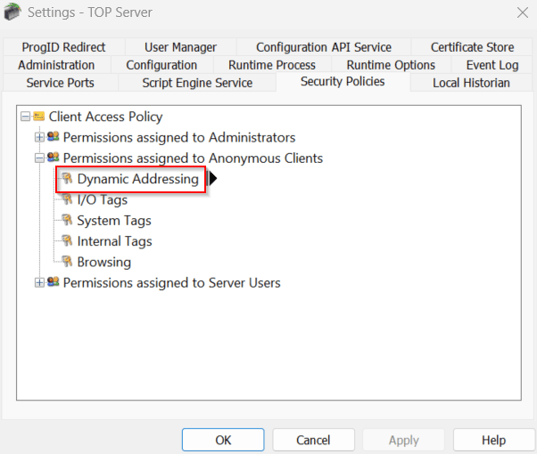
This release also adds a new Dynamic Addressing (Writes) permission. This gives administrators the ability to control writes to dynamic addresses for specific users and groups, including anonymous and data clients. For environments that require tighter control over write access, this provides another layer of protection and flexibility.
TOP Server 7.1 also adds a new warning when performing licensing operations on a Virtual Host, helping users make more informed decisions in virtualized environments.
Reliability and Usability Improvements
TOP Server 7.1 includes a range of updates designed to improve day-to-day performance, consistency, and ease of use.
Notable improvements include updates to the Show User Login setting, which has moved to Administrator Settings under the Configuration tab for easier access. Licensing command line functions have also been updated to better support a wider range of virtual platforms.
This release also includes improvements across client interfaces and drivers, including reduced CPU usage when the OPC UA server is under heavy load, improved OPC UA Client reconnect behavior, and more consistent handling of communication, browsing, and tag quality scenarios.
These updates help support more dependable communication between industrial devices and client applications while reducing time spent on troubleshooting and administration.
New Features and Enhancements
TOP Server 7.1 also adds several enhancements designed to make systems easier to monitor and manage.
Milliseconds are now shown in the Event Log, making it easier to correlate events across systems and log files during troubleshooting.

The Configuration API has also been improved with better sorting, filtering, and pagination for administrative objects. Communication diagnostics frames data is now available through the API, and new API support has been added for Event Log configuration and Configuration API Service settings.
For OPC UA users, a new system tag (_System._OpcUaClientNames) identifies connected OPC UA clients, including details such as application name, URI, IP address, and session ID. This gives administrators better visibility into active client connections.

Additional driver enhancements include improved OPC UA Client performance with large tag counts, support for 64-bit integer types in the Modbus TCP/IP Ethernet driver, expanded SNMP port support, and redundancy-related improvements for Siemens S7 Plus Ethernet users.
The Bottom Line
TOP Server 7.1 is a practical release focused on strengthening security, improving reliability, and giving users better visibility into their systems. For users running TOP Server V7, this update is worth reviewing and planning into your normal maintenance cycle.
As always, review the full release notes, back up your configuration, and test updates in a non-production environment when possible. If you have questions about whether TOP Server 7.1 applies to your system, contact our team and we’ll be happy to help.