PumpJack_EFM_250x250
EFM SuiteOil & GasEFM Capable

TOP Server® EFM (Electronic Flow Measurement) Suite OPC Server

Connectivity for Common EFM Protocols in the Oil and Gas Industry

4.9(287 reviews)
Contact Us for pricing

One-time purchase (perpetual license)

Part # 41233228-N

  • Perpetual License
  • Includes 1 Year Support & Maintenance
  • No limit on devices/tags/clients
  • ABB Totalflow Driver
  • Enron Modbus Driver
  • Fisher ROC Suite (ROC Ethernet, ROC Plus Ethernet, ROC Serial, ROC Plus Serial)
  • OMNI Flow Computer Driver
  • EFM Simulator Driver
  • EFM Exporter Plug-In
  • Flow-Cal CFX V5, V7, V8, & V8.1 Export
  • Quorum PGAS Export
  • CSV & SQL/ODBC Database Export

Perpetual License – to use the server and drivers in this suite on a single computer with no artificial limits on number of devices, tags, or connected client applications. Includes 1 yr support & maintenance agreement agreement.

11+

Supported Devices

2+

Protocols

30 Days

Free Trial

4.9/5

Customer Rating

Product Overview

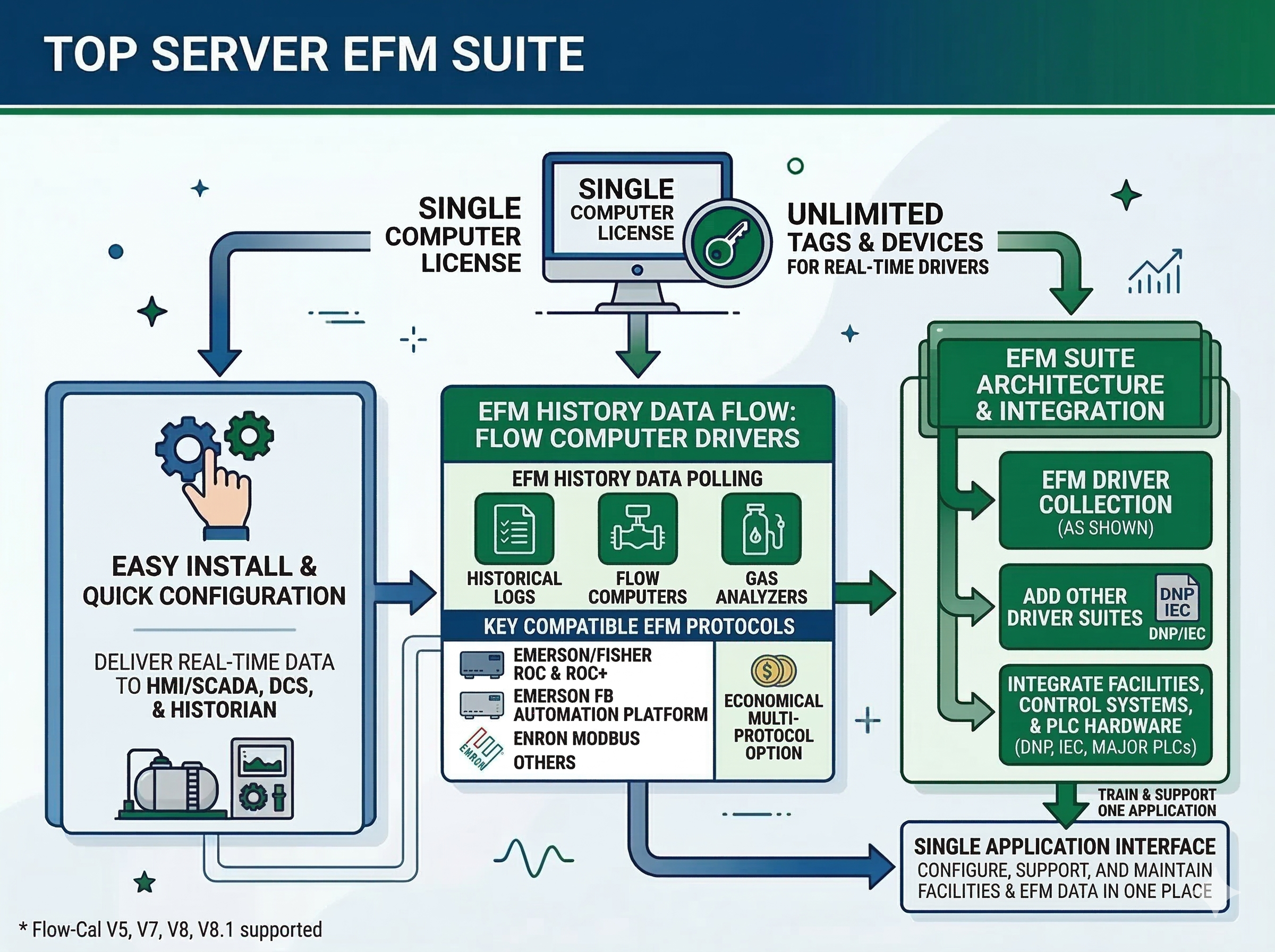
In the oil and gas industry, flow computers and devices store historical EFM (Electronic Flow Measurement) data which can be analyzed and used for custody transfer and production optimization. The TOP Server EFM Suite provides a license for use on a single computer for the most popular drivers required in oil and gas flow measurement and accounting applications including Flow-Cal V5, V7, V8, & V8.1, for historical and real-time polling engine capabilities. A strength of TOP Server is its extensive support for PLC & other control hardware, including common utility systems using DNP or IEC protocols, and every major PLC, enabled by adding other driver suites to the EFM Suite, empowering the integration of facilities & other equipment in a single application instead of having to train, support and maintain multiple applications. Whether your application is all local or geographically distributed, the TOP Server EFM Suite installs easily and is quickly configured to deliver the real-time data you need to your HMI/SCADA, DCS or Data Historian and the EFM history data you need to Flow-Cal, PGAS, and more. For applications where multiple oil and gas industry standard protocols for EFM historical and real-time data collection are required such as Emerson/Fisher ROC & ROC+ (Serial & Ethernet) Emerson FB Automation Platform (separate add-on license), Enron Modbus and more, the EFM Suite is an economical option. If you only need real-time data, the individual Oil and Gas drivers or TOP Server Oil and Gas Suite provide real-time collection without tag & device count licensing limitations.

Note: If you need history retrieval from an Emerson FB Automation Platform device via DNP3, the standard for that device, we offer that through our EFM Exporter for Emerson FB Automation Platform, which our team can quote you along with our TOP Server DNP3 driver suite.

Why Choose This Driver?

Seamless Connectivity

Connect to flow computers, RTUs, meters and other widely used oil and gas equipment via supported standards in a common communications layer

Comprehensive EFM Support

Historical EFM gas and liquid data collection with export to Flow-Cal, PGAS, CSV, SQL and other industry-standard formats

Flexible Configuration

Wild card support for channel, device, meter, and meter ID that can be used to define file paths and file names of EFM export data

Highly Scalable

Cost-effective for small, medium and large applications with 8 protocols for connectivity from dozens up to thousands of devices

Key Features & Benefits

Everything you need for reliable industrial connectivity

Drivers / Plug-ins Included

ABB Totalflow, Enron Modbus, Fisher ROC Suite (4 drivers), OMNI Flow Computer, EFM Simulator, and EFM Exporter

EFM Export Formats

Flow-Cal CFX (Gas & Liquids V5/V7/V8/V8.1), Flow-Cal Transaction Queue, Quorum PGAS, CSV, and SQL/ODBC Database export

Real-Time Data Connectivity

Extensive real-time data connectivity for HMI, SCADA, MES, ERP, and database applications (SQL, Access, Oracle)

Secure Communications

Secure communications from client to device across various network architectures

What's Included

  • Seamless connectivity to flow computers, RTUs, meters and other widely used oil and gas equipment from any number of manufacturers via supported standards in a common communications layer - for a full list of included drivers and suites just click on the Drivers Included section below.
  • Supports common open standards including Enron Modbus, Modbus TCP, ROC, ROC+, ABB DB1 / DB2, OMNI Flow Modbus and more.
  • Extensive real-time data connectivity for most software applications including HMI, SCADA, MES, and ERP, as well as database applications (such as SQL, Access, and Oracle).
  • Supports EFM export to Flow-Cal (CFX and Transaction Queue), Quorum PGAS, CSV, SQL (and other ODBC databases).
  • Highly scalable & cost-effective for small, medium and large applications with 8 protocols for connectivity from dozens up to thousands of devices.
  • Secure communications from client to device across various network architectures.

EFM Exporter Features

  • Wild card support for channel, device, meter, and meter ID that can be used to define the file path and file name of EFM export data.
  • Flexible scheduling (i.e. poll 15 minutes past the hour, every hour, etc.)
  • Support for demand polling single meters via _Poll system tag.
  • Collect daily and hourly history data, as well as alarms and events.
  • Full control of exported file names and locations including network path and wildcard support.
  • Organization of exported data by record times, including support for organizing files by contract hour.
  • Map data from one meter/device to multiple supported export formats.
  • CSV Import/Export of the configuration for mass editing.
  • Support for gathering historical data from Enron gas chromatograph devices.
  • Configuration support via Configuration API.

Common Features

  • Multi-threaded architecture for high scalability
  • Runtime changes via wizard-based configuration interface with intuitive Properties Editor
  • Secure User Management
  • Built-in Device/Network Redundancy
  • Auto-Demotion (Slow Polling)
  • Extensive communication and server diagnostics (OPC / Communications / Event Log)

Supported Devices & Models

Drivers / Plug-ins Included

  • ABB Totalflow
  • Enron Modbus
  • Fisher ROC Suite (ROC Ethernet, ROC Plus Ethernet, ROC Serial, ROC Plus Serial)
  • OMNI Flow Computer
  • EFM Simulator
  • EFM Exporter

Supported EFM Export Formats

  • Flow-Cal CFX File Exporter (Gas & Liquids): Gas EFM data with History Types 1-4 (CFX V5 or V8 & V8.1 Format), Liquid EFM data with History Types 11-13 (CFX V7 or V8 & V8.1 Format) — Not supported for Enron Modbus
  • Flow-Cal Transaction Queue: Gas EFM data with History Types 1-4
  • Quorum PGAS Exporter (Gas Only): Four types of EFM record outputs (Alarms/Events/Analytics/Volume), Enable/Disable Analytics and Volume
  • CSV Exporter (Gas & Liquids): Multiple meters per export, Output file for each EFM Type (Config/Alarms/Events/History)
  • SQL/ODBC Database Exporter (Gas & Liquids): Exports Configuration, Alarms, Events, Daily and Hourly History Data, Easy-to-use mappings between EFM attributes and DB table fields

Note: Note: For a complete list of supported models and firmware versions, please contact our technical support team or download the driver documentation.

Resources & Documentation

Everything you need to get started, configure, and troubleshoot your driver

Configuring EFM Collection for Fisher ROC devices (29:30)

How-to guides and application examples

View

Configuring EFM Collection for Enron Modbus devices (46:17)

How-to guides and application examples

View

Configuring EFM Collection for ABB Totalflow devices (27:00)

How-to guides and application examples

View

Configuring EFM Collection for OMNI Flow Computers (39:54)

How-to guides and application examples

View

Configuring EFM Export for PGAS, Flow-Cal, Generic CSV & Database (34:08)

How-to guides and application examples

View

TOP Server How-To Videos / Tutorials

How-to guides and application examples

View

TOP Server How-To Application Notes

How-to guides and application examples

View

TOP Server Quick Start Guide

How-to guides and application examples

View

TOP Server Troubleshooting Guide

How-to guides and application examples

View

TOP Server Best Practices Guide for EFM & Real-Time Data Collection over Telemetry

How-to guides and application examples

View

ABB Totalflow Help File

Complete driver documentation for ABB Totalflow

Download

Enron Modbus Help File

Complete driver documentation for Enron Modbus

Download

Fisher ROC Ethernet Help File

Complete driver documentation for Fisher ROC Ethernet

Download

Fisher ROC Serial Help File

Complete driver documentation for Fisher ROC Serial

Download

Fisher ROC+ Ethernet Help File

Complete driver documentation for Fisher ROC+ Ethernet

Download

Fisher ROC+ Serial Help File

Complete driver documentation for Fisher ROC+ Serial

Download

OMNI Flow Computer Help File

Complete driver documentation for OMNI Flow Computer

Download

EFM Simulator Help File

Complete driver documentation for EFM Simulator

Download

EFM Exporter Help File

Complete plug-in documentation for EFM Exporter

Download

TOP Server Oil and Gas Brochure

Product overview and capabilities brochure

View

TOP Server Data Sheet

Comprehensive product data sheet

View

Current/Past Release Notes

View release history and version information

View

TOP Server License Agreement

Software license terms and conditions

View

TOP Server EFM Suite Success Story

Customer case study and success story

View

Getting Started with the EFM Suite Blog Post

Comprehensive guide to getting started

View

TOP Server Operating System Support Information

OS compatibility and requirements

View

Software Toolbox Knowledge Base

Comprehensive support documentation

View

Customer Reviews

Customer ratings

4.9out of 5

287 global ratings

5 star
75%
4 star
15%
3 star
7%
2 star
2%
1 star
1%

Share your thoughts with other customers

John M.

Excellent reliability and performance

Reviewed in the United States on November 15, 2023

We've been using this driver for over 6 months in our oil & gas operations and it has been rock solid. The connectivity is stable, data accuracy is excellent, and the support team has been very responsive when we had questions during setup. Highly recommended for industrial applications.

|

Sarah K.

Easy setup and great documentation

Reviewed in the United States on October 3, 2023

As a systems integrator, I appreciate how straightforward the setup process was. The documentation is comprehensive and the driver performed exactly as expected. Integration with our SCADA system was seamless.

|

Mike R.

Good product, minor config challenges

Reviewed in the United States on September 20, 2023

Overall very satisfied with the driver. Had some initial configuration questions but support walked me through it. Once configured, it's been running smoothly for 3 months without issues. Would give 5 stars if the initial setup was more intuitive.

|

Get Started Now

Start your free 30-day trial today or speak with a connectivity expert to discuss your project requirements.
